






原文:http://www.ayende.com/Blog/archive/2006/07/25/7397.aspx
Let us assume that you have the following class hierarchy:
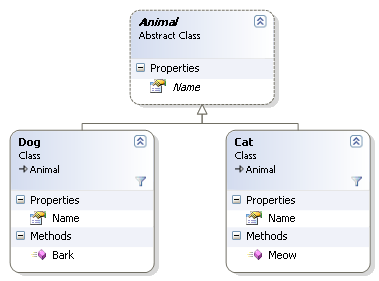
Now, what do you think the result of this code will be?
BindingList<Animal> animals = new BindingList<Animal>();
animals.Add(new Dog());
animals.Add(new Cat());
GridView gridView = new GridView();
gridView.DataSource = animals;
gridView.DataBind();
Ten points goes to the lady on the right that said that it will produce the following error:
Unhandled Exception: System.Reflection.TargetInvocationException: Property accessor 'Name' on object 'AnimalDesc.Cat' threw the following exception:'Object does not match target type.' ---> System.Reflection.TargetException: Object does not match target type.
The reason for this bug is that the TypeDescriptors in .Net are not aware of polymorphism. Even though both Cat and Dog inherit from Animal and has a Name property, and that the list that I passed to the DataSource is BindingList<T>, the TypeDescriptor only looks at the first item in the list, and uses it to describe all types in the list. This can cause problems when the collection that you pass to the GridView contains an inheritance hierarchy.
After butting my head against this issue for too long, I finally came up with this solution:
public class AnimalTypeDescriptionProvider : TypeDescriptionProvider
{
public AnimalTypeDescriptionProvider()
:base(TypeDescriptor.GetProvider(typeof(Animal)))
{
}
public override Type GetReflectionType(Type objectType, object instance)
{
return base.GetReflectionType(typeof(Animal), instance);
}
public override ICustomTypeDescriptor GetTypeDescriptor(Type objectType, object instance)
{
return base.GetTypeDescriptor(typeof(Animal), instance);
}
public static void Register()
{
TypeDescriptor.AddProvider(new AnimalTypeDescriptionProvider(), typeof(Animal));
}
}
Then, I call the AnimalTypeDescriptionProvider.Register(); method in the start of the application.
What this does is it lies to the data binding infrastructure, and tells them that any type that inherits from Animal is actually an Animal, and should be treated appropriately.
This solution is good enough for now, but it will prevent me from databinding a list of Dogs, for instance.
此内容由惯性聚合(RSS阅读器)自动聚合整理,仅供阅读参考。 原文来自 — 版权归原作者所有。