


1. 什么是流
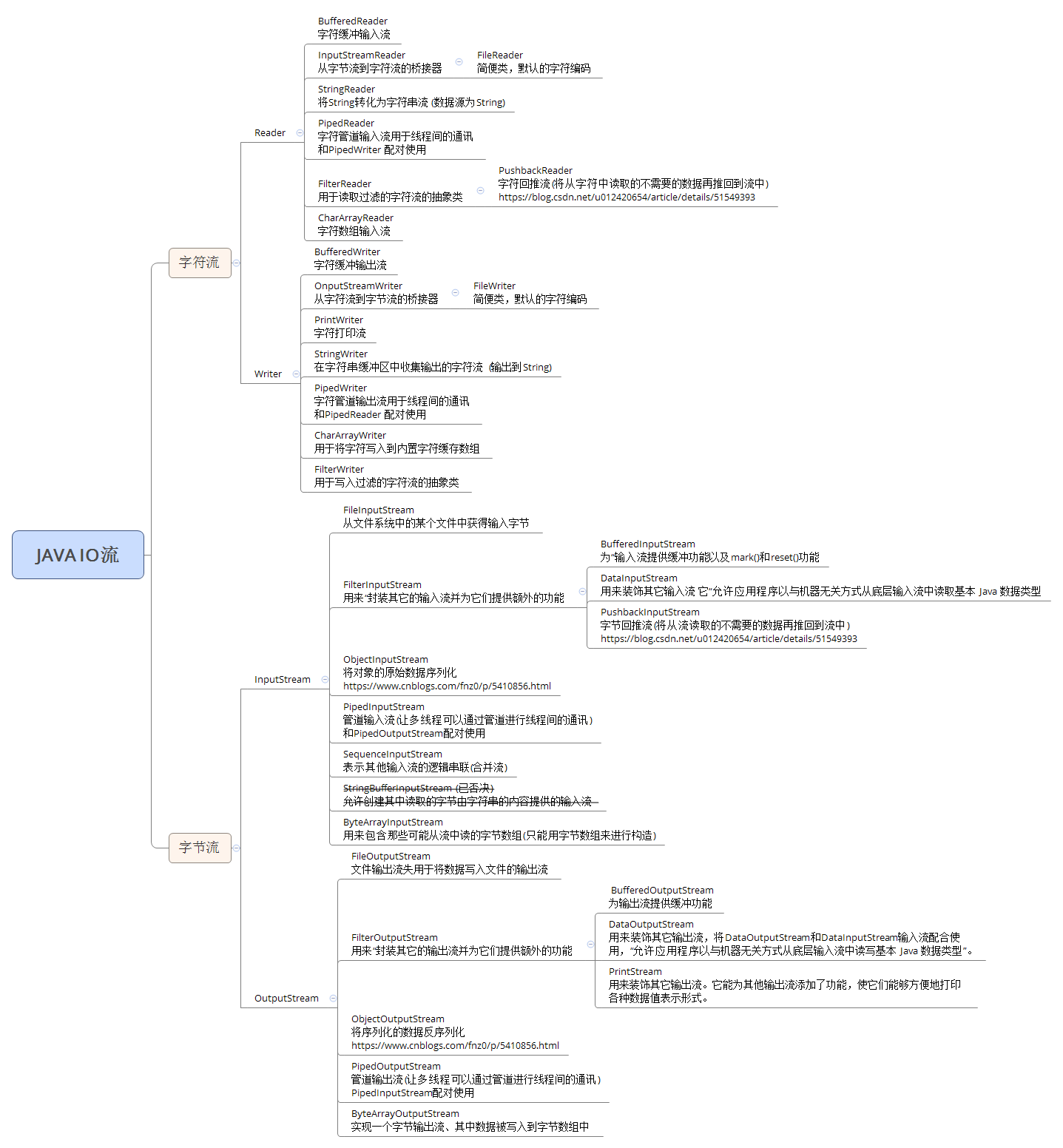
Java中的流是对字节序列的抽象,我们可以想象有一个水管,只不过现在流动在水管中的不再是水,而是字节序列。和水流一样,Java中的流也具有一个“流动的方向”,通常可以从中读入一个字节序列的对象被称为输入流;能够向其写入一个字节序列的对象被称为输出流
2. 字节流
Java中的字节流处理的最基本单位为单个字节,它通常用来处理二进制数据。Java中最基本的两个字节流类是InputStream和OutputStream,它们分别代表了一组基本的输入字节流和输出字节流。InputStream类与OutputStream类均为抽象类,我们在实际使用中通常使用Java类库中提供的它们的一系列子类。
3. 字符流
Java中的字符流处理的最基本的单元是Unicode码元(大小2字节),它通常用来处理文本数据。所谓Unicode码元,也就是一个Unicode代码单元,范围是0×0000~0xFFFF。在以上范围内的每个数字都与一个字符相对应,Java中的String类型默认就把字符以Unicode规则编码而后存储在内存中。然而与存储在内存中不同,存储在磁盘上的数据通常有着各种各样的编码方式。使用不同的编码方式,相同的字符会有不同的二进制表示。
4. 字符流与字节流的区别
经过以上的描述,我们可以知道字节流与字符流之间主要的区别体现在以下几个方面:
字节流操作的基本单元为字节;字符流操作的基本单元为Unicode码元。
字节流默认不使用缓冲区;字符流使用缓冲区。
字节流通常用于处理二进制数据,实际上它可以处理任意类型的数据,但它不支持直接写入或读取Unicode码元;字符流通常处理文本数据,它支持写入及读取Unicode码元。
示例一:文件读取和写入(支持编码选择、文件内容追加)
/**
* 读取文件文本内容。
*
* @param filePath 文件路径
* @param charset  字符编码格式
* @throws Exception
*/

public static String readAllText(String filePath, String charset) throws Exception {
StringBuilder sb = new StringBuilder();
try (
        InputStreamReader reader = new InputStreamReader(new FileInputStream(filePath), charset);
        BufferedReader br = new BufferedReader(reader)
) {
    String line;
    while ((line = br.readLine()) != null) {
        sb.append(line);
        sb.append(SystemCharUtils.getNewLine());
    }
} catch (Exception e) {
    throw e;
}

return sb.toString();
}


/**
* 将字符串追加到文件。
*
* @param str      待写入字符串
* @param filePath 文件路径(文件不存在则自动创建)
* @param charset  字符编码
* @throws Exception
*/
public static void appendFile(String str, String filePath, String charset) throws Exception {
// 创建新文件对象。
File file = new File(filePath);

//自动创建目录。
if (!file.getParentFile().exists()) {
    if (!file.getParentFile().mkdirs()) {
        throw new RuntimeException("文件目录创建失败:" + file.getParentFile().getAbsolutePath());
    }
}

//如果文件不存在则自动创建。
if (!file.exists()) {
    file.createNewFile();
}

try (
        OutputStreamWriter writer = new OutputStreamWriter(new FileOutputStream(file, true), charset);
        BufferedWriter bw = new BufferedWriter(writer);
) {
    bw.write(str);
} catch (Exception e) {
    throw e;
}
}
示例二:对象序列化到文件流 及 从文件流反序列化为对象
注意:实体对象要实现Serializable接口。
/**
     * 序列化文件路径。
     */
    String localFilePath = SystemCharUtils.getUserDir() + SystemCharUtils.getFileSeparator() + "data" + SystemCharUtils.getFileSeparator() + "test" +SystemCharUtils.getFileSeparator() + "testData.data";

    /**
     * 从文件流反序列化为对象。
     *
     * @param filePath 文件路径
     * @throws Exception
     */
    public static <T> T getObject(String filePath) throws Exception {
        try (
                ObjectInputStream inputStream = new ObjectInputStream(new FileInputStream(filePath));
        ) {
            return (T) inputStream.readObject();
        } catch (Exception e) {
            throw e;
        }
    }

    /**
     * 将对象序列化到文件流。
     *
     * @param obj      需要序列化的对象
     * @param filePath 文件路径
     * @throws Exception
     */
    public static void saveObject(Object obj, String filePath) throws Exception {
        // 创建新文件对象。
        File file = new File(filePath);

        //自动创建目录。
        if (!file.getParentFile().exists()) {
            if (!file.getParentFile().mkdirs()) {
                throw new RuntimeException("文件目录创建失败:" + file.getParentFile().getAbsolutePath());
            }
        }

        //如果文件不存在则自动创建。
        if (!file.exists()) {
            file.createNewFile();
        }

        try (
                ObjectOutputStream outputStream = new ObjectOutputStream(new FileOutputStream(file));
        ) {
            outputStream.writeObject(obj);
        } catch (Exception e) {
            throw e;
        }
    }
此内容由惯性聚合(RSS阅读器)自动聚合整理,仅供阅读参考。 原文来自 — 版权归原作者所有。