






[root@vm429.dev unit]# git help
usage: git [--version] [--exec-path[=<path>]] [--html-path] [--man-path] [--info-path]
[-p|--paginate|--no-pager] [--no-replace-objects] [--bare]
[--git-dir=<path>] [--work-tree=<path>] [--namespace=<name>]
[-c name=value] [--help]
<command> [<args>]
The most commonly used git commands are:
add Add file contents to the index
bisect Find by binary search the change that introduced a bug
branch List, create, or delete branches
checkout Checkout a branch or paths to the working tree
clone Clone a repository into a new directory
commit Record changes to the repository
diff Show changes between commits, commit and working tree, etc
fetch Download objects and refs from another repository
grep Print lines matching a pattern
init Create an empty git repository or reinitialize an existing one
log Show commit logs
merge Join two or more development histories together
mv Move or rename a file, a directory, or a symlink
pull Fetch from and merge with another repository or a local branch
push Update remote refs along with associated objects
rebase Forward-port local commits to the updated upstream head
reset Reset current HEAD to the specified state
rm Remove files from the working tree and from the index
show Show various types of objects
status Show the working tree status
tag Create, list, delete or verify a tag object signed with GPG tag Create, list, delete or verify a tag object signed with GPG
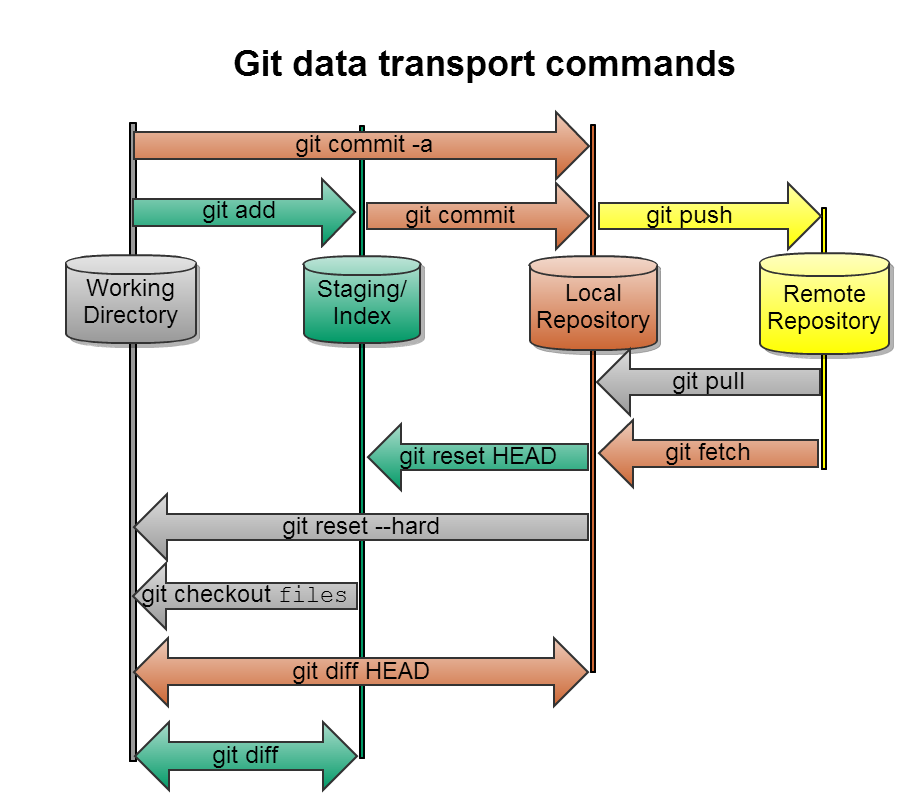
git commit 提交到本地。
git push提交到遠程服務器。
在本地仓库里添加一些文件,比如README,
$ git add README
$ git commit -m "first commit"
上传到github:
$ git push origin master
[root@vm514.dev sitecatalyst]# git help commit
[root@vm514.dev sitecatalyst]# git commit -a
[master 7f01ec7] Fix sitecatalyst test errors and failures. Upgrade tests from PHPUnit 3.4.0 to 3.7.27.
13 files changed, 14 insertions(+), 22 deletions(-)
[root@vm514.dev sitecatalyst]# git push
Counting objects: 47, done.
Compressing objects: 100% (21/21), done.
Writing objects: 100% (24/24), 2.03 KiB, done.
Total 24 (delta 13), reused 0 (delta 0)
To git@git.corp.adobe.com:ligyu/sitecatalyst.git
316256d..7f01ec7 master -> master
[root@vm514.dev sitecatalyst]# git pull
https://git.corp.adobe.com/ligyu/adminModule click “pull request”.
[root@vm82.dev sitecatalyst]# git fetch origin master
remote: Counting objects: 9, done.
remote: Compressing objects: 100% (1/1), done.
remote: Total 5 (delta 4), reused 5 (delta 4)
Unpacking objects: 100% (5/5), done.
From git.corp.adobe.com:AdobeAnalyticsWeb/sitecatalyst
* branch master -> FETCH_HEAD
[root@vm82.dev sitecatalyst]# git fetch origin master
From git.corp.adobe.com:AdobeAnalyticsWeb/sitecatalyst
* branch master -> FETCH_HEAD
[root@vm82.dev sitecatalyst]# git remote -v
origin git@git.corp.adobe.com:AdobeAnalyticsWeb/sitecatalyst.git (fetch)
origin git@git.corp.adobe.com:AdobeAnalyticsWeb/sitecatalyst.git (push)
If you have not yet added the changes to the index or committed them, then you just want to use the checkout command - this will change the state of the working copy to match the repository:
git checkout A
If you added it to the index already, use reset:
git reset A
If you had committed it, then you use the revert command:
# the -n means, do not commit the revert yet
git revert -n <sha1>
# now make sure we are just going to commit the revert to A
git reset B
git commit
git reset --hard <tag/branch/commit id>
For example:
$ git reset --hard e6b2d58b3d7dd7cbb6375c76aa036a70d03107f2
https://help.github.com/articles/syncing-a-fork
[httpd@vm514.dev application_platform]$ git remote rm upstream
[httpd@vm514.dev application_platform]$ git remote add upstream git@git.corp.adobe.com:AdobeAnalyticsWeb/application_platform.git
[httpd@vm514.dev application_platform]$ git remote -v
origin git@git.corp.adobe.com:ligyu/application_platform.git (fetch)
origin git@git.corp.adobe.com:ligyu/application_platform.git (push)
upstream git@git.corp.adobe.com:AdobeAnalyticsWeb/application_platform.git (fetch)
upstream git@git.corp.adobe.com:AdobeAnalyticsWeb/application_platform.git (push)
[httpd@vm514.dev application_platform]$ git branch -a
* master
remotes/origin/HEAD -> origin/master
remotes/origin/faster_ad
remotes/origin/mallet
remotes/origin/master
remotes/origin/profile_201309
remotes/origin/raven
remotes/origin/realtime
remotes/origin/v1.1
remotes/origin/v1.1_profile_201308
remotes/origin/v1.1_profile_201309
remotes/upstream/ims-linking
remotes/upstream/master
remotes/upstream/middleware-demo
remotes/upstream/oregon_standup
remotes/upstream/profile_201310
remotes/upstream/profile_201311
remotes/upstream/raven
remotes/upstream/realtime-fix
remotes/upstream/spring_2014
remotes/upstream/targetReport
remotes/upstream/unifiedfooter
remotes/upstream/v1.1
remotes/upstream/v1.1_profile_201310
remotes/upstream/v1.1_profile_201311
[httpd@vm514.dev application_platform]$ git pull upstream master
[httpd@vm514.dev application_platform]$ git push
Counting objects: 2775, done.
Compressing objects: 100% (609/609), done.
Writing objects: 100% (2463/2463), 573.12 KiB, done.
Total 2463 (delta 1903), reused 2359 (delta 1823)
To git@git.corp.adobe.com:ligyu/application_platform.git
429c62f..fde3ae0 master -> master
"sync_upstream4folk_as.sh"
cd appservice
REPOS=$(git remote -v)
if [[ $REPOS =~ .*upstream.* ]]
then
echo "Upstream has been added!"
else
git remote add upstream git@git.corp.adobe.com:AdobeAnalyticsWeb/appservice.git
fi
git remote -v
git pull upstream master
git push
git pull origin master
"sync_upstream4folk_as2.sh"
cd appservice
REPOS=$(git remote -v)
if [[ $REPOS =~ .*upstream.* ]]
then
echo "Upstream has been added!"
else
git remote add upstream git@git.corp.adobe.com:AdobeAnalyticsWeb/appservice.git
fi
git remote -v
git fetch upstream
git branch –va
git checkout master
git merge upstream/master
git push
此内容由惯性聚合(RSS阅读器)自动聚合整理,仅供阅读参考。 原文来自 — 版权归原作者所有。