惯性聚合 高效追踪和阅读你感兴趣的博客、新闻、科技资讯
阅读原文 在惯性聚合中打开

推荐订阅源

aimingoo的专栏
aimingoo的专栏
博客园 - 三生石上(FineUI控件)
GbyAI
GbyAI
大猫的无限游戏
大猫的无限游戏
M
MIT News - Artificial intelligence
Microsoft Azure Blog
月光博客
月光博客
Engineering at Meta
Engineering at Meta
I
InfoQ
T
Tailwind CSS Blog
N
Netflix TechBlog - Medium
S
SegmentFault 最新的问题
H
Help Net Security
博客园 - 【当耐特】
WordPress大学
WordPress大学
让小产品的独立变现更简单 - ezindie.com
美团技术团队
博客园 - 叶小钗
T
The Blog of Author Tim Ferriss
腾讯CDC
雷峰网
雷峰网
Martin Fowler
Martin Fowler
The GitHub Blog
The GitHub Blog
D
Docker

博客园 - 挖土.

学笛子 PowerShell: Try...Catch...Finally 实现方法 How to set the compuder to auto login 让 PowerShell 2.0 支持 DotNet FrameWork 4.0 用 Powershell 安装Dotnet FrameWorrk 4.0 PowerShell 调用.netFramework中的静态函数 PowerGUI Visual Studio is now in beta! PowerShell 中定义和使用泛型 PowerShell 如何引用DLL PowerShell中Add-Content 和 Out-File 的区别 给string加几个扩展方法 加快 c++ Builder 5编译速度 Windows 7 下的 SUBST 命令 Linker problems with Borland builder SQL 中的中位值计算 Windows 7的“上帝模式” XML 序列化和反序列化详例代码 给存储过程传递一个表 VSIdeTesthost installation issue - 挖土.
How to configure the BDE for Windows Vista/7 - 挖土.
挖土. · 2010-03-16 · via 博客园 - 挖土.

Posted on 2010-03-16 19:22  挖土.  阅读(395)  评论(0)    收藏  举报

在Windows 7如何配置Borland BDE

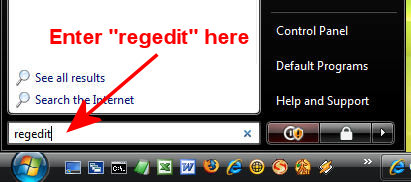
  1. Go to Start | Run?Type regedit...

    Run RegEdit
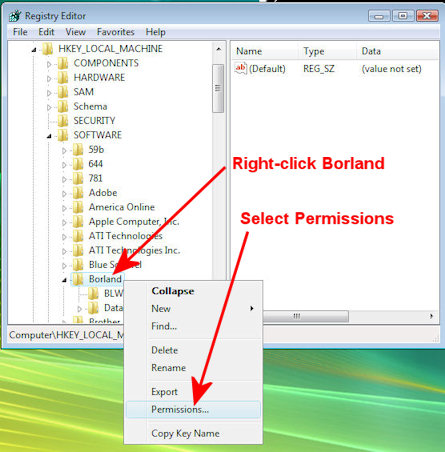
  2. Open the HKEY_LOCAL_MACHINE branch.
  3. Open the SOFTWARE branch.
  4. Right-Click on the entry labeled "Borland".Right click Borland in HKLM-Software-Borland
  5. In the menu that shows select Permissions. The following dialog will appear: Set Users permissions
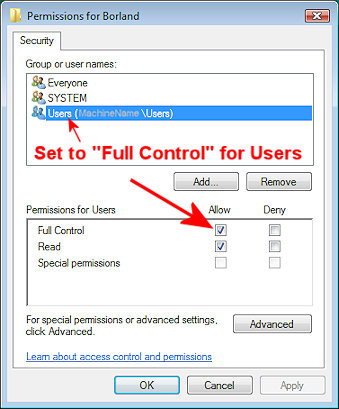
  6. Click "Users".
  7. Under "Permissions for Users ", select "Allow" for Full Control. Then click OK.
  8. Click OK to exit the Registry Key Permissions dialog box.
  9. Exit the Registry Editor window

刷新页面返回顶部