





很简单的一个地图demo,使用wms画线,请求wfs画点( 其他的就不详述了,已经有很多文档了)。
map文件如下:
 View Code
map
  NAME "OpenscalesDemo"
  SIZE 400 300
  IMAGECOLOR 242 232 106
  IMAGETYPE PNG
  STATUS ON
  EXTENT -180 -90 180 90

  PROJECTION
     "init=epsg:4269"
  END

  SYMBOL
    NAME 'circle'
    TYPE ELLIPSE
    FILLED TRUE
    POINTS
      1 1
    END
  END

    WEB
       TEMPLATE  "D:/tmp/test.html"
       IMAGEPATH "D:/tmp/"   #文件写在这里
       IMAGEURL "D:/tmp/"    #读取的时候读这里
       METADATA
         "wfs_srs"            "EPSG:4326 EPSG:4269"
         "wfs_enable_request" "*"
         "wms_enable_request" "*"
         "wms_srs"            "EPSG:4326 EPSG:4269 "
       END
    END


    LAYER
      NAME line_track
      TYPE LINE
      FEATURE
        POINTS
          0 0
          10 10
          72.36 33.82
          70.85 34.32
          69.43 35.15
          70.82 36.08
          70.90 37.05
          71.21 37.95
          100.0 56.0
          300   300
          100   100
          -100   -100
          -300  -300
        END
      END
      CLASS
        STYLE
          COLOR 251 13 0
          SIZE 3
        END
      END
    END

    LAYER
         name "pointtop_track"
         TYPE point
        FEATURE
           POINTS
              -100 -100
           END
        END
        CLASS
          STYLE
           SYMBOL 'circle'
           COLOR 13 58 179
           SIZE 8
           WIDTH 5
          END
          LABEL
            COLOR 255 13 0
            SIZE SMALL
          END
      END # end class
    END # end layer


    LAYER
        name "pointend_track"
        TYPE point
        FEATURE
           POINTS
              100 100
           END
        END
        CLASS
          STYLE
           SYMBOL 'circle'
           COLOR 13 58 179
           SIZE 8
           WIDTH 5
          END
          LABEL
            COLOR 255 13 0
            SIZE SMALL
          END
        END # end class
    END # end layer

END # end mapfile
TEMPLATE就不在这里罗列了,参见mapserver官网有现成的。
Flex 代码如下:
View Code
<?xml version="1.0" encoding="utf-8"?>
<s:Application
          xmlns:fx="http://ns.adobe.com/mxml/2009"
          xmlns:s="library://ns.adobe.com/flex/spark"
          xmlns:mx="library://ns.adobe.com/flex/mx"
          width="100%"
          height="100%"
          xmlns:os="http://openscales.org"
          creationComplete="initMap()" >

    <os:Map id="fxMap" width="100%" height="100%" center="67,-80"
         maxExtent="-180,-90,180,90" projection="EPSG:4326">

        <os:WMSC name="line_track"
          url="http://localhost:8085/cgi-bin/mapserv.exe?MAP=D:/tmp/GisDemo/GisDemo/Content/map/OpenscalesDemo.map"
          layers="line_track"
          format="image/jpeg"
          maxExtent="-180,-90,180,90"
          />

        <os:WFS
          name="line_track"
          url="http://localhost:8085/cgi-bin/mapserv.exe?MAP=D:/tmp/GisDemo/GisDemo/Content/map/OpenscalesDemo.map"
          typename ="pointtop_track"
          version="1.0.0"
          useCapabilities="false"
          style="{Style.getDefaultPointStyle()}"
            />

        <os:WFS
            name="pointtop_track"
            url="http://localhost:8085/cgi-bin/mapserv.exe?MAP=D:/tmp/GisDemo/GisDemo/Content/map/OpenscalesDemo.map"
            typename ="pointend_track"
            version="1.0.0"
            useCapabilities="false"
            style="{Style.getDefaultPointStyle()}"
        />

        <!-- 比例尺 -->
        <os:ScaleLine x="{10}" y="{height-80}" />
        <!-- 显示鼠标坐标 -->
        <os:MousePosition x="{fxMap.width / 2}"
              y="{fxMap.height-20}"
              displayProjection="EPSG:4326"/>
        <!-- 导航控件1 -->
        <os:PanZoom map="{map}"
           x="{fxMap.x+10}"
           y="{fxMap.y+10}" width="112" height="126"/>

    </os:Map>

    <fx:Script>
        <![CDATA[
        import org.openscales.core.Map;
        import org.openscales.fx.feature.*;
        import  org.openscales.core.feature.*;
        import mx.printing.PrintAdvancedDataGrid;
        import org.openscales.fx.layer.FxWFS;
        import org.openscales.core.style.Style;

        //private var popup:Anchored
        [Bindable]private var map:Map;

        public  function initMap():void {
            map = fxMap.map;

        }
]]>
    </fx:Script>

</s:Application>
在vs2010中增加openscales包的方法如下:
鼠标右键你创建的flex工程,如下图:
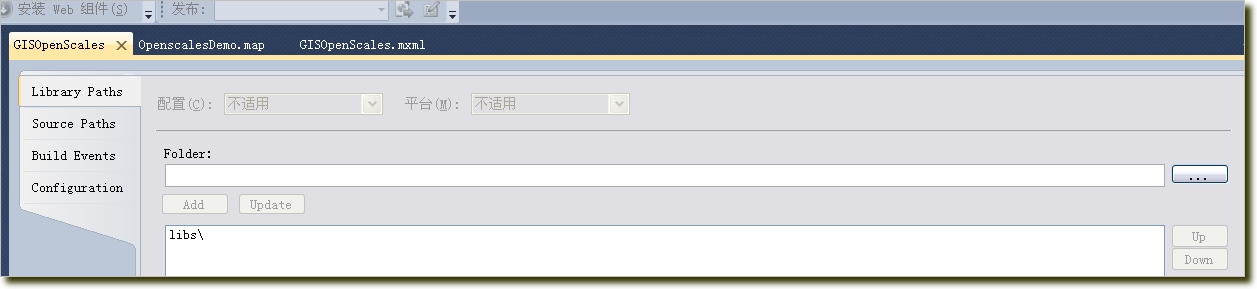
选择下载的openscales的开发包目录即可。
在实际调用地图的过程中,可能会有跨域访问的问题,在你的地图服务(即Apache)下面增加一下xml文件:crossdomain.xml,内容如下:
<?xml version="1.0"?>
<cross-domain-policy>
 <allow-access-from domain="*" />
</cross-domain-policy>
地图运行效果如下:

此内容由惯性聚合(RSS阅读器)自动聚合整理,仅供阅读参考。 原文来自 — 版权归原作者所有。