







采用负载均衡服务器的情况下部署两台站点服务器,碰到几个问题及他们的解决办法。
1. 当将发布好的站点文件copy到IIS目录下,配制好IIS对Framework的支持,访问网站,始终出现Service U
navailable两个大字,郁闷....搜索一番,发现了解决办法: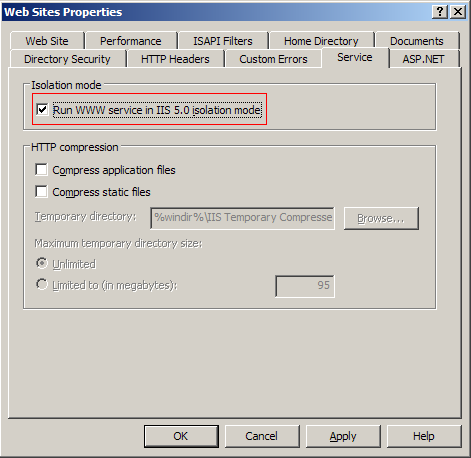
2. 配置第二台Web Server时,按照第一台的步骤部署配置完成,打开网页,出现下面的错误:
 This application has failed to start because the application configuration is incorrect. Reinstalling the application may fix this problem. (Exception from HRESULT: 0x800736B1)
FileLoadException: Could not load file or assembly 'acPDFCreatorLib.Net, Version=3.0.2735.26202, Culture=neutral, PublicKeyToken=8aedc7a81d17941d' or one of its dependencies. This application has failed to start because the application configuration is incorrect. Reinstalling the application may fix this problem. (Exception from HRESULT: 0x800736B1)]
System.Reflection.Assembly.nLoad(AssemblyName fileName, String codeBase, Evidence assemblySecurity, Assembly locationHint, StackCrawlMark& stackMark, Boolean throwOnFileNotFound, Boolean forIntrospection) +0
System.Reflection.Assembly.InternalLoad(AssemblyName assemblyRef, Evidence assemblySecurity, StackCrawlMark& stackMark, Boolean forIntrospection) +211
System.Reflection.Assembly.InternalLoad(String assemblyString, Evidence assemblySecurity, StackCrawlMark& stackMark, Boolean forIntrospection) +141
System.Reflection.Assembly.Load(String assemblyString) +25
System.Web.Configuration.CompilationSection.LoadAssemblyHelper(String assemblyName, Boolean starDirective) +32
3. 两台Web Server配置完成了,在本地都可以运行了,下面就访问事先做好的域名(指向均衡负载服务器),首页打开了,输入帐号密码登陆,又出现问题了!大黄页:
Validation of viewstate MAC failed. If this application is hosted by a Web Farm or cluster, ensure that <machineKey> configuration specifies the same validationKey and validation algorithm. AutoGenerate cannot be used in a cluster.
<system.web>
<pages enableViewStateMac="false" />
</system.web>
此内容由惯性聚合(RSS阅读器)自动聚合整理,仅供阅读参考。 原文来自 — 版权归原作者所有。