






cWeb是基于微软的.Net Framework 4框架,数据库是sql server 2008 r2。
cWeb开发框架下载,点击这里去下载。
cWeb开发框架借鉴三层架构理论分为三层,分别是:cData、cBN和cWeb。cData是数据层,cBN是业务处理层,cWeb是业务展示层。解决方案如图示:
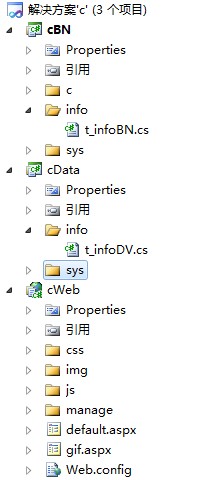
一、cData数据层
cData数据层,数据库字段的映射类。在其他开发框架中常见于datatable和dataview,也就是将数据库表映射成datatable,dataview继承datatable,并将其他如视图等的字段映射在dataview中。在类似于petshop等开发框架中分层可谓详细,虽然现在硬件的发展可以不用考虑继承、映射、调用等等的运行时间,但是对于大数据量下即使很小的优化都会起到极大的作用,所以直接的就是高效率的,简化后数据层都融合在了一起。
data层数据示例:
using System;

namespace AA.cData
{
    /// <summary>
    /// t_info 的摘要说明。
    /// </summary>
    [Serializable]
    public class t_infoDV
    {
        /// <summary>
        /// t_infoDV
        /// </summary>
        public t_infoDV()
        {
        }

        //============================数据库字段=================================//

        private long _ID = -1;
        /// <summary>
        /// ID
        /// </summary>
        public long ID
        {
            get
            {
                return _ID;
            }
            set
            {
                _ID = value;
            }
        }

        private string _t_info_title = null;
        /// <summary>
        /// t_info_title
        /// </summary>
        public string t_info_title
        {
            get
            {
                return _t_info_title;
            }
            set
            {
                _t_info_title = value;
            }
        }

        private DateTime _t_info_createtime = System.DateTime.MinValue;
        /// <summary>
        /// t_info_createtime
        /// </summary>
        public DateTime t_info_createtime
        {
            get
            {
                return _t_info_createtime;
            }
            set
            {
                _t_info_createtime = value;
            }
        }


        //============================扩展字段==================================//

        private string _t_info_title_like = null;
        /// <summary>
        /// t_info_title [模糊查询]
        /// </summary>
        public string t_info_title_like
        {
            get
            {
                return _t_info_title_like;
            }
            set
            {
                _t_info_title_like = value;
            }
        }


    }
}
二、cBN业务处理层
cBN业务处理层,也可以叫业务逻辑层。是数据层之上用来处理业务逻辑的方法,将除了web之外的所有业务处理都可以放在这个层里,比如添加、修改、删除、各种查询等方法,在web层仅仅调用一下就可以实现功能,也体现了业务逻辑通用原则,这样同样的业务处理就可以重复调用,提高了开发效率,减少了代码的冗长重复。
BN层示例:
using System;
using System.Collections.Generic;
using System.Text;

using System.Data;
using System.Data.SqlClient;

using cDB;
using AA.cData;

namespace AA.cBN
{
    /// <summary>
    /// t_info 的摘要说明。
    /// </summary>
    public class t_infoBN
    {
        DataInfo cDI;

        /// <summary>
        /// t_infoBN
        /// </summary>
        public t_infoBN()
        {
            cDI = new DataInfo();
        }


        #region [添加|修改|删除]

        /// <summary>
        /// [添加]
        /// </summary>
        /// <param name="tDV"></param>
        /// <param name="msg"></param>
        /// <returns></returns>
        public int Add(t_infoDV tDV, out string msg)
        {
            try
            {
                mCommand oCommand = new mCommand();

                oCommand.SqlTxt = "Insert into t_info(t_info_title,t_info_createtime)" +
                                    " values(@t_info_title,@t_info_createtime)";


                SqlParameter[] SqlItems = new SqlParameter[2];

                SqlItems[0] = new SqlParameter("@t_info_title", SqlDbType.NVarChar);
                SqlItems[0].Value = tDV.t_info_title;

                SqlItems[1] = new SqlParameter("@t_info_createtime", SqlDbType.DateTime);
                SqlItems[1].Value = tDV.t_info_createtime;


                oCommand.AddParameter(SqlItems);

                int iResult = cDI.iCommandSql(oCommand);

                if (iResult > -1)
                {
                    msg = "添加成功!";
                }
                else
                {
                    msg = "添加失败!";
                }

                return iResult;

            }
            catch //(Exception ex)
            {
                //msg = ex.Message;
                msg = "添加失败(异常)!";
                return -11;     //-11表示异常
            }
        }

        /// <summary>
        /// [修改]
        /// </summary>
        /// <param name="tDV"></param>
        /// <param name="msg"></param>
        /// <returns></returns>
        public int Edit(t_infoDV tDV, out string msg)
        {

            try
            {
                mCommand oCommand = new mCommand();

                oCommand.SqlTxt = "update t_info set " +
                                    "t_info_title=@t_info_title," +
                                    "t_info_createtime=@t_info_createtime " +
                                    "where ID=@ID";


                SqlParameter[] SqlItems = new SqlParameter[3];

                SqlItems[0] = new SqlParameter("@t_info_title", SqlDbType.NVarChar);
                SqlItems[0].Value = tDV.t_info_title;

                SqlItems[1] = new SqlParameter("@t_info_createtime", SqlDbType.DateTime);
                SqlItems[1].Value = tDV.t_info_createtime;

                SqlItems[2] = new SqlParameter("@ID", SqlDbType.BigInt);
                SqlItems[2].Value = tDV.ID;


                oCommand.AddParameter(SqlItems);

                int iResult = cDI.iCommandSql(oCommand);

                if (iResult > -1)
                {
                    msg = "修改成功!";
                }
                else
                {
                    msg = "修改失败!";
                }

                return iResult;

            }
            catch //(Exception ex)
            {
                //msg = ex.Message;
                msg = "添加失败(异常)!";
                return -11;     //-11表示异常
            }
        }

        /// <summary>
        /// [删除]
        /// </summary>
        /// <param name="tDV"></param>
        /// <param name="msg"></param>
        /// <returns></returns>
        public int Del(t_infoDV tDV, out string msg)
        {
            try
            {
                mCommand oCommand = new mCommand();
                oCommand.SqlTxt = "delete t_info where ID=@ID";
                SqlParameter[] SqlItems = new SqlParameter[1];

                SqlItems[0] = new SqlParameter("@ID", SqlDbType.BigInt);
                SqlItems[0].Value = tDV.ID;

                oCommand.AddParameter(SqlItems);

                int iResult = cDI.iCommandSql(oCommand);

                if (iResult > -1)
                {
                    msg = "删除成功!";
                }
                else
                {
                    msg = "删除失败!";
                }

                return iResult;
            }
            catch //(Exception ex)
            {
                //msg = ex.Message;
                msg = "删除失败(异常)!";
                return -11;     //-11表示异常
            }
        }
        #endregion


        #region [查询]
        /// <summary>
        /// [返回数据分页]
        /// </summary>
        /// <param name="tDV"></param>
        /// <param name="sqlWhere">where语句</param>
        /// <returns></returns>
        public DataTable GetDataList(t_infoDV tDV, string sqlWhere)
        {

            DataTable DTe = new DataTable();

            mCommand oCommand = new mCommand();

            StringBuilder SqlTxtPrefiex = new StringBuilder(" select ISNULL(count(ID),0) as Counts from View_t_info where 1 = 1 " + sqlWhere + " ");
            SqlParameter tSqlItem = null;


            if (tDV.t_info_title != null)
            {
                SqlTxtPrefiex.Append(" and t_info_title = @t_info_title");
                tSqlItem = new SqlParameter("@t_info_title", SqlDbType.NVarChar);
                tSqlItem.Value = tDV.t_info_title;
                oCommand.SqlParameters.Add(tSqlItem);
            }

            if (tDV.t_info_title_like != null)
            {
                SqlTxtPrefiex.Append(" and t_info_title like @t_info_title_like");
                tSqlItem = new SqlParameter("@t_info_title_like", SqlDbType.NVarChar);
                tSqlItem.Value = "%" + tDV.t_info_title_like + "%";
                oCommand.SqlParameters.Add(tSqlItem);
            }


            oCommand.SqlTxt = SqlTxtPrefiex.ToString();

            DTe = cDI.GetTable(oCommand);
            return DTe;
        }

        /// <summary>
        /// [返回数据]
        /// </summary>
        /// <param name="tDV"></param>
        /// <param name="column">显示的列,默认为【*】全部</param>
        /// <param name="sqlWhere">where语句</param>
        /// <param name="beginIndex">开始记录</param>
        /// <param name="endIndex">结束记录</param>
        /// <param name="Order">排序,如【order by ID desc】</param>
        /// <returns></returns>
        public DataTable GetDataList(t_infoDV tDV, string column, string sqlWhere, long beginIndex, long endIndex, string Order)
        {
            if (string.IsNullOrEmpty(column))
                column = " * ";

            mCommand oCommand = new mCommand();

            StringBuilder cSqlTxtPrefiex = new StringBuilder("select * from NoPagedTable WHERE rowIndex>=@beginIndex and rowIndex<=@endIndex");

            SqlParameter[] SqlItems = new SqlParameter[2];

            SqlItems[0] = new SqlParameter("@beginIndex", SqlDbType.BigInt);
            SqlItems[0].Value = beginIndex;

            SqlItems[1] = new SqlParameter("@endIndex", SqlDbType.BigInt);
            SqlItems[1].Value = endIndex;

            oCommand.SqlParameters.AddRange(SqlItems);


            if (Order == string.Empty)
            {
                Order = " order by ID DESC ";
            }

            StringBuilder SqlTxtPrefiex = new StringBuilder(
                "WITH NoPagedTable AS " +
                "(" +
                "SELECT ROW_NUMBER() OVER (" + Order + ") AS rowIndex," + column + " FROM View_t_info where 1 = 1 " + sqlWhere + " ");

            SqlParameter tSqlItem = null;

            if (tDV.t_info_title != null)
            {
                SqlTxtPrefiex.Append(" and t_info_title = @t_info_title");
                tSqlItem = new SqlParameter("@t_info_title", SqlDbType.NVarChar);
                tSqlItem.Value = tDV.t_info_title;
                oCommand.SqlParameters.Add(tSqlItem);
            }

            if (tDV.t_info_title_like != null)
            {
                SqlTxtPrefiex.Append(" and t_info_title like @t_info_title_like");
                tSqlItem = new SqlParameter("@t_info_title_like", SqlDbType.NVarChar);
                tSqlItem.Value = "%" + tDV.t_info_title_like + "%";
                oCommand.SqlParameters.Add(tSqlItem);
            }


            SqlTxtPrefiex.Append(")");

            oCommand.SqlTxt = SqlTxtPrefiex.ToString() + cSqlTxtPrefiex.ToString();

            return cDI.GetTable(oCommand);
        }

        /// <summary>
        /// [返回DataTable]
        /// </summary>
        /// <param name="tDV"></param>
        /// <param name="topNum">返回行数,默认【0】全部</param>
        /// <param name="column">显示的列,默认为【*】全部</param>
        /// <param name="sqlWhere">where语句</param>
        /// <param name="order">排序,如【order by ID desc】</param>
        /// <returns></returns>
        public DataTable GetDataTable(t_infoDV tDV, int topNum, string column, string sqlWhere, string order)
        {
            if (string.IsNullOrEmpty(column))
                column = " * ";

            string topNumSql = "";
            if (topNum > 0)
                topNumSql = " top " + topNum.ToString();

            DataTable DT = new DataTable();

            mCommand oCommand = new mCommand();

            StringBuilder SqlTxtPrefiex = new StringBuilder(" select " + topNumSql + " " + column + " from View_t_info where 1 = 1 " + sqlWhere + " ");
            SqlParameter tSqlItem = null;

            if (tDV.ID != -1)
            {
                SqlTxtPrefiex.Append(" and ID=@ID");
                tSqlItem = new SqlParameter("@ID", SqlDbType.BigInt);
                tSqlItem.Value = tDV.ID;
                oCommand.SqlParameters.Add(tSqlItem);
            }


            if (tDV.t_info_title != null)
            {
                SqlTxtPrefiex.Append(" and t_info_title = @t_info_title");
                tSqlItem = new SqlParameter("@t_info_title", SqlDbType.NVarChar);
                tSqlItem.Value = tDV.t_info_title;
                oCommand.SqlParameters.Add(tSqlItem);
            }

            if (tDV.t_info_title_like != null)
            {
                SqlTxtPrefiex.Append(" and t_info_title like @t_info_title_like");
                tSqlItem = new SqlParameter("@t_info_title_like", SqlDbType.NVarChar);
                tSqlItem.Value = "%" + tDV.t_info_title_like + "%";
                oCommand.SqlParameters.Add(tSqlItem);
            }


            if (string.IsNullOrEmpty(order))
                order = " order by ID desc ";

            SqlTxtPrefiex.Append(" " + order + " ");


            oCommand.SqlTxt = SqlTxtPrefiex.ToString();

            DT = cDI.GetTable(oCommand);
            return DT;
        }


        #endregion


    }
}
三、cWeb业务展示层
cWeb业务展示层,用于业务逻辑展示的层,调用BN层的函数直接显示在web页面中。
web层示例:
infolist.aspx.cs代码如下:
using System;
using System.Collections.Generic;
using System.Linq;
using System.Web;
using System.Web.UI;
using System.Web.UI.WebControls;

using System.Data;

using AA.cData;
using AA.cBN;
using cPage;

namespace AA.cWeb.manage.info
{
    public partial class infolist : System.Web.UI.Page
    {
        cUser cu = new cUser();

        public int p = 1;   //页码


        protected void Page_Load(object sender, EventArgs e)
        {
            #region [判断是否登录]
            if (!cu.isLogin())
            {
                cGlobal.frameGoUrl(this, "../../default.aspx");
                return;
            }
            #endregion

            #region 分页获得页码
            string _p = Request.QueryString["p"];

            if (string.IsNullOrEmpty(_p))
                _p = "1";

            if (cGlobal.IsIntType(_p))
            {
                p = Convert.ToInt32(_p);
            }
            else
            {
                cGlobal.showBoxBack(this, "页码不正确!");
                return;
            }
            #endregion

            #region [判断是具有访问权限]
            if (!cDataCommon.userPagePower(cu.userID, "0202"))
            {
                cGlobal.showBoxBack(this, "您没有权限访问!");
                return;
            }
            #endregion

            #region [获得在【系统设置=》角色管理=》权限设置】中点击某一菜单后,“菜单功能权限设置”设置的功能]
            string userPageFunctionPower = cDataCommon.userPageFunctionPower(cu.userID, "0202");
            //判断是否具有“添加”功能
            if (userPageFunctionPower.IndexOf("|add|") > -1)
                btnAdd.Visible = true;
            else
                btnAdd.Visible = false;
            #endregion


            if (!Page.IsPostBack)
            {

                dataBind();
            }

        }

        protected void dataBind()
        {
            string _url = "infolist.aspx?p=[#p#]";
            int _pageNum = 10;                              // 中间页码数量
            int _pageSize = 10;                             //每页记录数
            int _beginIndex = 0;
            int _endIndex = 0;

            t_infoBN tBN = new t_infoBN();
            t_infoDV tDV = new t_infoDV();


            DataTable rcDT = tBN.GetDataList(tDV, "");

            lblpage.Text = mPage.getPage(Convert.ToInt32(rcDT.Rows[0][0].ToString()), _pageSize, _pageNum, p, out _beginIndex, out _endIndex, _url);

            DataTable DT = tBN.GetDataList(tDV, "", "", _beginIndex, _endIndex, "");

            rlist.DataSource = DT;
            rlist.DataBind();

        }


        protected void rlist_ItemDataBound(object sender, RepeaterItemEventArgs e)
        {
            if (e.Item.ItemIndex > -1)
            {
                ((LinkButton)e.Item.FindControl("lnkbtnDel")).Attributes["onclick"] = "return confirm('确认要删除吗?');";
            }
        }

        protected void rlist_ItemCommand(object source, RepeaterCommandEventArgs e)
        {
            if (e.CommandName == "del")
            {
                try
                {
                    long _ID = Convert.ToInt64(((HiddenField)(e.Item.FindControl("hfID"))).Value);

                    t_sys_logBN tBN = new t_sys_logBN();
                    t_sys_logDV tDV = new t_sys_logDV();

                    tDV.ID = _ID;

                    string msg = "";
                    int iResult = -2;

                    iResult = tBN.Del(tDV, out msg);


                    if (iResult >= 0)   //0,执行完成,>1,执行完成影响的记录数
                    {
                        cGlobal.showBoxGo(this, "删除成功!", Request.Url.ToString());
                    }
                    else
                    {
                        cGlobal.showBoxBack(this, "删除失败!");
                    }

                }
                catch
                {
                    cGlobal.showBoxBack(this, "数据格式不正确(异常)");
                }
            }
        }

    }
}
更详细的介绍和cWeb源代码,去这里下载。
原帖地址:cWeb开发框架,基于asp.net的cWeb应用开发平台介绍(二)
bubufx提供,禁止转载。
此内容由惯性聚合(RSS阅读器)自动聚合整理,仅供阅读参考。 原文来自 — 版权归原作者所有。