





在Word中可以通过下面的方法手动添加一个条形码:使用菜单“视图”——“工具栏”——“控件工具箱”打开控件工具箱,使用控件工具箱右下角的最后一个按钮“其它控件”,在弹出的列表中选择“Microsoft BarCode Control 9.0”,在文档中新添加的条形码上单击右键,使用邮件菜单“属性”打开属性对话框,设置Value和Style属性值即可显示相应的条形码。
还有另外一种可以添加条形码的方法,使用一些条形码字库,只要输入相应条形码的字符,并选择使用特定的条形码字体即可。
这里讨论的是第一种方法,而且应用的场景是一次性向一个Word文档添加多个条形码,此时手动添加不适用,可以考虑使用VBA完成添加条形码的操作。
在VBA for Word的编程参考资料里很容易找到这样的代码:
1 Set myCB = ActiveDocument.Shapes.AddOLEControl(ClassType:="Forms.CheckBox.1")
2 With myCB.OLEFormat.Object
3 .Value = False
4 .Caption = "Check if over 21"
5 End With
这是向Word文档中添加一个复选框的VBA代码,如果是添加一个条形码对象,代码是这样的:
1 Set myCB = ActiveDocument.Shapes.AddOLEControl(ClassType:="BARCODE.BarCodeCtrl.1")
2 With myCB.OLEFormat.Object
3 .Value = "S-102909211000001-12"
4 .Style = 7
5 End With
条形码上显示的字符串是“S-102909211000001-12”。
在C#中如何完成以上操作?
首先应当在项目中添加Microsoft.Office.Interop.Word引用,再添加对Office安装目录下的2052目录中的msbcode9.ocx的引用,后者在解决方案资源管理器中显示为BARCODELib,需要使用此命名空间对条形码的属性进行设置。
然后使用以下代码完成向Word文档中添加一个条形码:
1 private void btnAddBarCodeControl_Click(object sender, EventArgs e)
2 {
3
4 Microsoft.Office.Interop.Word.Application CurWord = null;
5 Microsoft.Office.Interop.Word.Document CurDocument = null;
6 object mValue = System.Reflection.Missing.Value;
7
8 object objFileName = Application.StartupPath + "/testdoc.doc";
9
10 object objReadOnly = false;
11
12 CurWord = new Microsoft.Office.Interop.Word.Application();
13
14 CurDocument = CurWord.Documents.Open(
15 ref objFileName
16 , ref mValue
17 , ref objReadOnly
18 , ref mValue
19 , ref mValue
20 , ref mValue
21 , ref mValue
22 , ref mValue
23 , ref mValue
24 , ref mValue
25 , ref mValue
26 , ref mValue
27 , ref mValue
28 , ref mValue
29 , ref mValue
30 , ref mValue
31 );
32
33 object objOleControlType = "BARCODE.BarCodeCtrl.1";
34
35 object objLeft = 20;
36 object objTop = 20;
37 object objWidth = 200;
38 object objHeight = 50;
39
40 object comControl = CurDocument.Shapes.AddOLEControl(
41 ref objOleControlType
42 , ref objLeft
43 , ref objTop
44 , ref objWidth
45 , ref objHeight
46 , ref mValue
47 ).OLEFormat.Object;
48
49
50 ((BARCODELib.IBarCodeCtrl)comControl).Value = "S-102909211000001-12";
51
52 ((BARCODELib.IBarCodeCtrl)comControl).Style = 7;
53
54 CurDocument.Save();
55
56 }

上面的C#代码是由完成同样功能的VBA代码转换过来的,其它地方可能并无什么难理解之处,有两个地方需要说明一下——
1、AddOLEControl方法的第一个参数ClassType如何确定?语法提示告诉我们这是ActiveX控件的编程标识符,其实,这个编程标识符可以在VBA for Word编程参考资料中找到,文档主题即为“OLE 编程标识符”,常用控件的编程标识符列表如下:
| 要创建此控件 | 使用此标识符 |
| 复选框 | Forms.CheckBox.1 |
| 组合框 | Forms.ComboBox.1 |
| 命令按钮 | Forms.CommandButton.1 |
| 框架 | Forms.Frame.1 |
| 图像 | Forms.Image.1 |
| 标签 | Forms.Label.1 |
| 列表框 | Forms.ListBox.1 |
| 多页控件 | Forms.MultiPage.1 |
| 选项按钮 | Forms.OptionButton.1 |
| 滚动条 | Forms.ScrollBar.1 |
| 数值调节钮 | Forms.SpinButton.1 |
| TabStrip | Forms.TabStrip.1 |
| 文本框 | Forms.TextBox.1 |
| 切换按钮 | Forms.ToggleButton.1 |
当然,对于条形码控件来说,它的编程标识符要特殊一些,没有办法,只能找找VBA方法中处理时使用的ClassType名称了。
2、comControl的类型是如何确定的?如果不确定它的类型,我们是无法设置该控件的Value和Style属性的。
确定该COM对象类型的过程是这样的,添加对Microsoft.VisualBasic的引用,监视察看Microsoft.VisualBasic.Information.TypeName(comControl)的值(在设置OLE控件属性之前),可以得到字符串"IBarCodeCtrl"(原理可以参照“获取System.__ComObject的真正类型”,不再赘述),在BARCODELib命名空间下恰好有名称为IBarCodeCtrl的接口。
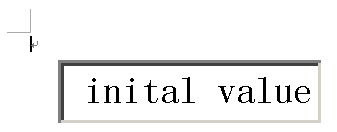
如果要添加的是Office的常用控件,而不是条形码控件,方法类似。以添加一个文本框为例,objOleControlType应为"Forms.TextBox.1",察看Microsoft.VisualBasic.Information.TypeName(comControl)的值为IMdeText,要使用这个接口,应该添加引用Microsoft.Vbe.Interop.Forms,这个命名空间下包含了Office常用控件的接口,可以使用下面的语句为该文本框设置初始显示的字符串:
1 ((Microsoft.Vbe.Interop.Forms.IMdcText)comControl).Text = "inital value";

P.S. 有关C#以COM方式操作Word文档可以参见sharemeteor的一篇随笔:.NET1.1下,使用C#自动生成Word2003文档(通过操作COM组件实现)。
Life is like a boat, and I'm at sea.
此内容由惯性聚合(RSS阅读器)自动聚合整理,仅供阅读参考。 原文来自 — 版权归原作者所有。