惯性聚合 高效追踪和阅读你感兴趣的博客、新闻、科技资讯
阅读原文 在惯性聚合中打开

推荐订阅源

博客园_首页
C
Check Point Blog
B
Blog RSS Feed
G
Google Developers Blog
H
Help Net Security
博客园 - Franky
Blog — PlanetScale
Blog — PlanetScale
H
Hackread – Cybersecurity News, Data Breaches, AI and More
量子位
Recent Announcements
B
Blog
Cyber Security Advisories - MS-ISAC
D
DataBreaches.Net
小众软件
小众软件
T
The Blog of Author Tim Ferriss
freeCodeCamp Programming Tutorials: Python, JavaScript, Git & More
MongoDB | Blog
MongoDB | Blog
Y
Y Combinator Blog
T
Tailwind CSS Blog
J
Java Code Geeks
MyScale Blog
MyScale Blog
雷峰网
雷峰网
有赞技术团队
有赞技术团队
博客园 - 聂微东

博客园 - zhanqiangz(闲云野鹤)

在ReportService2005.asmx 找不到 ReportingService2005 类 BizTalk相关的问题,打算持续更新。 恢复被格式化过的硬盘数据 BizTalk - Most possible reason for “is Delimiters are not unique” in EDI transaction What happens if BizTalk artifacts are not GACed? XmlSerializer is not trustable BizTalk - How to create custom functoid. BizTalk - Carefully use Send Port Group BizTalk-Get to know functoid. BizTalk - String Functoids 一辈子都忘不了的七夕节 Head First Design patterns笔记-Singleton patterns (从“一夫一妻制社会中婚约的达成”看单件模式) Global.asax文件里的Application_Init能触发吗? 使用HttpApplication实例(翻译) Head First Design patterns笔记-Decorator Patterns (从”用不同技能武装自己”看装饰模式) Head First Design patterns笔记-Observer Patterns (从TFS的Project alerts功能看观察者模式) ASP.NET 2.0的编译行为 Head First Design patterns笔记-Strategy Patterns (从不同的人使用不同的交通工具上班看策略模式) 晕菜了,TFS居然把vss里的那个rollback功能cut掉了,还好有人写了工具.
BizTalk - How to debug map in VS2005
zhanqiangz(闲云野鹤) · 2008-05-09 · via 博客园 - zhanqiangz(闲云野鹤)

I am here not talking about debugging BizTalk application with HAT, my topic is how to debug map in VS2005. Is it a new topic? I hope so. :)

1. Why is it possible to debug BizTalk map in VS2005?
    1).

VS2005 enables you to debug XSLT (It might be a new feature coming with VS2005, I am not sure whether VS2003 has this feature.)
    2).  BizTalk map is essentially a XSLT file.

2. Are  you ready? the exciting journey begins here...
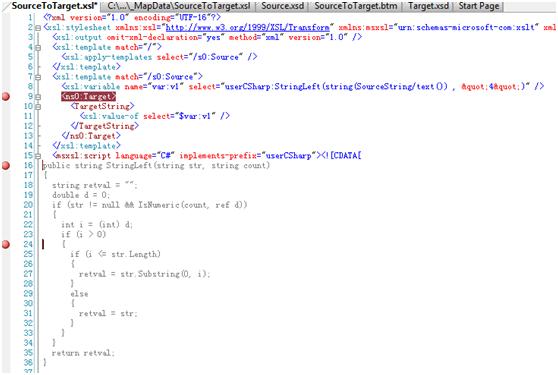
1). Generate XSLT file based on physical map. We will use the sample code which is for previous topic.
               Sample Map

 2).    Open your explorer, right click on the map file and select validate map.
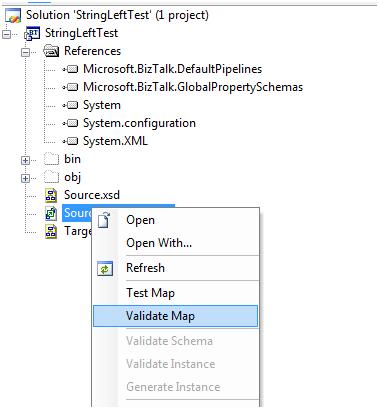
        Validate Map
3).

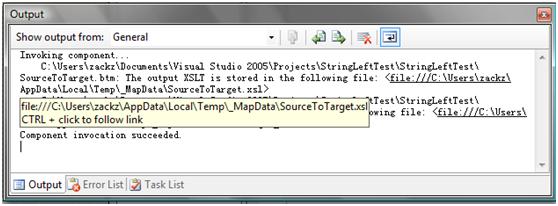
In the output window, you can see the xsl file is generated.
          XLS file
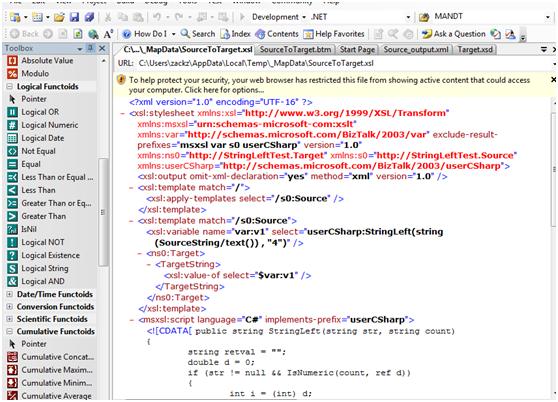
4). Press Ctrl and click the file path to open it.
           Open xsl file
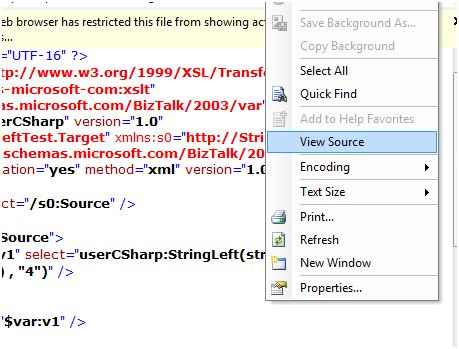
5). Now you CANNOT find any menu regarding XSLT/Map debugging. Do not worry!  Right click on the document and select View Source.
         
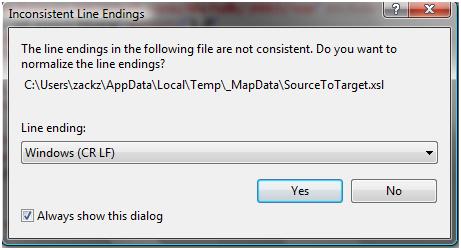
6). A window pops up (shown as below), click Yes to continue.
           popup window
7). Click anywhere on the document and see what have been changed on the menu bar.
           
          It’s true, you found Debug XSLT menu item. Before debugging let’s put some breakpoints here.
             set breakpoint
8).  Just click it…another window will pop up to ask you specify a input file instance before debugging and continue to debug. As you can see watch window, command/immediate window now is available for you keep tracking variables, you can press F10 to step forward.
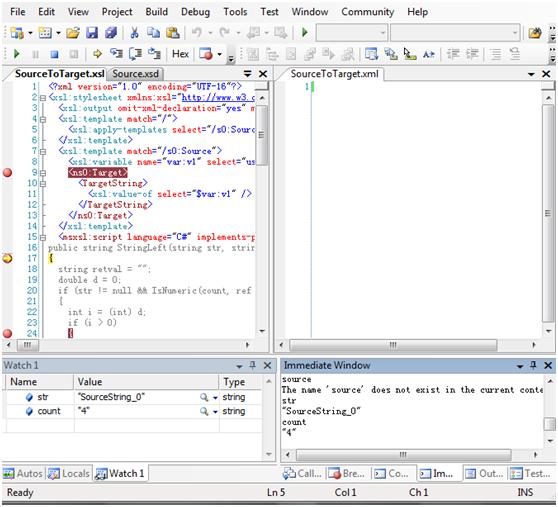
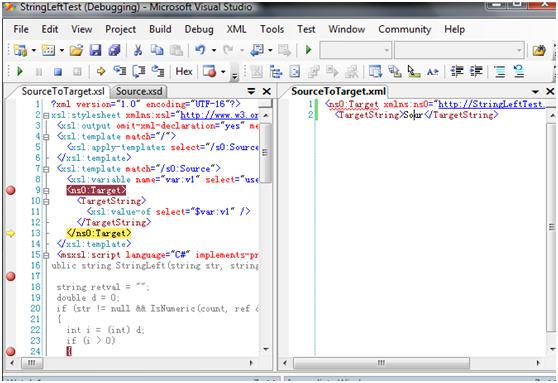
            debugging   
            
9). In the right hand window, you can see the output (tips: you can press Ctrl+K+D to format the output file to make it more readable).
             outputWhat do you see? It is really cool, isn’t it?
Enjoy!