








<!DOCTYPE html>
<!--
To change this license header, choose License Headers in Project Properties.
To change this template file, choose Tools | Templates
and open the template in the editor.
-->
<html>
<head>
<meta http-equiv="Content-Type" content="text/html; charset=gb2312" />

<title>table test</title>
 <style>

/*
To change this license header, choose License Headers in Project Properties.
To change this template file, choose Tools | Templates
and open the template in the editor.
*/
/*
Created on : 2014-7-9, 14:24:31
Author : Administrator
*/
body{ margin:0 auto; text-align:center}
/*设置表头的margin为0则表居中显示,border为0则无边界*/
table{margin:0 auto;
border:0px;
solid:#000
}
/*设置th表头的属性,font-weight为bold则显示为黑粗*/
table tr th{ height:28px;
width: auto;
line-height:28px;
background:#999;
font-weight:bold
}
table tbody tr{
height:28px;
line-height:28px;
text-align:center;
background:#FFF;
vertical-align:middle;
}
/*
*设置鼠标经过颜色的变化
*/
/*采用csss的这个方法,获得奇数行,让后设置其属性,这样避免使用expression这个容易出错的方法*/
table tbody tr:nth-child(odd){
background-color: #DEDEDE
}

table tbody tr:hover{
background-color: #CCCCCC;
}
</style>
</head>
<body>
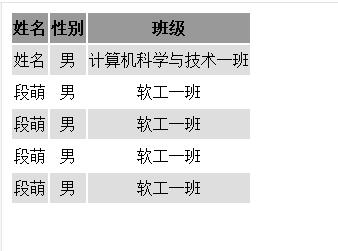
<table>
<tr>
<th>姓名</th>
<th>性别</th>
<th>班级</th>
</tr>
<tbody>
<tr>
<td>姓名</td>
<td>男</td>
<td>计算机科学与技术一班</td>
</tr>
<tr>
<td>段萌</td>
<td>男</td>
<td>软工一班</td>
</tr>
<tr>
<td>段萌</td>
<td>男</td>
<td>软工一班</td>
</tr>
<tr>
<td>段萌</td>
<td>男</td>
<td>软工一班</td>
</tr>
<tr>
<td>段萌</td>
<td>男</td>
<td>软工一班</td>
</tr>
</tbody>
</table>
</body>
</html>
此内容由惯性聚合(RSS阅读器)自动聚合整理,仅供阅读参考。 原文来自 — 版权归原作者所有。