







在WSS V3中列表(List)中是支持文件夹的,可以用文件夹来组织一个列表的项目。
WSS V3中列表的结构如下:
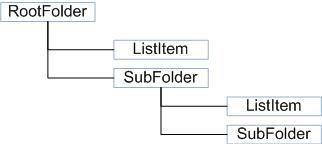
在WSS V3的对象模型中SPList下的所有列表项目和子文件夹都是SPListItem,只是SPListItem的ContentType不一样
项目的ContentType.Name = Item
文件夹的ContentType.Name = Folder
用SPQuery.Folder可以设置Query的文件夹,利用SPList.GetItems(SPQuery)可以得到相应文件夹下的项目(包括了文件夹)
遍历列表项目的时候需要做到:
1)遍历出文件夹的层级结构
2)得到每个文件夹下的ListItem并区分是Item还是Folder,如果是Folder则还需要继续向下遍历
根据以上的分析,利用递归来完成列表的遍历:
 public static void getlistitems(SPList templist,SPFolder tempfolder,string levelstring)
 {
{ if (templist.RootFolder != tempfolder)
 { Console.WriteLine(" " + levelstring + "." + tempfolder.Name);
 } else { Console.WriteLine(levelstring + "." + tempfolder.Name); } SPQuery myquery =new SPQuery(); if (tempfolder.SubFolders.Count != 0) { myquery.Folder = tempfolder; foreach (SPListItem tempitem in templist.GetItems(myquery)) { if (tempitem.ContentType.Name == "Item") Console.WriteLine(" " + levelstring + "." + tempfolder.Name + "." + tempitem.Title + "(Item)"); if (tempitem.ContentType.Name == "Folder") getlistitems(templist, tempitem.Folder, " " + levelstring + "." + tempfolder.Name); } } else { myquery.Folder = tempfolder; foreach (SPListItem tempitem in templist.GetItems(myquery)) { Console.WriteLine(" " + levelstring + "." + tempfolder.Name + "." + tempitem.Title+"(Item)"); } }
 }
}
利用这个递归过程便利一个列表得到的结果:
此内容由惯性聚合(RSS阅读器)自动聚合整理,仅供阅读参考。 原文来自 — 版权归原作者所有。