





04 Jan 2024,
We’re excited to share that local redirect mode is now available on Windows in mitmproxy 10.2! This allows users to seamlessly intercept local applications without configuring proxy settings.
Local Redirect Mode, One Platform at a Time
While mitmproxy’s traditional proxying modes are all relatively platform-independent, our new effort to transparently redirect traffic from the local machine is not. After debuting local redirect mode for macOS last month, we’re happy to report that our Windows functionality is now ready for testing, too!
While limited to CLI invocations for now, this paves the path for significant usability improvements going forward. As on macOS, you can try out local redirect mode as follows:
# Capture all local traffic
mitmproxy --mode local
# Capture cURL only
mitmproxy --mode local:curl
How it works
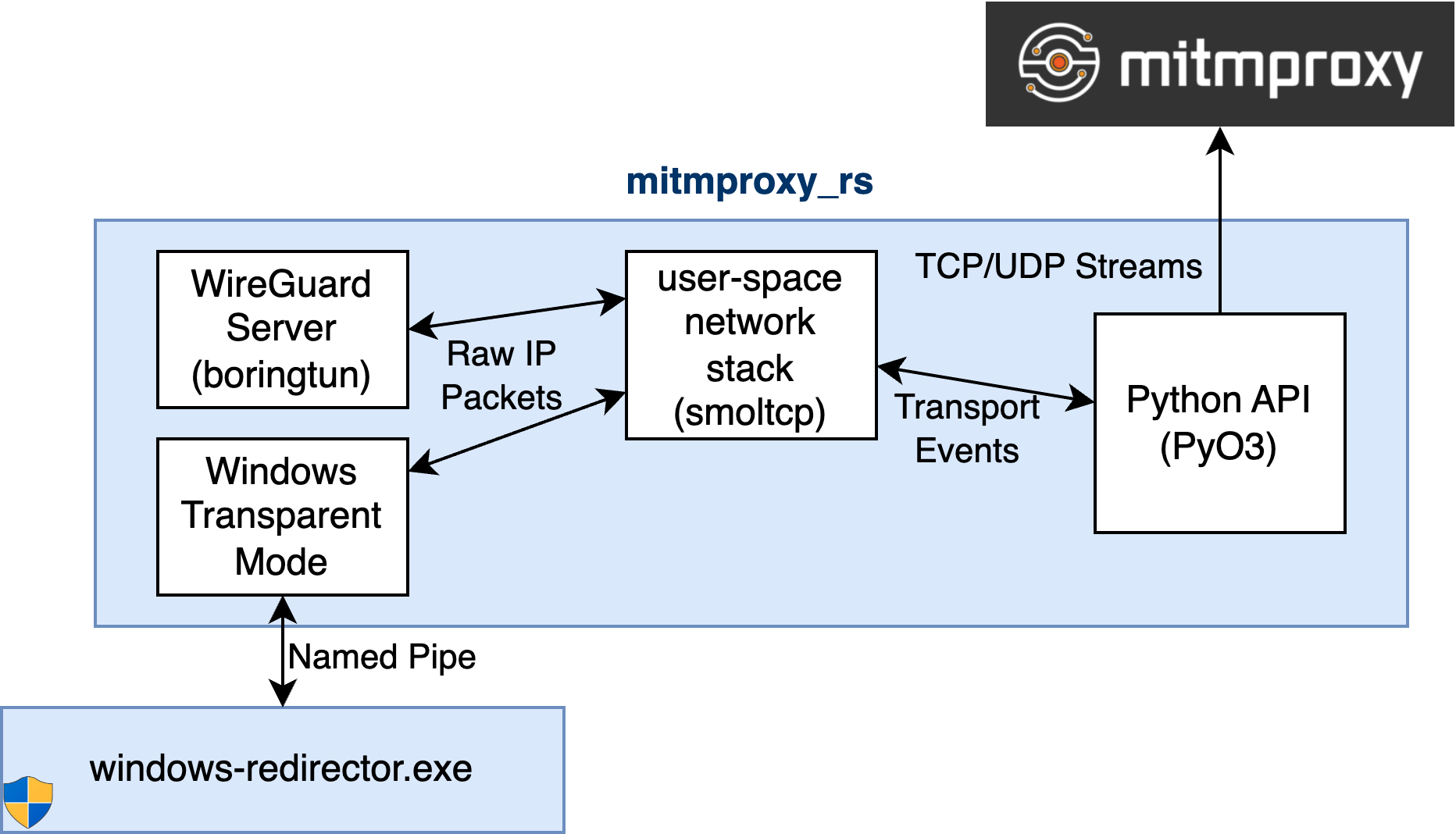
Packet Redirection on Windows
While macOS provided us with relatively nice system APIs for traffic redirection (let’s not get into the associated code-signing nightmares here), Windows does not have an equivalent to this. Instead of handling TCP streams as on macOS, we capture individual packets and need to handle TCP reassembly ourselves.
To capture packets, mitmproxy spawns a privileged redirector process that makes use of WinDivert, a user-mode packet capture library, via the excellent windivert-rust crate. This allows us to target specific PIDs while avoiding memory-unsafe code on our end.
When the redirector has determined that a particular packet needs to be intercepted, it is passed through a named pipe to mitmproxy_rs. Here we re-use our existing user-space TCP/IP stack to transform packets into streams, and then pass them on to mitmproxy.
Next Steps
Local redirect mode for Windows is now available for users in mitmproxy 10.2. We still intend to extend it with automated certificate installation, and more importantly a UI integration into mitmweb. If you are curious about contributing, please join us on GitHub!
Acknowledgments
This work supported by the NGI0 Entrust fund established by NLnet.