

惯性聚合 高效追踪和阅读你感兴趣的博客、新闻、科技资讯
阅读原文 在惯性聚合中打开

推荐订阅源

雷峰网
雷峰网
aimingoo的专栏
aimingoo的专栏
云风的 BLOG
云风的 BLOG
Microsoft Security Blog
Vercel News
Vercel News
The GitHub Blog
The GitHub Blog
T
The Blog of Author Tim Ferriss
Microsoft Azure Blog
U
Unit 42
IT之家
IT之家
D
DataBreaches.Net
Y
Y Combinator Blog
B
Blog RSS Feed
F
Fortinet All Blogs
GbyAI
GbyAI
V
Visual Studio Blog
博客园 - 叶小钗
Google DeepMind News
美团技术团队
L
LangChain Blog
N
Netflix TechBlog - Medium
G
Google Developers Blog
Recent Announcements
T
Tailwind CSS Blog

博客园 - montaque

xp 与 windows 7 共享收藏夹 Microsoft ILM V2 新特性 云计算 PDC , XAML 2009以及未来 PDC , KeyNote2 个人计算,Windows 7+ Live Service PDC - C#4.0 以及未来 PDC 第一天总结 PDC 2008 WPF/Silverlight 中利用XamlReader /Writer 来处理对象的序列化反序列化 让你的Expression XAML 编辑器支持智能提示 silverlight 测试 EDI batch Receiving in Biztalk 2006 R2 EDI Party Resolution in Biztalk R2 EDI in Biztalk 2006 R2 Hello,Biztalk 2006 R2 BAM, WCF 集成 Hello, Biztalk 2006 R2 BAM what's new in Biztalk 2006 R2 hello biztalk R2 Mix08
Powershell 脚本自动下载 FTP Server上面固定格式的文件
montaque · 2008-06-10 · via 博客园 - montaque

如何用写一个bat脚本返回昨天的年月日,其实用bat写很麻烦,你要写一个For 来拿到Date的年月日,然后再写一个小程序来推算昨天的年月日。其实要使能直接执行.net代码多好,.net Datetime.Now.AddDays(-1) 就是昨天了

其实Powershell就帮你回答这个问题,可以利用.net 类库丰富的功能支持,比如操作XML,文件IO,网络等特性。当然也可也自己来写一个类库,来实现复杂的脚本。

这时候,你打开powershell,敲入 [DateTime]::Now

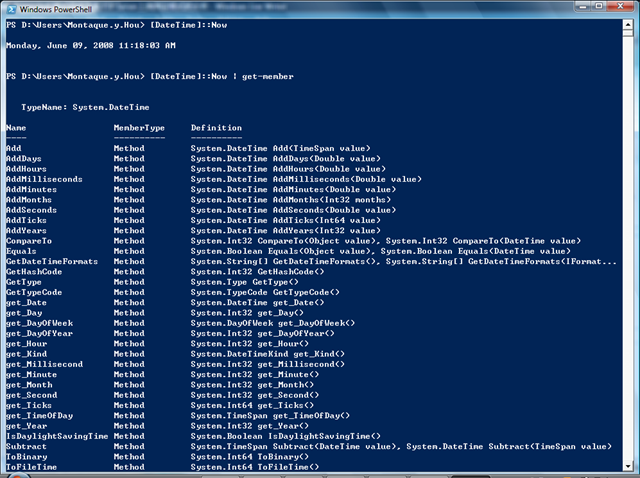
则返回当前的日期,如果看看Now有哪些方法和属性

[DateTime]::Now | get-member
image

当然你要计算你长了多大的话,[DateTime]::Now-[DateTime]("yourbirthday")就返回你的年龄了,呵呵。我通常用这个来计算一下我baby几个月几天了。

powershell允许你定义一个变量,针对FTP下载的问题。你首先生成你要下载的文件名,然后整理到一个String,发给FTP就可以了。

以下是一个简单的例子。

$yersterday=[DateTime]::Now.AddDays(-1);
$yyyy=$yersterday.Year;
$mm=$yersterday.Month;
$day=$yersterday.Day;
$file1=[String]::Format("90193698_{0}{1:00}{2:00}_{0}{1:00}{2:00}.zip",$yyyy,$mm,$day); 

$cmd = "open yourftpserver
user username password

binary
get $file1"

$cmd | ftp -i -n

把他另存为一个PS1文件。 如果让他自动运行的话,写一个windows schedule task "powershell fullpathoftheps1"

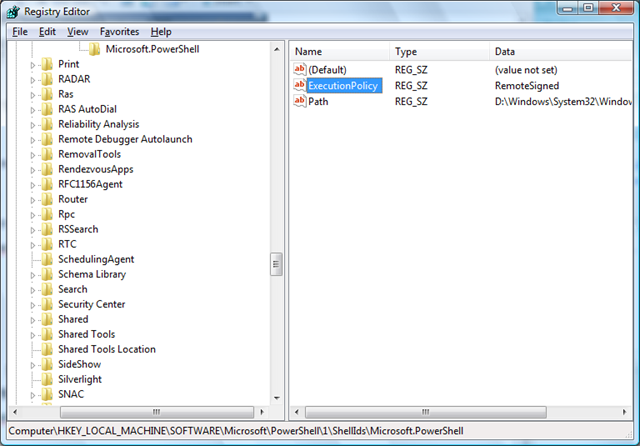
默认poweshell有一个执行策略,不运行执行伟签名的文件。你可以改为

set-ExecutionPolicy RemoteSigned

或者直接改一下注册表

HKEY_LOCAL_MACHINE\SOFTWARE\Microsoft\PowerShell\1\ShellIds\Microsoft.PowerShell
image

或许这是个PS很好的一个实用例子吧。