惯性聚合 高效追踪和阅读你感兴趣的博客、新闻、科技资讯
阅读原文 在惯性聚合中打开

推荐订阅源

Engineering at Meta
Engineering at Meta
Cloudbric
Cloudbric
云风的 BLOG
云风的 BLOG
A
About on SuperTechFans
The GitHub Blog
The GitHub Blog
IT之家
IT之家
F
Full Disclosure
B
Blog RSS Feed
奇客Solidot–传递最新科技情报
奇客Solidot–传递最新科技情报
Hugging Face - Blog
Hugging Face - Blog
B
Blog
H
Help Net Security
The Cloudflare Blog
Recorded Future
Recorded Future
P
Proofpoint News Feed
P
Proofpoint News Feed
C
Cisco Blogs
T
Tailwind CSS Blog
P
Palo Alto Networks Blog
D
Docker
爱范儿
爱范儿
Know Your Adversary
Know Your Adversary
博客园 - 聂微东
D
Darknet – Hacking Tools, Hacker News & Cyber Security
Y
Y Combinator Blog
雷峰网
雷峰网
AWS News Blog
AWS News Blog
D
DataBreaches.Net
博客园 - 司徒正美
Threat Intelligence Blog | Flashpoint
博客园 - Franky
C
Cybersecurity and Infrastructure Security Agency CISA
Blog — PlanetScale
Blog — PlanetScale
cs.CL updates on arXiv.org
Latest news
Latest news
Google DeepMind News
Martin Fowler
Martin Fowler
MongoDB | Blog
MongoDB | Blog
C
CERT Recently Published Vulnerability Notes
阮一峰的网络日志
阮一峰的网络日志
K
KPMG report finds enterprise disconnect between AI and its ROI | CIO
C
CXSECURITY Database RSS Feed - CXSecurity.com
酷 壳 – CoolShell
酷 壳 – CoolShell
C
Cyber Attacks, Cyber Crime and Cyber Security
腾讯CDC
小众软件
小众软件
G
Google Developers Blog
Hacker News - Newest:
Hacker News - Newest: "LLM"
Scott Helme
Scott Helme
O
OpenAI News

博客园 - skyfei

Xcode 文档注释方法 Show in Finder OC代码 C# x86应用x64系统上读取x64位应用的注册表 Make webclient support upload the large file which are larger than 1G Shortcut key for WPF get Android information with adb, the build version Decodes a QuotedPrintable encoded string C# USB Detection - winform and WPF [转] 线程同步 C# 常见面试题(2) 转:C# Interview Questions Openxml: 导出excel 设置 cell的格式 - skyfei OpenXML: excel 插入BarChart图表 OpenXML: Asp.net利用OpenXML 导出Excel. TRIGGERS :Cannot use text, ntext, or image columns in the 'inserted' and ' deleted' tables. 'String or binary data would be truncated' error message .net Create Excel 2007 file with open xml 利用.Net Framework2.0 zip压缩、解压 string 数据 C#中文和UNICODE字符转换方法 - skyfei - 博客园
查看iOS模拟器应用的沙箱文件
skyfei · 2015-09-18 · via 博客园 - skyfei

iOS 升级到8.3 以后就不能用iFunBox 这样的工具看沙箱里的文件了(非共享的), 而开发时我们的数据库文件又不在共享目录里。关于这个问题,我们可以看模拟器里的沙箱文件, iOS8.0 以后,模拟器沙箱路径为:

file:///Users/xxx/Library/Developer/CoreSimulator/Devices/F5B568B0-BECE-4D9E-BB94-E89039AB7697/data/Containers/Data/Application/

其中F5B568B0-BECE-4D9E-BB94-E89039AB7697 为模拟的deviceID, 可以在xcode 里获得:xcode/Window/Devices/模拟器名字/identifier

在Application 目录下是一些guid, 都是模拟器上应用的guid,好在数量不多, 依次打开,查找我们想要的应用即可。

注:目录"Library" 是隐藏文件夹, 可以用finder 直接goto 进去, 或者百度找显示隐藏文件夹的方法

找到模拟器的路径后,可以拉个快捷方式到个人收藏里,这样查看应用的数据变化就方便多了。

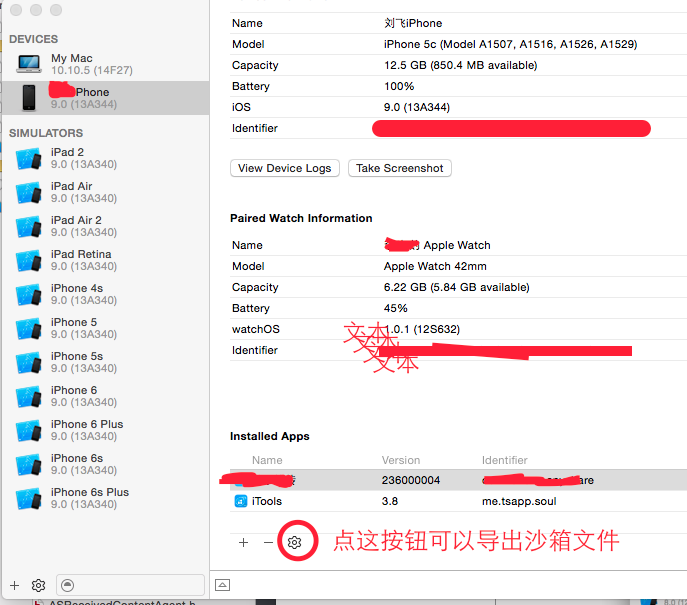
查看真机的沙箱文件方法:

1.把手机连到Mac上

2. 选择Xcode/Window/DEVICES/yourIphone

3. 在Installed Apps 里选择你要查看的App

4. 点击设置按钮,选择download container, 保存到Mac 上就可以查看了

5. 我也不清楚“show container” 为啥不work