



惯性聚合 高效追踪和阅读你感兴趣的博客、新闻、科技资讯
阅读原文 在惯性聚合中打开

推荐订阅源

D
Docker
U
Unit 42
Google DeepMind News
B
Blog RSS Feed
S
SegmentFault 最新的问题
阮一峰的网络日志
阮一峰的网络日志
雷峰网
雷峰网
Microsoft Security Blog
爱范儿
爱范儿
Cyber Security Advisories - MS-ISAC
博客园_首页
Apple Machine Learning Research
罗磊的独立博客
GbyAI
GbyAI
Stack Overflow Blog
Stack Overflow Blog
Martin Fowler
Martin Fowler
宝玉的分享
宝玉的分享
L
LangChain Blog
Engineering at Meta
Engineering at Meta
量子位
有赞技术团队
有赞技术团队
博客园 - 【当耐特】
A
About on SuperTechFans
Y
Y Combinator Blog

博客园 - Jun1st

ASP.NET AJAX 4的Client-Side Template和DataView ASP.NET AJAX 4的Client-Side Template和DataView 体验ASP.NET4之ClientID 体验ASP.NET 4之URL Routing 使用Extension Methods来使IDataReader更加方便 Custom WCF Configuration File USE HttpRuntime.Cache OVER HttpContext.Current.Cache Make Asynchronous Calls from Page IIS and VS Embedded Local Web Server Integrate jQuery with ASP.NET Data Controls Tech-Ed 2008 上海 ASP.NET MVC的分页和导航 LINQ and Pipeline Pattern Why Would a .Net Programmer Learn Ruby On Rails(翻译) ASP.NET MVC之AJAX Asp.Net MVC---Walkthrough Asp.Net MVC 入门篇——Overview Asp.Net 2.0之SqlCacheDependency Security Basics and ASP.NET Support(翻译)
Application之间共享Master Page
Jun1st · 2010-03-01 · via 博客园 - Jun1st

2010-03-01 21:51  Jun1st  阅读(1866)  评论()    收藏  举报

Master Page使得我们能够在不同的页面之间,共享一个页面框架。但是在如果我们需要在不同的application之间共享同一个master页面呢?在实际应用中,我们可能会碰到这样的情况。公司有一个类似与Portal这样的门户,用户首先访问这个网站,再通过链接进入各个子网站,但是Portal和子网站之间要保持风格上的一致。

但是ASP.NET 并没有提供我们一种简单的方式,来使不同的application之间能够共享master page。当有十几个程序需要共用一个master page之后,当master page有更新之后,把更新发布到所有的应用程序中去,是一件即无聊又令人头疼的事情。

本文就介绍的是以虚拟目录的方式,共享master page

建立主项目

首先建立一个名为MainApplication的项目,这个项目是Master Page所在的项目,

Solution

在子Application中应用Main.Master

在ASP.NET中,我们没法引用项目之外的master page。在添加一个Web Content Form时,如果不指定一个master page, 无法完成添加。为了方便起见,我们先把这个master page添加进项目(之后可以删除)。

在IIS中,建立虚拟目录,Alias可以随意取,但是Physical Path需要指向共享的master page所在的文件夹。
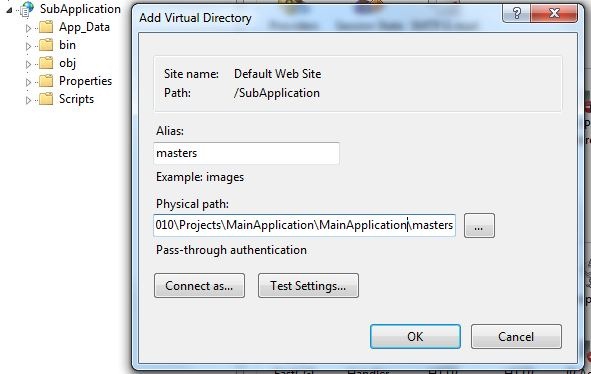
Pic1

完成之后,SubApplication中就有了masters这个虚拟目录,可供引用想要共享的master page。

2

这时我们就可以引用masters所指向的目录中的master page。我们可以把刚刚添加的content form 的,从

3

改成

4

这时就可以通过View in Browser来查看这个页面了,但是看到的就是白板,什么都没有。不过正好给我们机会,让我们可以修改位于MainApplication中的master page来测试。

很简单,但是似乎挺实用,希望对大家也有所帮助

Thanks
