惯性聚合 高效追踪和阅读你感兴趣的博客、新闻、科技资讯
阅读原文 在惯性聚合中打开

推荐订阅源

V
V2EX
J
Java Code Geeks
MongoDB | Blog
MongoDB | Blog
Cyber Security Advisories - MS-ISAC
Blog — PlanetScale
Blog — PlanetScale
A
About on SuperTechFans
Engineering at Meta
Engineering at Meta
美团技术团队
N
Netflix TechBlog - Medium
月光博客
月光博客
博客园 - 三生石上(FineUI控件)
F
Fortinet All Blogs
奇客Solidot–传递最新科技情报
奇客Solidot–传递最新科技情报
MyScale Blog
MyScale Blog
aimingoo的专栏
aimingoo的专栏
Last Week in AI
Last Week in AI
The Cloudflare Blog
量子位
Apple Machine Learning Research
小众软件
小众软件
腾讯CDC
OSCHINA 社区最新新闻
OSCHINA 社区最新新闻
D
DataBreaches.Net
H
Hackread – Cybersecurity News, Data Breaches, AI and More

博客园 - sayo.net

website the breakpoint will not currently be hit. no symbols have been loaded for this document How to add MS Test to post build Resolve Error: The service cannot be activated because it does not support ASP.NET compatibility. Resolve Error: Service has zero application (non-infrastructure) endpoints. WCF Could not establish trust relationship for the SSL/TLS secure channel with authority Could not find a base address that matches scheme http for the endpoint with binding MetadataExchangeHttpBinding. Resolve error: Could Not Load Type ‘System.ServiceModel.Activation.HttpModule’ 在IIS7.5上运行Message Security with UserName的WCF Service WCF部署问题两则 SQL Server Mangement Studio无法创建Database Dagrams的简单解决办法 一些有用的WCF相关链接 [Android开发]如何自定义ArrayAdapter 让Android的emulator支持web camera 如何旋转Android Emulator HTC Hero Android 2.1 真机调试 HTC Hero Android 2.1 真机调试 CouchDB系列 - 安装CouchDB Test from Windows Live Writer Silverlight Toolkit初探
在WCF中使用REST时,如何去掉URL中的.svc后缀
sayo.net · 2011-07-08 · via 博客园 - sayo.net

以Windows 7里面的IIS7.5为例。

假设我们的service method样子为

<WebGet(UriTemplate:="{parameter}")> _
        
<OperationContract()> _
        
Function ServiceMethod(ByVal parameter As StringAs Boolean

我们希望将一个这样的url

http://localhost/SomeService/ServiceMethod.svc/Parameter

使用

http://localhost/SomeService/ServiceProvider/Parameter

来访问

首先从这里安装一个URLRewrite。

 安装后打开IIS,从Features View里面可以看到URL Rewrite设置图标。
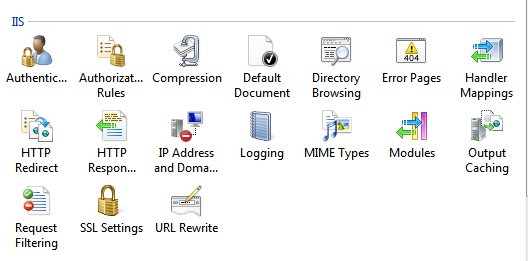
 

 双击进入设置,选择Add Rule(s)...然后选择Blank Rule

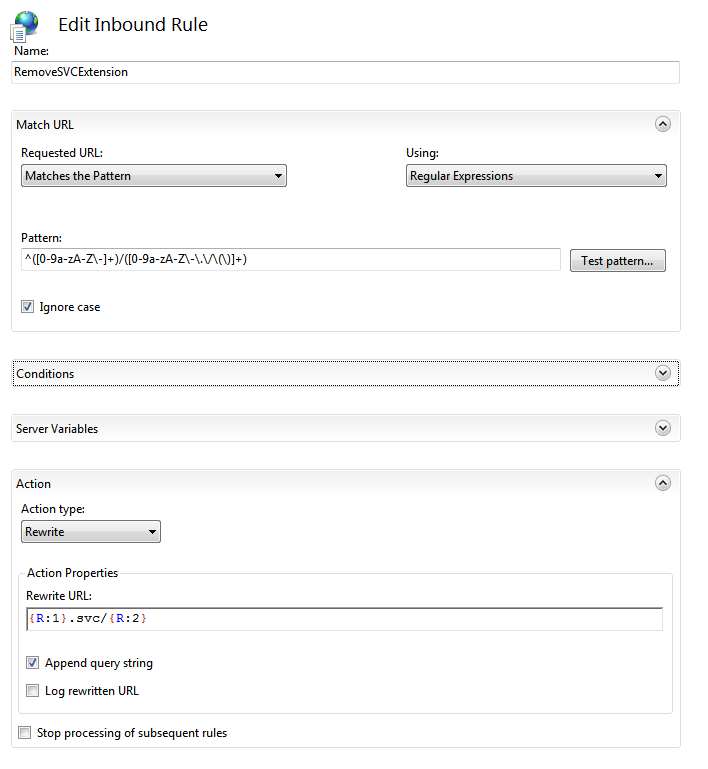
进行如下设置

Fill out the form with the following data (we will describe the patterns in detail in a moment):

  1. Name:                       RemoveSvcExtension (or any name you want)
  2. Requested URL:         Matches the pattern
  3. Using:                       Regular Expressions
  4. Pattern:                    ^([0-9a-zA-Z\-]+)/([0-9a-zA-Z\-\.\/\(\)]+)
  5. Ignore Case:             Checked
  6. Action Type:              Rewrite
  7. Rewrite URL:             {R:1}.svc/{R:2}
  8. Append QueryString   Checked
 

 稍微解释一下Regex Pattern的含义。

  • The "^" indicates the beginning of the line or string
  • The parenthesis "()" allow you to define a numbered capture group, meaning that you can reference everything inside the parens later by index.  In our example, we have 2 numbered capture groups 1 and 2.  You refer back to these later with the syntax: {R:1} and {R:2}
  • The pattern [0-9a-zA-Z\-]+ indicates any character in 0-9, lowercase a-z, uppercase A-Z or "-", one or more repetitions.
  • The / is a straight match to a slash "/".  In other words, the first named capture group will capture 0-9,a-z, A-Z and "-" prior to the first "/" and you will be able to reference them with {R:1}
  • Then we have another named capture group
  • The pattern [0-9a-zA-Z\-\.\/\(\)] matches any character in 0-9, lowercase a-z, uppercase A-Z or "-", ".", "/", "(", ")", one or more repetitions.