惯性聚合 高效追踪和阅读你感兴趣的博客、新闻、科技资讯
阅读原文 在惯性聚合中打开

推荐订阅源

阮一峰的网络日志
阮一峰的网络日志
D
Darknet – Hacking Tools, Hacker News & Cyber Security
S
Schneier on Security
The Last Watchdog
The Last Watchdog
Cyberwarzone
Cyberwarzone
S
Securelist
Threat Intelligence Blog | Flashpoint
C
Cyber Attacks, Cyber Crime and Cyber Security
L
Lohrmann on Cybersecurity
钛媒体:引领未来商业与生活新知
钛媒体:引领未来商业与生活新知
博客园 - 司徒正美
The Cloudflare Blog
V
V2EX
博客园_首页
博客园 - 聂微东
Vercel News
Vercel News
人人都是产品经理
人人都是产品经理
G
GRAHAM CLULEY
T
Tenable Blog
Last Week in AI
Last Week in AI
Y
Y Combinator Blog
L
LINUX DO - 最新话题
cs.CL updates on arXiv.org
SecWiki News
SecWiki News
博客园 - 三生石上(FineUI控件)
S
Secure Thoughts
N
News | PayPal Newsroom
T
The Blog of Author Tim Ferriss
The GitHub Blog
The GitHub Blog
T
Troy Hunt's Blog
博客园 - 【当耐特】
Forbes - Security
Forbes - Security
H
Hacker News: Front Page
A
About on SuperTechFans
B
Blog RSS Feed
Engineering at Meta
Engineering at Meta
MongoDB | Blog
MongoDB | Blog
CTFtime.org: upcoming CTF events
freeCodeCamp Programming Tutorials: Python, JavaScript, Git & More
罗磊的独立博客
D
DataBreaches.Net
P
Privacy & Cybersecurity Law Blog
Schneier on Security
Application and Cybersecurity Blog
Google DeepMind News
奇客Solidot–传递最新科技情报
奇客Solidot–传递最新科技情报
OSCHINA 社区最新新闻
OSCHINA 社区最新新闻
Jina AI
Jina AI
D
Docker
P
Proofpoint News Feed

博客园 - 瑞雪年

Git仓库迁移命令 .NET Core也可以使用MongoDB了 ng2-timesheet, 一个timesheet.js的angular2复制版 Angular 2 + Electron 开发web和桌面应用 Xamarin.Forms.Platform.Perspex, Xamarin Forms 的 Perspex(号称下一代WPF) 实现 Visual Studio Xamarin编译Android项目出错的解决办法 Salesforce + AngularJS + Bootstrap NativeScript 也能开发桌面应用 (nativescript-dotnet-runtime) iOS集成丁香园DXY OAuth 登陆 swift代码示例 WinObjC?这是什么鬼? 如何禁用Marlin温度保护 React Native也正式发布了 微信企业号 用javascript写Android和iOS naitve应用,实在炫酷。 CoreCLR 在 Linux 下编译成功 Swift 对比学习 (二) Swift 对比学习 (一) 重量级Orchard模块发布 - 模块生成工具RaisingStudio.ModuleGenerator coding.net
开始使用 Xamarin.Forms.Platform.Avalonia
瑞雪年 · 2020-02-08 · via 博客园 - 瑞雪年

前言:

    几年前研究 Xamarin.Forms 时,为了尝试对Linux平台的支持,发现了 Avalonia, 可以把它看成一个WPF的跨平台实现,于是就参考了 Xamarin.Forms.Platform.WPF 的代码, 写了一个 Xamarin.Forms.Platform.AvaluoniaUI,由于那是 Avalonia 项目也刚刚创建,很多功能还不完善,Xamarin.Forms.Platform.AvaloniaUI 当时实现的功能也非常有限,而且还有很多BUG, 后来由于忙别的就没怎么太关注过。今年春节,又赶上疫情,“全民闭关”,Avalonia 也趋于成熟,于是把代码进行了大量重构,并且改名为:Xamarin.Forms.Platform.Avalonia

正文:

  1. 新建一个 Avalonia 项目, 可以阅读后面的链接了解更多:http://avaloniaui.net/docs/quickstart/create-new-project.

  2. 你可以使用以下命令,在 NuGet 中找到并安装 Xamarin.Forms.Platform.Avalonia:

Install-Package Xamarin.Forms.Platform.Avalonia
  1. 创建一个 Xamarin.Forms 应用, 可以阅读后面的链接了解更多: at https://docs.microsoft.com/en-us/xamarin/get-started/first-app.
  2. 将新建的 Xamarin.Forms 应用项目,作为项目引用添加到新建的 Avalonia 项目中.
  3. 编辑 MainWindow.xaml.cs, 添加命名空间引用:
using Xamarin.Forms.Platform.Avalonia;
  1. 把 MainWindow 的基类改为 FormsApplicationPage, 同时添加 Forms.Init() 和 LoadApplication() 的方法调用,参见下面示例,代码中的 'FormsGallery.App' 应该是你的 Xamarin.Forms 应用的App的类名:
    public class MainWindow : FormsApplicationPage
    {
        public MainWindow()
        {
            InitializeComponent();
#if DEBUG
            this.AttachDevTools();
#endif

            Xamarin.Forms.Forms.Init();
            LoadApplication(new FormsGallery.App());
        }

        private void InitializeComponent()
        {
            AvaloniaXamlLoader.Load(this);
        }
    }

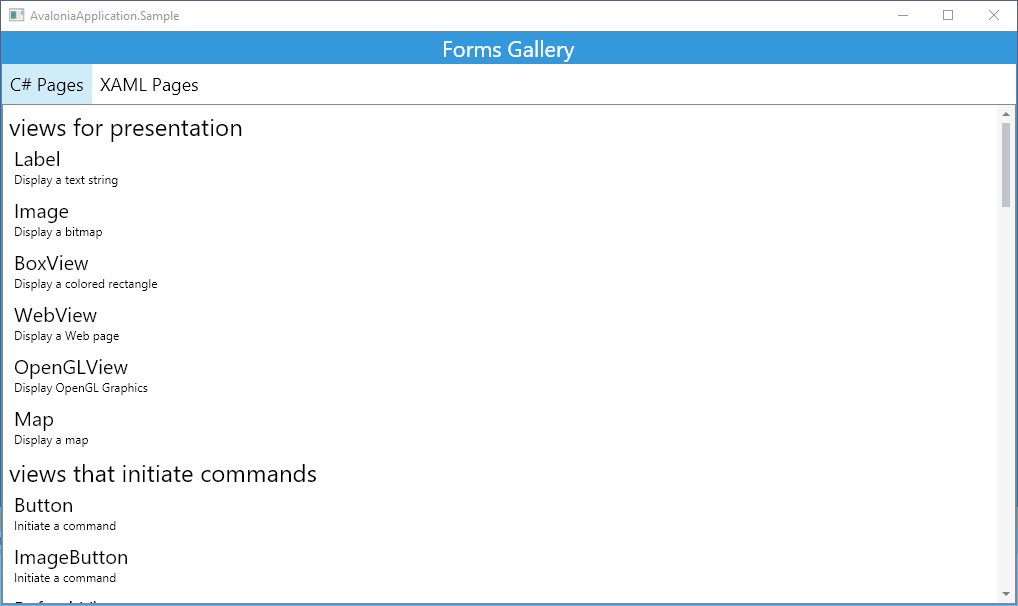
然后运行新建的 Avalonia 项目,你就可以看到你的 Xamarin.Forms 应用跑在 Avalonia 平台上了。