惯性聚合 高效追踪和阅读你感兴趣的博客、新闻、科技资讯
阅读原文 在惯性聚合中打开

推荐订阅源

S
Schneier on Security
有赞技术团队
有赞技术团队
T
The Blog of Author Tim Ferriss
F
Fortinet All Blogs
D
DataBreaches.Net
F
Full Disclosure
腾讯CDC
博客园 - 【当耐特】
MyScale Blog
MyScale Blog
Stack Overflow Blog
Stack Overflow Blog
小众软件
小众软件
Hugging Face - Blog
Hugging Face - Blog
Last Week in AI
Last Week in AI
OSCHINA 社区最新新闻
OSCHINA 社区最新新闻
爱范儿
爱范儿
The GitHub Blog
The GitHub Blog
Engineering at Meta
Engineering at Meta
大猫的无限游戏
大猫的无限游戏
freeCodeCamp Programming Tutorials: Python, JavaScript, Git & More
S
SegmentFault 最新的问题
The Register - Security
WordPress大学
WordPress大学
博客园 - 聂微东
雷峰网
雷峰网
J
Java Code Geeks
Exploit-DB.com RSS Feed
P
Privacy International News Feed
酷 壳 – CoolShell
酷 壳 – CoolShell
A
Arctic Wolf
Scott Helme
Scott Helme
C
Cyber Attacks, Cyber Crime and Cyber Security
T
Tor Project blog
博客园 - 三生石上(FineUI控件)
Know Your Adversary
Know Your Adversary
AWS News Blog
AWS News Blog
G
Google Developers Blog
www.infosecurity-magazine.com
C
CERT Recently Published Vulnerability Notes
O
OpenAI News
Project Zero
Project Zero
K
KPMG report finds enterprise disconnect between AI and its ROI | CIO
Application and Cybersecurity Blog
云风的 BLOG
云风的 BLOG
N
News and Events Feed by Topic
MongoDB | Blog
MongoDB | Blog
让小产品的独立变现更简单 - ezindie.com
Microsoft Security Blog
Cisco Talos Blog
Cisco Talos Blog
P
Palo Alto Networks Blog
Schneier on Security

博客园 - helloxuxu

简介DOMINO内置域和CGI变量 Domino系统中B/S下附件链接的处理方法 如何在Domino中使用文本文件注册用户 IBM Lotus Notes/Domino技术知识文档汇总 (2008) NOTES.INI 設定 给Domino系统管理员的十二项建议 用代码设置Excel单元格的格式 - helloxuxu - 博客园 给Domino系统管理员的十二项建议 Javascript中没有自带的将字符转换成日期型的函数 ABAP 函数 WebSphere Application Server v6中的问题诊断以及日志策略 Lotus Notes常见问题答疑 谈谈Visual Basic应用程序的几种打印方法 DB1访问DB2 在VB6中导出EXCEL,FOXPRO,PRODOX格式的表 如何将A文档的附件拷贝的B文档中 查询 SAP ABAP程序优化方法(搜集自论坛) 用 LotusScript 实现 Excel 报表的自动生成和操作
如何在Web上執行不同欄位類型的欄位驗證?
helloxuxu · 2007-09-28 · via 博客园 - helloxuxu

如何在Web上執行不同欄位類型的欄位驗證?

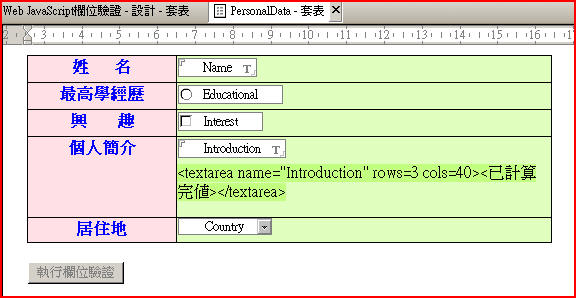
1. 請先在Notes的套表中建立一些測試欄位 ,請參考下圖之畫面設計:

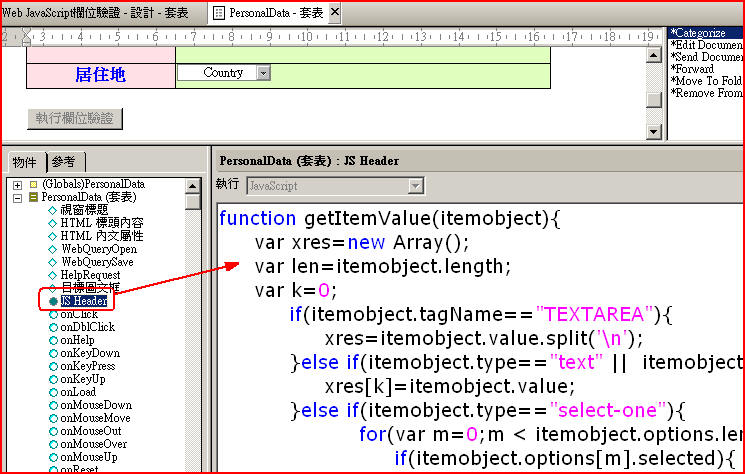
2. 在上述套表中的JSHeader中貼上如下的程式:

function getItemValue(itemobject){

        var xres=new Array();

        var len=itemobject.length;

        var k=0;

                if(itemobject.tagName=="TEXTAREA"){

                        xres=itemobject.value.split('\n');

                }else if(itemobject.type=="text" ||  itemobject.type=="password" || itemobject.type=="hidden" || itemobject.type=="file"){  

                        xres[k]=itemobject.value;

                }else if(itemobject.type=="select-one"){

                                for(var m=0;m < itemobject.options.length;m++){

                                        if(itemobject.options[m].selected){

                                                xres[k++]=itemobject.options[m].text;

                                        }

                                }             

                }else if( itemobject.type=="select-multiple"){

                                for(var m=0;m < itemobject.options.length;m++){

                                        if(itemobject.options[m].selected){

                                                xres[k++]=itemobject.options[m].text;

                                        }

                                }                     

                }else if(itemobject.type=="radio"){

                                        if(itemobject.checked){

                                                xres[0]=itemobject.value;

                                        }else{

                                                xres[0]="";

                                        }

                }else if(itemobject.type=="checkbox"){

                                        if(itemobject.checked){

                                                xres[0]=itemobject.value;

                                        }else{

                                                xres[0]="";

                                        }

                }else{

                        if(itemobject[0].type=="radio"){

                                for(var i=0 ;i<len;i++){

                                        var x=itemobject[i];

                                        if(x.checked){

                                                xres[k++]=x.value;

                                        }

                                }

                        }else if(itemobject[0].type=="checkbox"){

                                for(var i=0 ;i<len;i++){

                                        var x=itemobject[i];

                                        if(x.checked){

                                                xres[k++]=x.value;

                                        }

                                }

                        }else if(itemobject[0].type=="text" ||  itemobject[0].type=="password" || itemobject[0].type=="hidden" || itemobject[0].type=="file"){

                                for(var i=0 ;i<len;i++){

                                        var x=itemobject[i];

                                        xres[k++]=x.value;

                                } 

                        }else{

                                xres[0]="";

                        } 

                }

        return xres;      

}

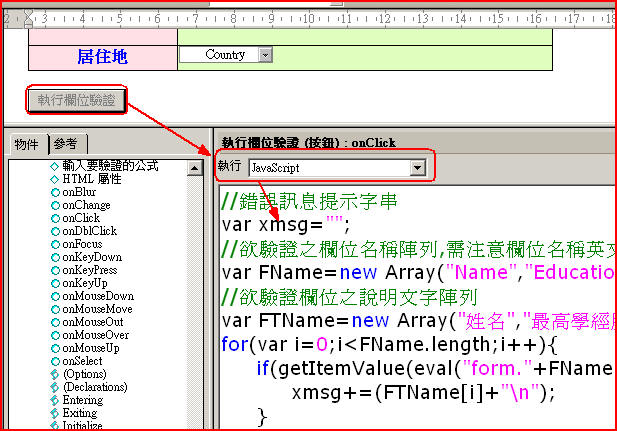
3. 在套表中建立一欄位驗證測試按鈕,按鈕的JavaScript程式如下:

//錯誤訊息提示字串

var xmsg="";

//欲驗證之欄位名稱陣列,需注意欄位名稱英文字大小寫

var FName=new Array("Name","Educational","Interest","Introduction","Country");

//欲驗證欄位之說明文字陣列

var FTName=new Array("姓名","最高學經歷","興趣","個人簡介","居住地");

for(var i=0;i<FName.length;i++){

        if(getItemValue(eval("form."+FName[i]))==""){

                xmsg+=(FTName[i]+"\n");

        }

}

if (xmsg!=""){

        alert("尚有以下欄位未輸入,請再確認:"+"\n"+xmsg);   

}else{

        alert("驗證通過!!");

}

4.測試畫面如下: