






http://www.kerum.pl/infodepot/00004
This is sample ALV popup based on REUSE_ALV_POPUP_TO_SELECT function module (classic style). It includes only buttons for ENTER and CANCEL to make this dialog simple for a user. Other buttons related to ALV standard functions are excluded.
Here the sample popup:
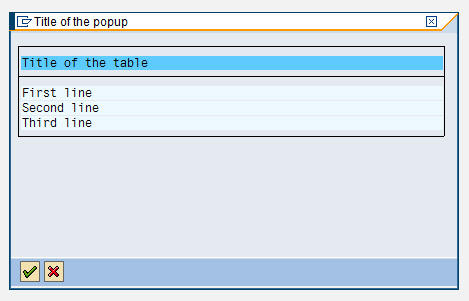
and the related coding:
REPORT zkm_test.
TYPE-POOLS:
slis.
PERFORM display_popup.
FORM display_popup.
DATA:
BEGIN OF ls_popup,
text(60) TYPE c,
END OF ls_popup,
lt_popup LIKE TABLE OF ls_popup,
lt_fcat TYPE slis_t_fieldcat_alv,
ls_fcat TYPE slis_fieldcat_alv,
lt_excl TYPE slis_t_extab,
ls_excl TYPE slis_extab,
lv_exit TYPE c.
ls_popup-text = 'First line'. APPEND ls_popup TO lt_popup.
ls_popup-text = 'Second line'. APPEND ls_popup TO lt_popup.
ls_popup-text = 'Third line'. APPEND ls_popup TO lt_popup.
ls_fcat-col_pos = 1.
ls_fcat-fieldname = 'TEXT'.
ls_fcat-outputlen = 60.
ls_fcat-seltext_m = 'Title of the table'.
APPEND ls_fcat TO lt_fcat.
ls_excl-fcode = '&ETA'. APPEND ls_excl TO lt_excl.
ls_excl-fcode = '%SC'. APPEND ls_excl TO lt_excl.
ls_excl-fcode = '%SC+'. APPEND ls_excl TO lt_excl.
ls_excl-fcode = '&OUP'. APPEND ls_excl TO lt_excl.
ls_excl-fcode = '&ODN'. APPEND ls_excl TO lt_excl.
ls_excl-fcode = '&ILT'. APPEND ls_excl TO lt_excl.
ls_excl-fcode = '&OL0'. APPEND ls_excl TO lt_excl.
ls_excl-fcode = '&CRB'. APPEND ls_excl TO lt_excl.
ls_excl-fcode = '&CRL'. APPEND ls_excl TO lt_excl.
ls_excl-fcode = '&CRR'. APPEND ls_excl TO lt_excl.
ls_excl-fcode = '&CRE'. APPEND ls_excl TO lt_excl.
ls_excl-fcode = '&ALL'. APPEND ls_excl TO lt_excl.
ls_excl-fcode = '&SAL'. APPEND ls_excl TO lt_excl.
CALL FUNCTION 'REUSE_ALV_POPUP_TO_SELECT'
EXPORTING
i_title = 'Title of the popup'
i_selection = ''
i_screen_start_column = 1
i_screen_start_line = 1
i_screen_end_column = 62
i_screen_end_line = 10
i_tabname = 'LT_POPUP'
it_fieldcat = lt_fcat
it_excluding = lt_excl
IMPORTING
e_exit = lv_exit
TABLES
t_outtab = lt_popup.
IF lv_exit = 'X'.
ELSE.
ENDIF.
ENDFORM.
此内容由惯性聚合(RSS阅读器)自动聚合整理,仅供阅读参考。 原文来自 — 版权归原作者所有。