








前言
在开发基于Ado.net Entity Framework的程序时,通常都是把EDM ( 实体数据模型 ) 单独放在的一个Class Library里。
在发布该Class Library时需要注意一些事项,否则可能会出现些问题。
开始
看看下图,解决方案里包括两个Project:EFDemo.Console 和 EFDemo.Models 。这里我把EDM都放在 EFDemo.Models Class Library里。
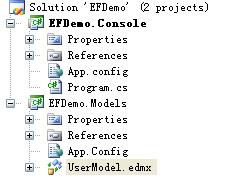
在 EFDemo.Models Class Library 中添加一个"ADO.NET Entity Data Model" 项 ,名为"UserModel"。 通过向导配置连接等操作后就会创建一个EDM。EDM包括三个文件(.csdl、.msl 和.ssdl 文件)。
创建完EDM后会在配置文件(这里是App.Config)的<connectionStrings>节点里添加一些信息。如例子中创建UserModel.edmx后会在配置文件中添加一个子节点:
<connectionStrings>
<add name="UserEntities" connectionString="metadata=.\UserModel.csdl|.\UserModel.ssdl|.\UserModel.msl;provider=System.Data.SqlClient;provider connection string="Data Source=xxxxxx;Initial Catalog=SAASDB;Persist Security Info=True;User ID=sa;Password=xxx;MultipleActiveResultSets=False"" providerName="System.Data.EntityClient" />
</connectionStrings>
注意突出显示的“metadata=.\UserModel.csdl|.\UserModel.ssdl|.\UserModel.msl”,在这里指定这三个文件的位置,".\"表示Build后这三个文件会被部署到"Build Output Path"位置。
回到例子中,EFDemo.Console Project 引用 EFDemo.Models Project,这样就可以在 EFDemo.Console Project 中使用 UserModel 了,写完代码后,把上面配置文件信息Copy到EFDemo.Console Project 的App.config中, Ctrl + F5 运行,发现出现下面错误信息:
System.Data.MetadataException: The specified metadata path is not valid. A valid path must be either an existing directory, an existing file with extension '.csdl', '.ssdl', or '.msl', or a URI that identifies an embedded resource.明显看出是找不到UserModel.csdl、UserModel.ssdl和UserModel.msl这三个文件,到EFDemo.Console的Build Output Path中看确实没有。
有一种解决方法是,每次Build完EFDemo.Models Project后,Copy这三个文件到EFDemo.Console Project的bin里,但是这种做法明显不是最好的。
可以通过以下的配置来更好的解决这问题。
1.打开UserModel Model的属性面板,设置“Metadata Artifact Processing ” 选项的值为“Embed in Output Assembly ”。表示这三个文件会被嵌入到Assembly里。

2. 打开UserModel.edmx项的属性面板,确认Build Action值为"EntityDeploy"。
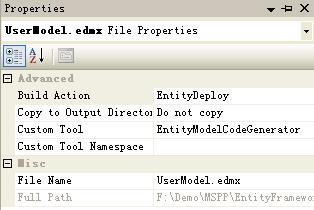
以上配置完成之后配置文件中的UserEntities节点值自动改为:
<connectionStrings>
<add name="UserEntities" connectionString="metadata=res://*/UserModel.csdl|res://*/UserModel.ssdl|res://*/UserModel.msl;provider=System.Data.SqlClient;provider connection string="Data Source=xxxxxx;Initial Catalog=SAASDB;Persist Security Info=True;User ID=sa;Password=xxx;MultipleActiveResultSets=False"" providerName="System.Data.EntityClient" />
</connectionStrings>
注意看突出显示的"metadata=res://*/UserModel.csdl|res://*/UserModel.ssdl|res://*/UserModel.msl"。"*"表示它会去所有的Aseembly中找这三个被嵌入在Assembly中的文件。当然如果我们明确知道这三个文件放在EFDemo.Models.dll 这个Assembly中的话,应该指定只在该Assembly中找,而不要浪费时间在所有Assembly中找:
<connectionStrings>
<add name="UserEntities" connectionString="metadata=res://EFDemo.Models/UserModel.csdl|res://EFDemo.Models/UserModel.ssdl|res://EFDemo.Models/UserModel.msl;provider=System.Data.SqlClient;provider connection string="Data Source=xxxxxx;Initial Catalog=SAASDB;Persist Security Info=True;User ID=sa;Password=xxx;MultipleActiveResultSets=False"" providerName="System.Data.EntityClient" />
</connectionStrings>
把这些配置信息更新到EFDemo.Console Project 的App.config中,Ctrl + F5, 运行正常。
作者:Inrie (洪晓军)
此内容由惯性聚合(RSS阅读器)自动聚合整理,仅供阅读参考。 原文来自 — 版权归原作者所有。