惯性聚合 高效追踪和阅读你感兴趣的博客、新闻、科技资讯
阅读原文 在惯性聚合中打开

推荐订阅源

WordPress大学
WordPress大学
Microsoft Security Blog
Security Archives - TechRepublic
V
Visual Studio Blog
宝玉的分享
宝玉的分享
IT之家
IT之家
人人都是产品经理
人人都是产品经理
T
The Blog of Author Tim Ferriss
I
InfoQ
B
Blog RSS Feed
T
Threatpost
博客园_首页
M
MIT News - Artificial intelligence
Spread Privacy
Spread Privacy
cs.CL updates on arXiv.org
Know Your Adversary
Know Your Adversary
U
Unit 42
Engineering at Meta
Engineering at Meta
C
Cyber Attacks, Cyber Crime and Cyber Security
月光博客
月光博客
Scott Helme
Scott Helme
T
Tor Project blog
有赞技术团队
有赞技术团队
AWS News Blog
AWS News Blog
让小产品的独立变现更简单 - ezindie.com
Last Week in AI
Last Week in AI
S
Schneier on Security
Vercel News
Vercel News
博客园 - Franky
C
Cybersecurity and Infrastructure Security Agency CISA
L
LINUX DO - 热门话题
NISL@THU
NISL@THU
L
LangChain Blog
爱范儿
爱范儿
Google DeepMind News
The GitHub Blog
The GitHub Blog
雷峰网
雷峰网
Latest news
Latest news
C
CXSECURITY Database RSS Feed - CXSecurity.com
Hugging Face - Blog
Hugging Face - Blog
Exploit-DB.com RSS Feed
www.infosecurity-magazine.com
G
GRAHAM CLULEY
S
Security Affairs
A
About on SuperTechFans
K
KPMG report finds enterprise disconnect between AI and its ROI | CIO
大猫的无限游戏
大猫的无限游戏
W
WeLiveSecurity
Cisco Talos Blog
Cisco Talos Blog
罗磊的独立博客

博客园 - Findekano

C#异步调用的bug? 恩,VS调试时候的监视也不能够尽信啊 最近正在看的几本书 VS.NET2005使用体验(二) [C# FAQ]通过Windows Forms预处理Win32消息 将应用程序直接加入到"Run..."中打开的小工具 OpenGL & MFC 相关联接 .::Findekano's Tidbet:: .::Findekano's Tidbet:: .::Findekano's Tidbet:: .:: Findekano's Tidbet :: CorelDraw's Application Recovery Manager.. .:: Findekano's Tidbet :: C#&.NET Framework中的Beep .:: Findekano's Tidbet :: [C# FAQ]C#代码中如何启动另一个应用程序或批处理程序? 今天开始,努力攒钱... 又闻到味道 如何保持代码格式?
VS.NET2005使用体验(一)
Findekano · 2004-11-05 · via 博客园 - Findekano

安装了VS.NET2005,一边看书一边用VC++ 8.0些一些测试代码,顺便在这里记录一些IDE新的改进记录
界面就不说了,截图到处都是,只说几个比较贴心的功能改进。


首先是改动记录提示:

可以看到,打开文件之后,改动过的部分左边会出现黄色提示,打开之后改动并保存的部分为绿色提示,原有代码前面没有提示。


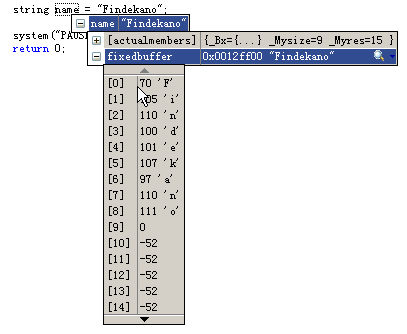
对调试期变量监视增强了很多,请看下面图片:
图1
图2
图3
可以看见,对std::string类型,调试器自动提示了两个内容:[actualmember]和[fixedbuffer],前者是原始的内存映像,和VS.NET2003中显示的一样。后者则是整理过的容器内容。对于这种字符串类型(猜测可能是对以\0结尾的变量)会自动出现如图三的按钮,可以将字符串内容解析为文本、XML或者HTML显示出来...
这个功能怎么说呢...爽!像FeinEvaluatorPro之类的应用软件恐怕要及早谋划出路才是