








The existing documentation about the visual tree and logical tree in the Windows SDK leaves much to be desired. Ever since I started with WPF, I have felt unsure about what exactly differentiates the two. Here I will use a simple diagram to make a comparison between them.
<Window>
<Grid>
<Label Content="xuning"/>
<Button>
<TextBlock Text="pfs"/>
</Button>
</Grid>
</Window>
Following is the logical and visual tree of the above xaml codes:
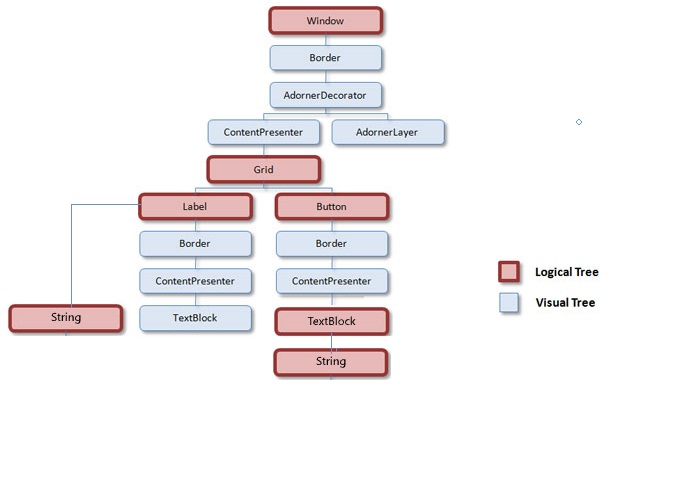
There may be several questions come into your mind after seeing this picture:
The secret is behind a property called LogicalChildren. Panel, ItemsControl, ContentControl, and Decorator, which are the most common base classes, all define this property make the logical tree operate already. For example, if you create a custom Button that subclasses ContentControl, your Content property will pick up your button as the logical parent without you doing anything.
At the end of this article, a table lists the classes that have special support for logical children, and under which property they implement that support.
Unlike the button, we didn’t declare a TextBlock as the Content of Label, instead we only used a string “Xuning” there. Who created a TextBlock for us? Apparently, it’s created by WPF framework. When WPF starts to render an object, it will first check whether there is a template defined for that type, either control template or data template, if it cannot find one, it will simply call the object’s ToString method and put the return value into a TextBlock.
The element in logical tree doesn’t have to be a UIElement or Visual object, it can be any type. Label is a ContentControl which take its Content property as logical child, here it happens to be string “xuning”.
Related Resources:
Of logical and visual trees in WPF
Understanding the Visual Tree and Logical Tree in WPF
Appendix:
|
Class |
Property(ies) |
|
System.Windows.Controls |
|
|
AdornedElementPlaceholder |
Child property |
|
ContentControl |
Content |
|
Decorator |
Child |
|
Grid |
Children (inherited from Panel), Columns, Rows |
|
HeaderedContentControl |
Content (inherited from ContentControl), Header |
|
HeaderedItemsControl |
Items (inherited from ItemsControl), Header |
|
InkCanvas |
Children |
|
ItemsControl |
Items |
|
Page |
Content |
|
Panel |
Children |
|
RichTextBox |
Document |
|
TextBlock |
Text |
|
TextBox |
Text |
|
ToolBarTray |
ToolBars |
|
ViewBox |
Child |
|
System.Windows.Controls.Primitives |
|
|
BulletDecorator |
Bullet and Child |
|
DocumentViewerBase |
Document |
|
Popup |
Child |
|
System.Windows.Documents |
|
|
FixedDocument |
Pages |
|
FixedPage |
Children |
|
FlowDocument |
Blocks |
|
FlowDocumentReader |
Document |
|
FlowDocumentScrollViewer |
Document |
|
PageContent |
Child |
|
Table |
RowGroups, Columns |
|
Span |
Inlines |
此内容由惯性聚合(RSS阅读器)自动聚合整理,仅供阅读参考。 原文来自 — 版权归原作者所有。