





Self
FindAncestor
TemplatedParent
PreviousData
Self用于绑定源和绑定目标相同的场景中。对象的一个属性与同一对象的另一个属性绑定。
例如,让我们取一个高度和宽度相同的椭圆。在XAML文件中添加下面给出的代码。宽度属性与高度属性相对绑定。
<Grid>
    <Ellipse Width="{Binding RelativeSource={RelativeSource Self}, Path=Height}"
             Height="100"
             Fill="Black" />
</Grid>FindAncestor
顾名思义,当绑定源是绑定目标的祖先(父级)之一时使用此选项。使用FindAncestor扩展,可以找到任何级别的祖先。
现在,让我们使用FindAncestor扩展将祖先的Name属性绑定到子元素button的Content属性。
<Grid Name="Parent_3">
    <StackPanel Name="Parent_222"
                Width="100"
                HorizontalAlignment="Center"
                VerticalAlignment="Center">
        <StackPanel Name="Parent_2"
                    Width="100"
                    HorizontalAlignment="Center"
                    VerticalAlignment="Center">
            <Border Name="Parent_1">
                <StackPanel x:Name="Parent_0"
                            Orientation="Vertical">
                    <!--  下面这个按钮Content得到:Parent_2  -->
                    <Button Height="50"
                            Content="{Binding RelativeSource={RelativeSource FindAncestor, AncestorType={x:Type StackPanel}, AncestorLevel=2}, Path=Name}" />
                    <!--  下面这个按钮Content得到:Parent_0  -->
                    <Button Height="50"
                            Content="{Binding RelativeSource={RelativeSource FindAncestor, AncestorType={x:Type StackPanel}, AncestorLevel=1}, Path=Name}" />
                    <!--  下面这个按钮Content得到:Parent_0  -->
                    <Button Height="50"
                            Content="{Binding RelativeSource={RelativeSource FindAncestor, AncestorType={x:Type StackPanel}}, Path=Name}" />
                </StackPanel>
            </Border>
        </StackPanel>
    </StackPanel>
</Grid>TemplatedParent是一个属性,它使您能够创建一个包含少量未知值的控件模板。这些值取决于应用ControlTemplate的控件的属性。
    <Window.Resources>
        <ControlTemplate x:Key="template1">
            <!--
                在应用模板时,按钮的Background(Beige)与椭圆的Fill属性相对绑定,Content(Click me)与ContentPresenter的Content属性相对绑定。依赖值生效并给出以下输出。
            -->
            <Canvas>
                <Ellipse Width="155"
                         Height="110"
                         Fill="Black" />
                <Ellipse Width="150"
                         Height="100"
                         Fill="{Binding RelativeSource={RelativeSource TemplatedParent}, Path=Background}" />
                <ContentPresenter Margin="35"
                                  Content="{Binding RelativeSource={RelativeSource TemplatedParent}, Path=Content}" />
            </Canvas>
        </ControlTemplate>
    </Window.Resources>
<Button Height="0"
Margin="5"
Background="Beige"
Content="Click me"
FontSize="18"
Template="{StaticResource template1}" />PreviousData这个用得很少,表示值相对于以前数据的变化。
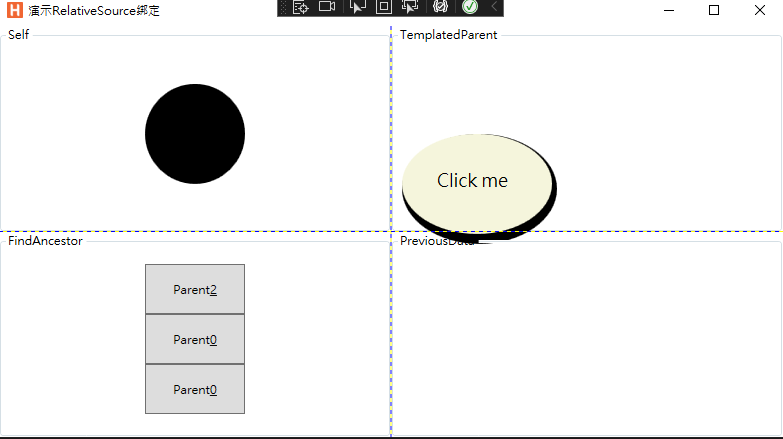
最终效果图
此内容由惯性聚合(RSS阅读器)自动聚合整理,仅供阅读参考。 原文来自 — 版权归原作者所有。