惯性聚合 高效追踪和阅读你感兴趣的博客、新闻、科技资讯
阅读原文 在惯性聚合中打开

推荐订阅源

V
V2EX
博客园 - 叶小钗
Last Week in AI
Last Week in AI
Google DeepMind News
钛媒体:引领未来商业与生活新知
钛媒体:引领未来商业与生活新知
Microsoft Security Blog
腾讯CDC
P
Proofpoint News Feed
大猫的无限游戏
大猫的无限游戏
The Cloudflare Blog
aimingoo的专栏
aimingoo的专栏
月光博客
月光博客
量子位
A
About on SuperTechFans
Engineering at Meta
Engineering at Meta
Apple Machine Learning Research
Jina AI
Jina AI
博客园 - Franky
OSCHINA 社区最新新闻
OSCHINA 社区最新新闻
人人都是产品经理
人人都是产品经理
D
DataBreaches.Net
博客园_首页
Cyber Security Advisories - MS-ISAC
Stack Overflow Blog
Stack Overflow Blog

博客园 - hehoge

mysql mybatis 日期查询 druid报错:javax.management.InstanceNotFoundException: com.alibaba.druid:type=DruidDataSourceStat linux下安装Mysql mysql删除固定前缀的表 Mac上操作 androidStudio Unable to find a @SpringBootConfiguration xstream.fromXML 忽略没有的节点 Fatal error compiling: 无效的目标发行版: 1.8 NoSuchMethodError 一般是jar包冲突了 联通网络环境上无法访问http://repo1.maven.org/maven2/中央库解决,镜像库添加 maven build 报release 400错误 mysql启动问题access denied for user 'root'@'localhost'(using password:YES) adapter结构异常记录 eclipse项目报红解决 Location Type Project 'testma' is missing required source folder: 'src/test/resources' testma Build 当遇到eclipse调试断点乱走数据不准确的时候,请maven clean,maven install git学习(一)与eclipse结合 反欺诈组之前接口项目学习 null值插入数据库会报错
如何在类中获取request,和网站路径
hehoge · 2017-06-13 · via 博客园 - hehoge
@RequestMapping(value = "res/testjs")
	public ModelAndView testjs( ModelMap model ) throws Exception {
		String path = resService.getRequestPath();
		model.put("path", path);
		return new ModelAndView("res/testjs");
	}

  上面是调用:

下面是方法:

import javax.servlet.http.HttpServletRequest;
import org.springframework.web.context.request.RequestContextHolder;
import org.springframework.web.context.request.ServletRequestAttributes; 

public String getRequestPath() {
		HttpServletRequest request  = ((ServletRequestAttributes) RequestContextHolder.getRequestAttributes()).getRequest();
		String path =request.getScheme()+"://"+request.getServerName()+":"+request.getServerPort()+"/"+request.getRequestURL()+"/";  
		return path;
	}

  还有web.xml配置监听:

<listener>
        <description>springrequestListener </description>
        <listener-class>org.springframework.web.context.request.RequestContextListener</listener-class>
     </listener>

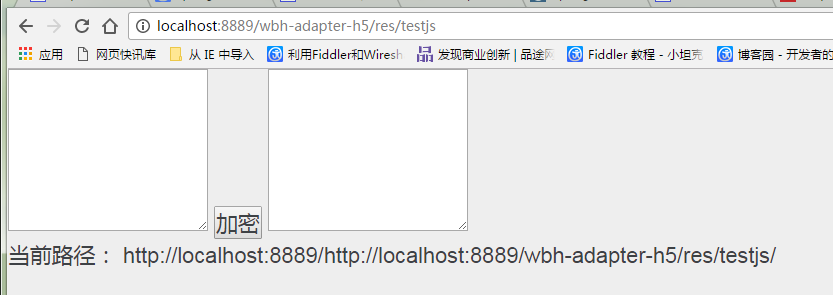
  效果: