惯性聚合 高效追踪和阅读你感兴趣的博客、新闻、科技资讯
阅读原文 在惯性聚合中打开

推荐订阅源

K
Kaspersky official blog
Martin Fowler
Martin Fowler
CTFtime.org: upcoming CTF events
V
Visual Studio Blog
博客园_首页
Engineering at Meta
Engineering at Meta
The Cloudflare Blog
MongoDB | Blog
MongoDB | Blog
Blog — PlanetScale
Blog — PlanetScale
T
The Blog of Author Tim Ferriss
雷峰网
雷峰网
D
Docker
博客园 - 司徒正美
S
SegmentFault 最新的问题
M
MIT News - Artificial intelligence
博客园 - 叶小钗
博客园 - 三生石上(FineUI控件)
U
Unit 42
J
Java Code Geeks
A
About on SuperTechFans
N
Netflix TechBlog - Medium
freeCodeCamp Programming Tutorials: Python, JavaScript, Git & More
S
Security Affairs
I
Intezer
Cisco Talos Blog
Cisco Talos Blog
C
Cyber Attacks, Cyber Crime and Cyber Security
Threat Intelligence Blog | Flashpoint
B
Blog RSS Feed
P
Privacy & Cybersecurity Law Blog
T
Tenable Blog
T
Threatpost
H
Hacker News: Front Page
G
Google Developers Blog
博客园 - 【当耐特】
Hugging Face - Blog
Hugging Face - Blog
Apple Machine Learning Research
L
Lohrmann on Cybersecurity
大猫的无限游戏
大猫的无限游戏
Google DeepMind News
A
Arctic Wolf
S
Secure Thoughts
GbyAI
GbyAI
NISL@THU
NISL@THU
S
Security @ Cisco Blogs
Exploit-DB.com RSS Feed
Webroot Blog
Webroot Blog
C
CXSECURITY Database RSS Feed - CXSecurity.com
O
OpenAI News
Spread Privacy
Spread Privacy
Application and Cybersecurity Blog

博客园 - ubirdy

在Cursor中使用Anthropic的Skills 切换至windows自带中文输入法后卡住的bug解决 用ikuai软路由提供内网NTP服务 在欧拉系统(openEuler)上安装uWSGI 海康工业相机SDK错误码常见场景解析 ubuntu22.04 server安装nvidia cuda 12.08提示Nouveau 驱动已经在用 ubuntu22.04更换镜像源 ubuntu22.04安装CUDA ICMP时间戳漏洞CVE-1999-0524的处理 解决supervisor在香橙派AIpro上启动问题 用ffplay在香橙派AIPro上播放PCM文件 香橙派OrangePi_AiPro超频CPU与NPU 昇腾310B4在转换onnx格式至om格式时提示BrokenPipeError: [Errno 32] Broken pipe Python打包工具 Pyinstaller使用教程 FFplay命令参数 yoloV7训练结果分析 在windows中安装pytorch的GPU版本及torchvision Win11禁用右键菜单折叠改用经典右键菜单 Altas产品查询CANN软件包版本的方法
在欧拉系统(openEuler)上安装Nginx
ubirdy · 2025-08-22 · via 博客园 - ubirdy

1. 检查是否已安装 Nginx

首先,检查系统中是否已经安装了 Nginx:

如果未安装或需要重新安装,请继续以下步骤。

2. 使用包管理器安装 Nginx(推荐)

欧拉系统支持 yumdnf 包管理器,可以直接安装 Nginx。

(1)更新包管理器缓存

确保包管理器的缓存是最新的:

(2)安装 Nginx

运行以下命令安装 Nginx:

(3)启动并设置开机自启

安装完成后,启动 Nginx 服务,并设置为开机自启:

sudo systemctl start nginx
sudo systemctl enable nginx
(4)检查 Nginx 状态

确认 Nginx 服务是否正常运行:

你应该会看到类似以下的输出,表示服务正在运行:

image

3. 配置防火墙

如果你的服务器启用了防火墙(如 firewalld),需要开放 HTTP 和 HTTPS 端口(80 和 443)。

(1)使用 firewalld 开放端口

运行以下命令开放 HTTP 和 HTTPS 端口:

sudo firewall-cmd --permanent --add-service=http
sudo firewall-cmd --permanent --add-service=https
sudo firewall-cmd --reload
(2)验证端口是否开放

你可以使用以下命令检查端口是否已成功开放:

sudo firewall-cmd --list-all

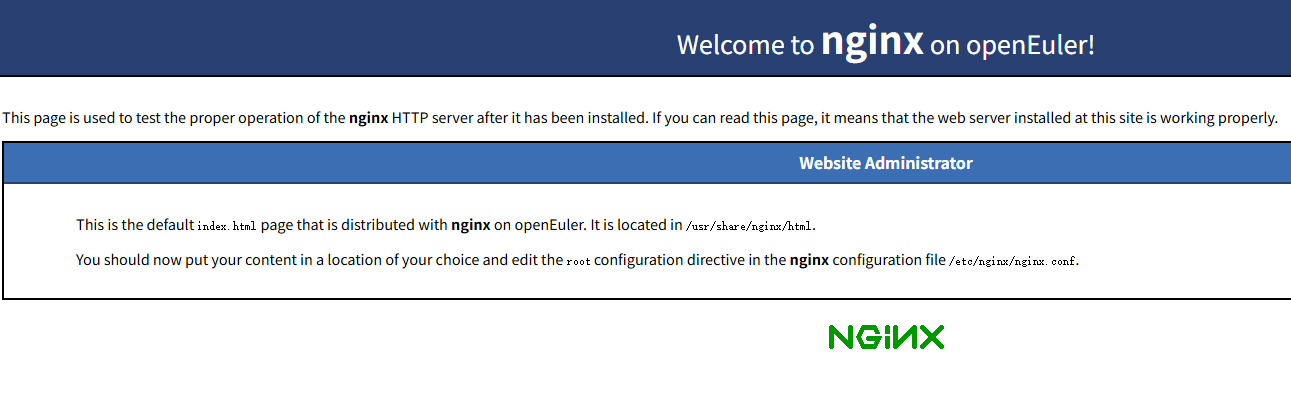
4. 测试 Nginx 安装

打开浏览器,访问服务器的 IP 地址或域名

image

如果看到 Nginx 的默认欢迎页面,则说明安装成功。

5. 手动安装 Nginx(可选)

如果你需要手动安装 Nginx,可以按照以下步骤操作:

(1)安装依赖

安装编译 Nginx 所需的依赖:

sudo yum install gcc pcre pcre-devel zlib zlib-devel openssl openssl-devel
(2)下载 Nginx 源码

Nginx 官方网站 下载最新的稳定版本:

wget https://nginx.org/download/nginx-1.24.0.tar.gz

解压源码包:

tar -zxvf nginx-1.24.0.tar.gz
cd nginx-1.24.0
(3)编译和安装

配置、编译并安装 Nginx:

./configure
make
sudo make install

默认情况下,Nginx 会被安装到 /usr/local/nginx

(4)启动 Nginx

进入安装目录并启动 Nginx:

cd /usr/local/nginx/sbin
sudo ./nginx

6. 常用 Nginx 命令

以下是一些常用的 Nginx 命令:

  • 启动 Nginx:sudo systemctl start nginx
  • 停止 Nginx:sudo systemctl stop nginx
  • 重启 Nginx:sudo systemctl restart nginx
  • 重新加载配置文件:sudo nginx -s reload
  • 检查配置文件语法:sudo nginx -t

7. 配置 Nginx

Nginx 的配置文件通常位于 /etc/nginx/nginx.conf/usr/local/nginx/conf/nginx.conf。你可以根据需要修改配置文件。

例如,编辑默认的 server 块以更改根目录或添加虚拟主机

    server {
        listen       80;
        server_name  localhost;
        location / {
            root   /usr/share/nginx/html;
            index  index.html index.htm;
        }
    }

修改完成后,重新加载配置: