惯性聚合 高效追踪和阅读你感兴趣的博客、新闻、科技资讯
阅读原文 在惯性聚合中打开

推荐订阅源

W
WeLiveSecurity
cs.AI updates on arXiv.org
Hacker News - Newest:
Hacker News - Newest: "LLM"
Cloudbric
Cloudbric
V
Visual Studio Blog
L
LangChain Blog
A
About on SuperTechFans
B
Blog
T
Tenable Blog
罗磊的独立博客
Hacker News: Ask HN
Hacker News: Ask HN
Blog — PlanetScale
Blog — PlanetScale
博客园 - 三生石上(FineUI控件)
The Register - Security
OSCHINA 社区最新新闻
OSCHINA 社区最新新闻
P
Palo Alto Networks Blog
U
Unit 42
WordPress大学
WordPress大学
D
Darknet – Hacking Tools, Hacker News & Cyber Security
N
News and Events Feed by Topic
T
Threat Research - Cisco Blogs
C
Check Point Blog
Security Latest
Security Latest
M
MIT News - Artificial intelligence
Application and Cybersecurity Blog
宝玉的分享
宝玉的分享
P
Proofpoint News Feed
NISL@THU
NISL@THU
Forbes - Security
Forbes - Security
S
Securelist
Security Archives - TechRepublic
Hugging Face - Blog
Hugging Face - Blog
aimingoo的专栏
aimingoo的专栏
Latest news
Latest news
GbyAI
GbyAI
T
Troy Hunt's Blog
钛媒体:引领未来商业与生活新知
钛媒体:引领未来商业与生活新知
L
LINUX DO - 热门话题
V2EX - 技术
V2EX - 技术
小众软件
小众软件
Google DeepMind News
K
Kaspersky official blog
C
CXSECURITY Database RSS Feed - CXSecurity.com
O
OpenAI News
H
Hackread – Cybersecurity News, Data Breaches, AI and More
Threat Intelligence Blog | Flashpoint
N
Netflix TechBlog - Medium
www.infosecurity-magazine.com
Google DeepMind News
P
Proofpoint News Feed

博客园 - KLAPT

Gateway 网关 CodeX =>Skills Redis 内存满了怎么处理 SpringBoot 默认配置修改 JWT 续签 Access Token + Refresh Token 双 Token claudeCode 命令 MyBatis 的 Mapper 接口 AI | CC GUI 集成 IDEA 完整教程 在IDEA中使用Claude Code IDEA中使用CodeX MyBatisPlus解决大数据量查询慢问题 idea 中的 claude code Token Dubbo 和 Spring Cloud Gateway的区别 Transactional 注解中propagation 掌握 Spring 框架这 10 个扩展点 SpringBoot 快速实现 api 加密 Spring Boot/Cloud 中 bootstrap.yml 与 application.yml SpringBoot 实现 DOCX 转 PDF 微服务Token鉴权设计的几种方案 进程、线程、协程 RSA 加密 Java二维码 ntp服务端和客户端 Chronyd与NTP chronyd 作为服务器时钟 chrony sudo命令和su 的区别 java -cp 和 java -jar 达梦数据库创建用户 梦数据库新增大字段报错问题 达梦数据库操作 MySQL UPDATE多表关联更新 达梦数据库 为HTTP POST请求设置请求体 在Java中调用第三方接口并返回第三方页面 Java调用第三方接口的方法 Nginx 之Rewrite 使用详解 linux 命令 Spring Boot项目中集成Spring Security OAuth2和Apache Shiro
Maven 项目打包:实现业务代码与第三方依赖分离
KLAPT · 2026-01-28 · via 博客园 - KLAPT

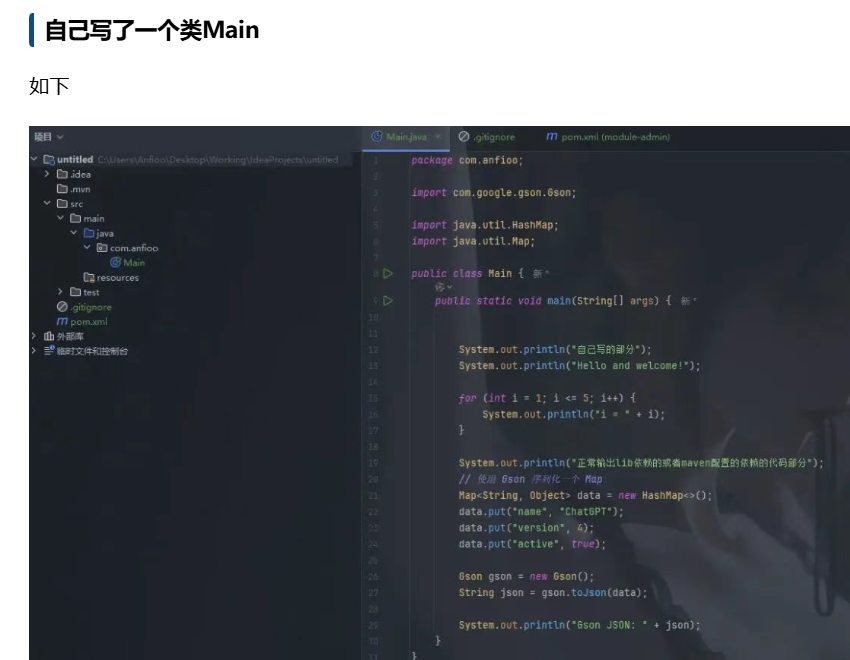
在实际项目部署中,我们有时不希望将所有代码打成一个 fat jar(大包) ,而是希望实现如下目标:

  • 自己的业务代码:打包成一个干净的 xxx.jar(仅包含 .class、资源等,不含依赖)。
  • 第三方依赖库:打包输出到 lib/ 子目录中,便于管理、替换、升级。

    image

    image

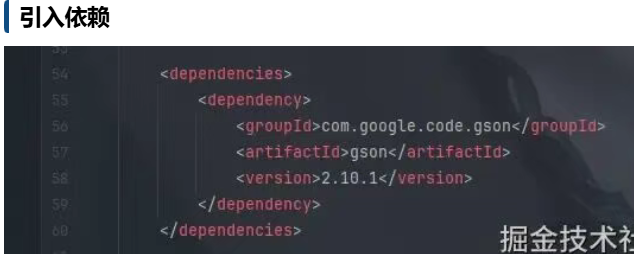
     将自己写的代码 打包到module-admin.jar中,而第三方依赖库打包到module-admin.jar 文件的子目录 lib 下,配置:

  • <projectxmlns="http://maven.apache.org/POM/4.0.0"
             xmlns:xsi="http://www.w3.org/2001/XMLSchema-instance"
             xsi:schemaLocation="http://maven.apache.org/POM/4.0.0
                                 http://maven.apache.org/xsd/maven-4.0.0.xsd">
        <modelVersion>4.0.0</modelVersion>
        <groupId>com.anfioo</groupId>
        <artifactId>module-admin</artifactId>
        <version>1.0.0</version>
        <build>
            <finalName>module-admin</finalName>
            <plugins>
                <!-- 让 JAR 知道主类是哪个 -->
                <plugin>
                    <artifactId>maven-jar-plugin</artifactId>
                    <version>3.2.0</version>
                    <configuration>
                        <archive>
                            <manifest>
                                <mainClass>com.anfioo.Main</mainClass>
                            </manifest>
                        </archive>
                        <outputDirectory>${project.build.directory}/output</outputDirectory>
                    </configuration>
                </plugin>
                <!--            配置了maven坐标,会把依赖放入project.build.directory的output/lib下-->
                <!-- 拷贝依赖到 lib 目录 -->
                <plugin>
                    <groupId>org.apache.maven.plugins</groupId>
                    <artifactId>maven-dependency-plugin</artifactId>
                    <version>3.1.2</version>
                    <executions>
                        <execution>
                            <id>copy-dependencies</id>
                            <phase>package</phase>
                            <goals>
                                <goal>copy-dependencies</goal>
                            </goals>
                            <configuration>
                                <outputDirectory>${project.build.directory}/output/lib</outputDirectory>
                            </configuration>
                        </execution>
                    </executions>
                </plugin>
            </plugins>
        </build>

        <dependencies>
            <dependency>
                <groupId>com.google.code.gson</groupId>
                <artifactId>gson</artifactId>
                <version>2.10.1</version>
            </dependency>
        </dependencies>
    </project>