



惯性聚合 高效追踪和阅读你感兴趣的博客、新闻、科技资讯
阅读原文 在惯性聚合中打开

推荐订阅源

S
Schneier on Security
有赞技术团队
有赞技术团队
T
The Blog of Author Tim Ferriss
F
Fortinet All Blogs
D
DataBreaches.Net
F
Full Disclosure
腾讯CDC
博客园 - 【当耐特】
MyScale Blog
MyScale Blog
Stack Overflow Blog
Stack Overflow Blog
小众软件
小众软件
Hugging Face - Blog
Hugging Face - Blog
Last Week in AI
Last Week in AI
OSCHINA 社区最新新闻
OSCHINA 社区最新新闻
爱范儿
爱范儿
The GitHub Blog
The GitHub Blog
Engineering at Meta
Engineering at Meta
大猫的无限游戏
大猫的无限游戏
freeCodeCamp Programming Tutorials: Python, JavaScript, Git & More
S
SegmentFault 最新的问题
The Register - Security
WordPress大学
WordPress大学
博客园 - 聂微东
雷峰网
雷峰网
J
Java Code Geeks
Exploit-DB.com RSS Feed
P
Privacy International News Feed
酷 壳 – CoolShell
酷 壳 – CoolShell
A
Arctic Wolf
Scott Helme
Scott Helme
C
Cyber Attacks, Cyber Crime and Cyber Security
T
Tor Project blog
博客园 - 三生石上(FineUI控件)
Know Your Adversary
Know Your Adversary
AWS News Blog
AWS News Blog
G
Google Developers Blog
www.infosecurity-magazine.com
C
CERT Recently Published Vulnerability Notes
O
OpenAI News
Project Zero
Project Zero
K
KPMG report finds enterprise disconnect between AI and its ROI | CIO
Application and Cybersecurity Blog
云风的 BLOG
云风的 BLOG
N
News and Events Feed by Topic
MongoDB | Blog
MongoDB | Blog
让小产品的独立变现更简单 - ezindie.com
Microsoft Security Blog
Cisco Talos Blog
Cisco Talos Blog
P
Palo Alto Networks Blog
Schneier on Security

博客园 - 会走路的虾米

springboot怎样动态加载配置文件 定时任务清除Windows服务器30天以上java系统日志 html5图片实现双指拉大 windows上的TortoiseSVN迁移到另一台windows上 查看linux内存使用情况的相关命令 pom.xml文件中xmlns作用 linux下安装jdk java中String的3个替换方法(replace,replaceAll,replaceFirst)的区别 把tomcat做成服务模式 解决unable to find valid certification path to requested target windows校验下载文件的md5 冒泡排序法的写法 eclipse中使用maven创建springmvc项目 eclipse中创建简单maven项目,并导出jar包运行 eclipse创建maven模块化web项目 js获取iframe最上层或者上上层的元素值 slf4j下使用log4j myeclipse使用tortoisesvn sl4j日志加traceId
windows下3主3从的redis5.X集群
会走路的虾米 · 2025-08-26 · via 博客园 - 会走路的虾米

因为工作关系,最近需要部属redis集群。

其实很久之前已经部属过了,但是之前的没有用上。

最近又需要用起来,然后查询之前的做法,但是找不到相关日记。

所以就花了一些时间去看之前是怎样弄的,现在弄好了,特意整理成日记,以便后期需要时可以查询。

这次用的redis版本是5.0.10,本来我使用的版本是4X,但是4X版本集群时,好像不太方便,好像需Ruby环境支持,这里直接跳过不熟悉的东西,改用5X。

------------------------------------------------------------------------------分割线下的内容是正式开始工作------------------------------------------------------------------------------

第一步,把一个redis复制6份,整体目录如上图这个,以各自的端口命名。
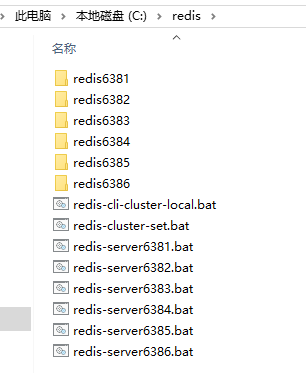
image

第二步,对redis.windows.conf文件的修改,内容如下:

port 分别设置为6381,6382,6383,6384,6385,6386
bind 设置为服务器的IP
cluster-enabled 设置为yes
cluster-config-file 分别设置为nodes-6381.conf,nodes-6382.conf,nodes-6383.conf,nodes-6384.conf,nodes-6385.conf,nodes-6386.conf
slaveof 网上说可以手工配置主从关系,但是我试了几次都不行,决定还是不配置这里了,让redis自主选择
masterauth <密码>和requirepass <密码> 这两个我都有配置,设置成一样的,应该没有太大关系

第三步,把服务器上的端口打开,我是打开了6381,6382,6383,6384,6385,6386和16381,16382,16383,16384,16385,16386

第四步,编写服务端启动脚本,以下是redis-server6381,redis-server6382,redis-server6383.......相关文件的内容

C:
cd C:\redis\redis6381
redis-server.exe redis.windows.conf

C:
cd C:\redis\redis6382
redis-server.exe redis.windows.conf

C:
cd C:\redis\redis6383
redis-server.exe redis.windows.conf

......

第五步,编写集群设置脚本redis-cluster-set

C:
cd C:\redis\redis6381
redis-cli.exe -a xxx --cluster create 192.168.xxx.xxx:6381 192.168.xxx.xxx:6382 192.168.xxx.xxx:6383 192.168.xxx.xxx:6384 192.168.xxx.xxx:6385 192.168.xxx.xxx:6386 --cluster-replicas 1

第六步,编写测试脚本redis-cli-cluster-local

C:
cd C:\redis\redis6381
redis-cli.exe -c -a xxx -h 192.168.xxx.xxx -p 6381

image

 依次执行完这6步之后,就可以进行set和get相关操作了