





測試數據:article.sql
配置文件:csft_mysql.conf
php測試代碼:test_coreseek.php
CREATE TABLE `article` (
  `id` int(11) NOT NULL AUTO_INCREMENT,
  `title` varchar(255) COLLATE utf8mb4_general_ci DEFAULT NULL,
  `content` text COLLATE utf8mb4_general_ci,
  `pub_date` int(11) DEFAULT NULL,
  PRIMARY KEY (`id`)
) ENGINE=MyISAM AUTO_INCREMENT=4 DEFAULT CHARSET=utf8mb4 COLLATE=utf8mb4_general_ci;

-- ----------------------------
-- Records of article
-- ----------------------------
INSERT INTO `article` VALUES ('1', '武漢疫情', '2020年初,武漢發生疫情,成為重災區', null);
INSERT INTO `article` VALUES ('2', '武漢第一線', '疫情逐漸好轉', null);
INSERT INTO `article` VALUES ('3', '上級指導思想', '公司領導統一安排', null);
#MySQL数据源配置,详情请查看:http://www.coreseek.cn/products-install/mysql/
#请先将var/test/documents.sql导入数据库,并配置好以下的MySQL用户密码数据库

#源定义
source mysql
{
    type                    = mysql
    sql_host                = localhost
    sql_user                = root
    sql_pass                = root
    sql_db                  = coreseek
    sql_port                = 3306
    sql_query_pre            = SET NAMES utf8

    #sql_query第一列id需为整数
    #title、content作为字符串/文本字段,被全文索引
    sql_query                = SELECT id, UNIX_TIMESTAMP(pub_date) AS pub_date, title, content FROM article


    #从SQL读取到的值必须为整数
    #sql_attr_uint            = group_id

    #从SQL读取到的值必须为整数,作为时间属性
    sql_attr_timestamp        = pub_date

    #命令行查询时,设置正确的字符集
    sql_query_info_pre      = SET NAMES utf8

    #命令行查询时,从数据库读取原始数据信息
    sql_query_info            = SELECT * FROM article WHERE id=$id
}

#index定义
index mysql
{
    #对应的source名称
    source          = mysql

    #请修改为实际使用的绝对路径,例如:/usr/local/coreseek/var/...
    path            = D:/Coreseek/var/data/mysql
    docinfo         = extern
    mlock           = 0
    morphology      = none
    min_word_len    = 1
    html_strip      = 0

    #中文分词配置,详情请查看:http://www.coreseek.cn/products-install/coreseek_mmseg/
    #charset_dictpath = /usr/local/mmseg3/etc/ #BSD、Linux环境下设置,/符号结尾

    #Windows环境下设置,/符号结尾,最好给出绝对路径,例如:C:/usr/local/coreseek/etc/...
    charset_dictpath = D:/Coreseek/etc/
    charset_type        = zh_cn.utf-8
}

#全局index定义
indexer
{
    mem_limit            = 128M
}

#searchd服务定义
searchd
{
    listen              = 9312
    read_timeout        = 5
    max_children        = 30
    max_matches         = 1000
    seamless_rotate     = 0
    preopen_indexes     = 0
    unlink_old          = 1
    pid_file = D:/Coreseek/var/log/searchd_mysql.pid  #请修改为实际使用的绝对路径,例如:/usr/local/coreseek/var/...
    log = D:/Coreseek/var/log/searchd_mysql.log        #请修改为实际使用的绝对路径,例如:/usr/local/coreseek/var/...
    query_log = D:/Coreseek/var/log/query_mysql.log #请修改为实际使用的绝对路径,例如:/usr/local/coreseek/var/...
}
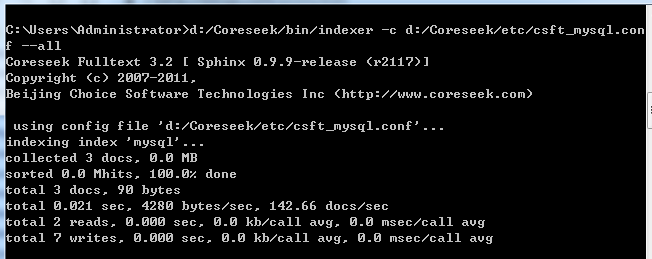
d:/Coreseek/bin/indexer -c d:/Coreseek/etc/csft_mysql.conf --all
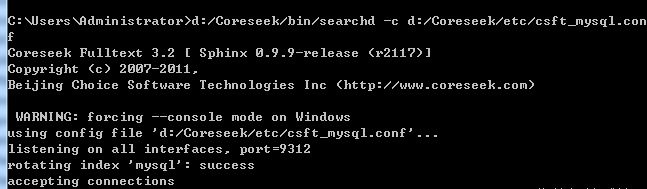
d:/Coreseek/bin/searchd -c d:/Coreseek/etc/csft_mysql.conf
<?php

$word = $_GET['w'] ?? "疫情";

require ( "sphinxapi.php" );
$cl = new SphinxClient ();
$cl->SetServer ( '127.0.0.1', 9312);
$cl->SetConnectTimeout ( 3 );
$cl->SetArrayResult ( true );
$cl->SetMatchMode ( SPH_MATCH_ANY);
$res = $cl->Query ( $word, "*" );
echo "<pre>";
//print_r($cl);
print_r($res);
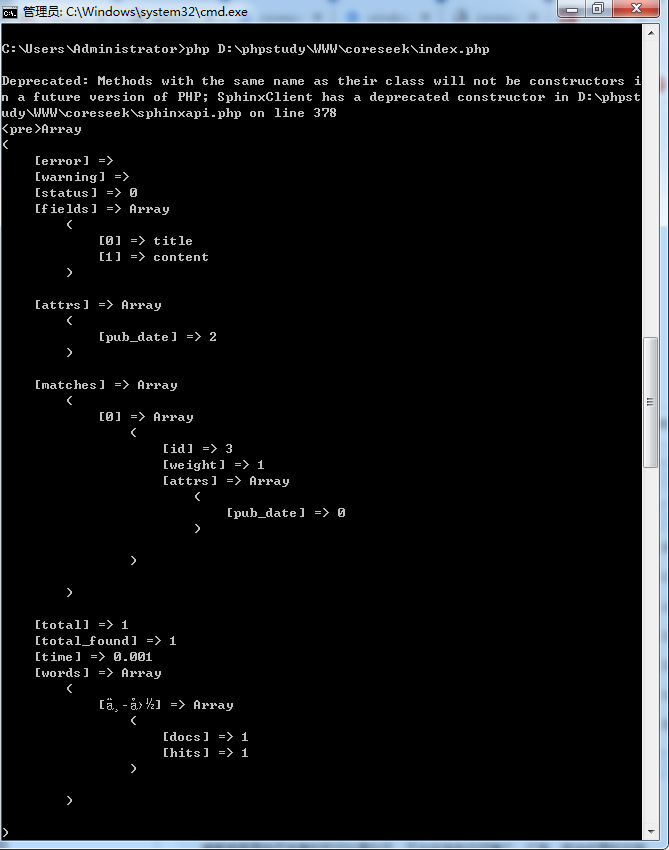
php D:\phpstudy\WWW\coreseek\index.php

此内容由惯性聚合(RSS阅读器)自动聚合整理,仅供阅读参考。 原文来自 — 版权归原作者所有。