




在项目中遇到需要自定义底部的tabbar,首先需要了解底部tabbar最少2个最多5个,项目中可能会遇到自定义时底部的tabbar总个数超过5个的情况,
比如:在商家端小程序底部需要显示3个tabbar,客户端小程序也需要显示3个tabbar,此时商家端和客户端的tabbar都不相同,此时自定义就可以用到。
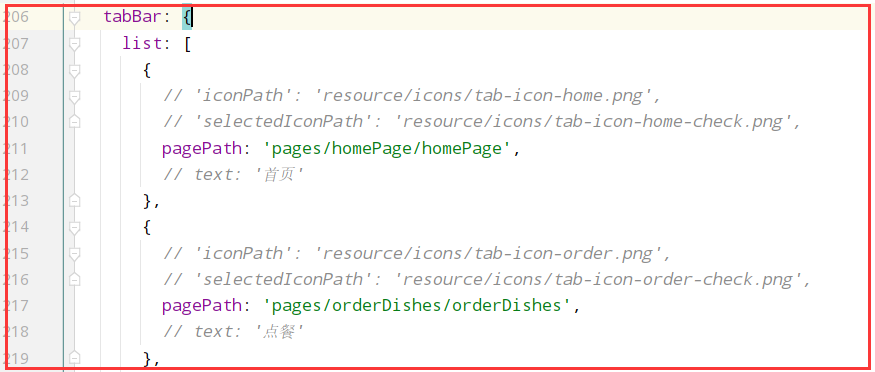
CoverView/CoverImage 微信小程序原生的覆盖层组件, 好处避免导航被原生组件遮挡,切换底部导航页面时,导航栏不会有闪烁的问题app.config 中按正常填写 tabBar 项的相关配置(为了向下兼容),并把 tabBar 项的 custom 字段设置为 true。config 里需要声明 usingComponents 项,也可以在 app.config 设置全局开启。pages/custom-tab-bar 目录下,不能放在 components 或 src 根目录CoverView/CoverImage,不能使用普通 View/Image(否则会被原生组件遮挡)tabBar: { custom: true, list: [ { pagePath: 'pages/storeManagePage/storeManagePage', text: '库存', }, { pagePath: 'pages/my/my', text: '我的', } ] }
export default {
  navigationBarTitleText: '供应链',
  enablePullDownRefresh: true,  //使能微信小程序的下拉刷新
  backgroundTextStyle: 'dark', //顶部显示颜色为深色的三个点
  usingComponents: {
    'custom-tab-bar': '../custom-tab-bar'
  }
}
在页面中引入组件
render () { return (
      <View className='app-page store-manage-page'>
         ...
      </* 这里引入底部导航栏组件 */>
        <custom-tab-bar></custom-tab-bar>
      </View>
    )
  }
custom-tab-bar 目录,在里面书写组件, 大部分的内容,不可直接复制粘贴使用,代码进行了简单的替换,如果项目使用了redux,建议将TabList数据放在redux中
/**
 * author: wang.p  2022-10-17
 * description: 自定义组件
 * */

import Taro from '@tarojs/taro'
import React, {Component} from 'react';
import { CoverView, CoverImage } from '@tarojs/components'
import classnames from 'classnames';
import PropsType from 'prop-types';
import {connect} from "react-redux";
import {onChangeGlobalData} from "@/reducers/globalReducer";
import './index.scss'

// 底部导航栏数组,可以放到后端数据库中,前端获取后缓存
const TabListData = [
  {
    pagePath: '/pages/storeManagePage/storeManagePage',
    text: '供应链',
    iconPath: '未选中图片路径.png',
    selectedIconPath: '已选中图片路径.png',
  }, {
    pagePath: '/pages/my/my',
    text: '我的',
    iconPath: '未选中图片路径.png',
    selectedIconPath: '已选中图片路径.png' ,
  }
]

class CustomTabBar extends Component {

  static propTypes = {
    SelectedTabBar: PropsType.string,  // 激活的tabbar路径
    onChangeGlobalData: PropsType.func,  // 修改tabbar
  }

  state = {
    selected: 0,  // 当前激活的tab下标
    color: '#000',  // 字体颜色
    selectedColor: '#00bab4',  // 激活的字体颜色
    backgroundColor: '#ffffff',  // 背景色
    borderStyle: 'black',   // 边框颜色
  }

  componentDidMount() {
  }


  render() {
    const {SelectedTabBar} = this.props;
    return (
      <CoverView className={classnames('custom-tab')}>
        {
          TabListData.map((item, index) => {
            return <CoverView className='custom-tab-item' onClick={this.switchTab.bind(this, item)}
                              data-path={item.pagePath} key={index}>
              <CoverImage className='custom-tab-item-img'
                          src={SelectedTabBar === item.pagePath ? item.selectedIconPath : item.iconPath}/>
              <CoverView className='custom-tab-item-text'
                         style={{color: SelectedTabBar === item.pagePath ? this.state.selectedColor : this.state.color}}>
                {item.text}
              </CoverView>
            </CoverView>
          })
        }
      </CoverView>
    )
  }

  /**
   * 切换Tab
   * */
  switchTab = (tabData) => {
    let that = this;
    const {pagePath, navigateTo} = tabData;
    if (navigateTo) {
      Taro.navigateTo({
        url: pagePath
      })
    } else {
      Taro.switchTab({
        url: pagePath,
        success: () => {
      // 页面切换时,修改缓存的导航栏
          that.props.onChangeGlobalData({SelectedTabBar: pagePath});
        }
      })
    }
  }
}

const mapStateToProps = (state) => {
  const {SelectedTabBar} = state[StoreKeys.GlobalData];
  return {
    SelectedTabBar: SelectedTabBar
  };
};

const mapDispatchToProps = {
  onChangeGlobalData   // 这个是修改激活的tabbar信息,本人将其缓存在redux中
};

export default connect(mapStateToProps, mapDispatchToProps)(CustomTabBar)
.custom-tab {
  display: flex;
  flex-direction: row;
  justify-content: space-around;
  position: fixed;
  bottom: 0;
  width: 100vw;
  height: 50Px;
  border-radius: 0;
  box-sizing: border-box;
  border-top: 1Px solid #f1f1f1;
  background-color: #FFFFFF;

  &-item {
    flex: 1;
    display: flex;
    flex-direction: column;
    justify-content: center;
    align-items: center;
    position: relative;

    &-img {
      margin: 0 auto;
      width: 28PX;
      height: 28Px;
    }

    &-text {
      margin-top: 4Px;
      font-size: 10Px;
    }
  }
}
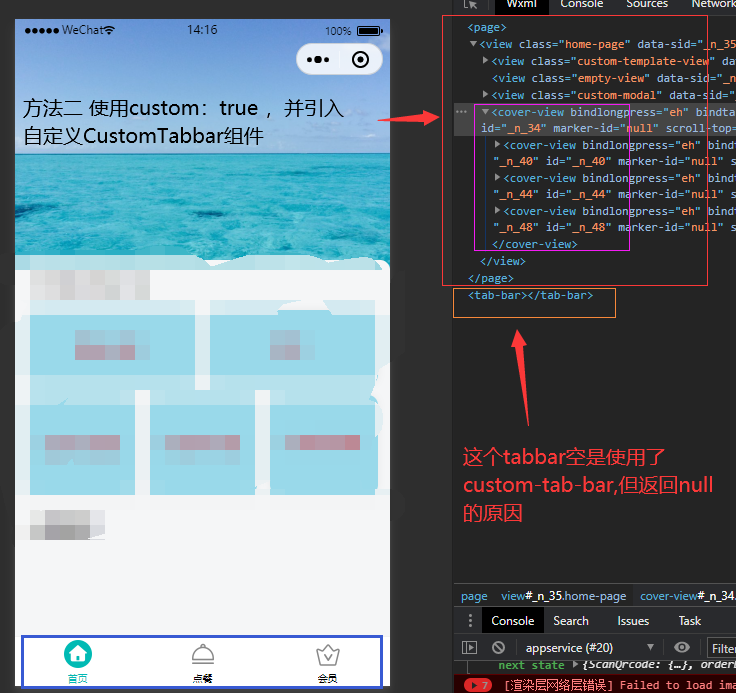
使用方法二,还是要创建方法一种的custom-tab-bar,不然编译时会提示需要解决这个custom-tab-bar/index.js不存在的问题


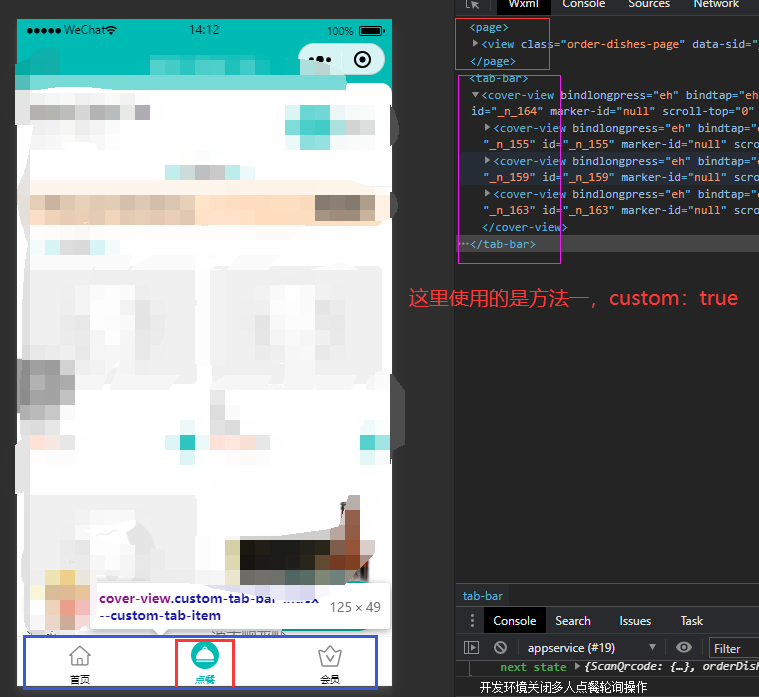
说明一点,方法一和方法二在页面上显示会有不同,方法一在页面html中是显示在page标签外的,而方法二是显示在page标签里面的
此内容由惯性聚合(RSS阅读器)自动聚合整理,仅供阅读参考。 原文来自 — 版权归原作者所有。