



惯性聚合 高效追踪和阅读你感兴趣的博客、新闻、科技资讯
阅读原文 在惯性聚合中打开

推荐订阅源

S
Schneier on Security
C
Cyber Attacks, Cyber Crime and Cyber Security
D
Darknet – Hacking Tools, Hacker News & Cyber Security
Project Zero
Project Zero
T
The Exploit Database - CXSecurity.com
G
GRAHAM CLULEY
T
Threatpost
A
Arctic Wolf
cs.CL updates on arXiv.org
Scott Helme
Scott Helme
Simon Willison's Weblog
P
Proofpoint News Feed
C
Cisco Blogs
Threat Intelligence Blog | Flashpoint
K
Kaspersky official blog
P
Palo Alto Networks Blog
C
CXSECURITY Database RSS Feed - CXSecurity.com
T
Threat Research - Cisco Blogs
The Hacker News
The Hacker News
T
Tor Project blog
NISL@THU
NISL@THU
The GitHub Blog
The GitHub Blog
Security Latest
Security Latest
aimingoo的专栏
aimingoo的专栏
C
CERT Recently Published Vulnerability Notes
Recorded Future
Recorded Future
CTFtime.org: upcoming CTF events
Google DeepMind News
Martin Fowler
Martin Fowler
N
News | PayPal Newsroom
P
Privacy & Cybersecurity Law Blog
MyScale Blog
MyScale Blog
G
Google Developers Blog
V
V2EX
V
Visual Studio Blog
P
Privacy International News Feed
Google Online Security Blog
Microsoft Azure Blog
宝玉的分享
宝玉的分享
博客园 - 【当耐特】
L
LINUX DO - 热门话题
MongoDB | Blog
MongoDB | Blog
腾讯CDC
J
Java Code Geeks
The Last Watchdog
The Last Watchdog
L
Lohrmann on Cybersecurity
Cyberwarzone
Cyberwarzone
博客园 - 聂微东
Webroot Blog
Webroot Blog
S
Secure Thoughts

博客园 - LCX测试小姐姐

apifox 批量导入和运行项目 Jmeter 与 阿里云 性能测试PTS 作为python自动化测试 推送阿里的通义灵码,大大提高效率 redis测试点 性能测试过程中优化-2: jmeter 把响应结果数据写入指定txt文件 Elasticsearch 分词功能 Elasticsearch 常用功能 Cookie、session、token、sign鉴权 性能测试过程中优化-1: RocketMQ jmeter性能测试实例3解析--性能瓶颈分析过程 pip freeze >requirements.txt python 生成 .exe文件、调用.exe文件 jmeter性能测试实例2解析--linux环境 memcache常用命令 memcache与redis关系与区别 MySql常见性能查询、调优语句和慢sql 性能测试中TPS值上不去分析原因及满足性能指标 mysql之测试工程师必会基础知识
性能测试过程中优化-3:
LCX测试小姐姐 · 2024-03-22 · via 博客园 - LCX测试小姐姐

  在上篇中记录了压力机服务器配置调到了60核120G,但这个配置也是压测结果非常不稳定,同样场景多次压测试通过率与响应时间差异极大。意识到一味的提升配置,改jmeter内存大小 起不到相应的作用。依然绕不开单机压问的问题
(1、单机端口不够用
   2、带宽不够用
 3、负载过高,性能损耗大,延时高,数据不准)

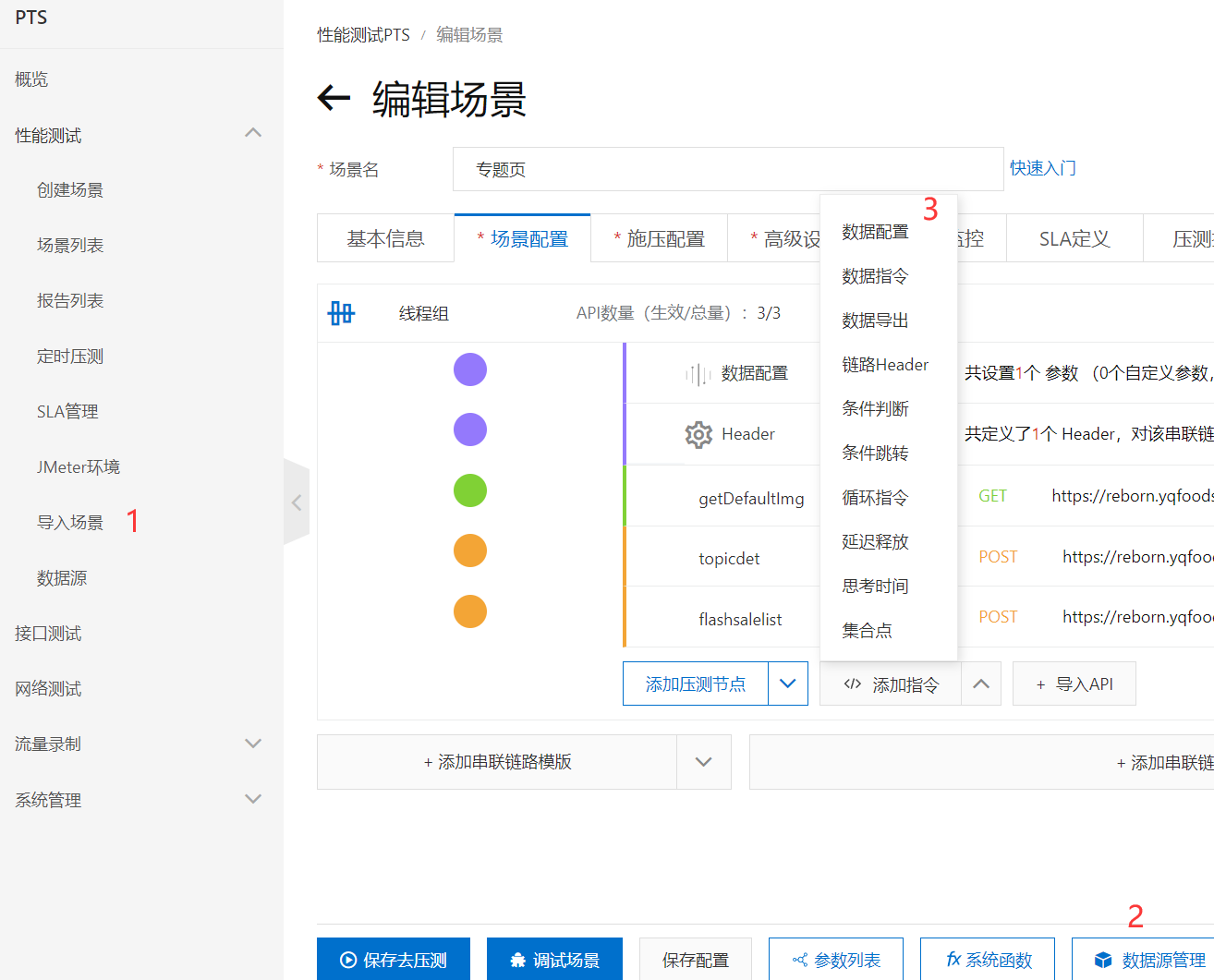
  想着分布式,但分布式做了依然达不到压测量级的数据(每台压力机最大负载到6000是比较稳定的,要最大并发5万时,就需要好几台服务服来做分布式,维护起来相当费精力)。无奈花钱买了阿里云pts性能测试,不得不说真的爽,不用考虑任何配置及技术问题,支持jmeter脚本,操作如下:

1、导入场景->jmeter脚本

2、若有数据源参数,数据源管理->上传自己的数据源文件即可(只支持.csv。(原.txt 改为.csv格式即可) )

3、数据配置  选择步骤2中设置的变量名
 。
PTS好用,轻松的模拟海量真实流量(再也不用考虑带宽、压力机配置、分布式等技术问题),只是需要成本。