

惯性聚合 高效追踪和阅读你感兴趣的博客、新闻、科技资讯
阅读原文 在惯性聚合中打开

推荐订阅源

S
Secure Thoughts
罗磊的独立博客
T
The Blog of Author Tim Ferriss
人人都是产品经理
人人都是产品经理
博客园 - 叶小钗
Last Week in AI
Last Week in AI
美团技术团队
Google Online Security Blog
Application and Cybersecurity Blog
D
Docker
G
Google Developers Blog
大猫的无限游戏
大猫的无限游戏
酷 壳 – CoolShell
酷 壳 – CoolShell
小众软件
小众软件
月光博客
月光博客
L
LINUX DO - 最新话题
cs.AI updates on arXiv.org
CTFtime.org: upcoming CTF events
W
WeLiveSecurity
H
Heimdal Security Blog
Vercel News
Vercel News
SecWiki News
SecWiki News
Forbes - Security
Forbes - Security
Blog — PlanetScale
Blog — PlanetScale
Google DeepMind News
Exploit-DB.com RSS Feed
www.infosecurity-magazine.com
TaoSecurity Blog
TaoSecurity Blog
T
Troy Hunt's Blog
A
About on SuperTechFans
C
Check Point Blog
S
Security Affairs
Hacker News - Newest:
Hacker News - Newest: "LLM"
AI
AI
WordPress大学
WordPress大学
K
KPMG report finds enterprise disconnect between AI and its ROI | CIO
Help Net Security
Help Net Security
博客园_首页
The Last Watchdog
The Last Watchdog
S
SegmentFault 最新的问题
Hugging Face - Blog
Hugging Face - Blog
Security Archives - TechRepublic
Engineering at Meta
Engineering at Meta
cs.CV updates on arXiv.org
I
Intezer
K
Kaspersky official blog
M
MIT News - Artificial intelligence
J
Java Code Geeks
G
GRAHAM CLULEY
P
Palo Alto Networks Blog

博客园 - happy刘艺

关于SKILL idea解压包安装问题解决 转载:java :: Java中的双冒号操作符 转:Git的使用--如何将本地项目上传到Github(两种简单、方便的方法) 转:springboot 与swagger整合出现Unable to infer base url.This is common when using dynamic的解决办法 转:Swagger2自动生成接口文档和Mock模拟数据 InfluxDB springboot application.properties文件加载顺序 maven surefire插件与testng spring-boot项目学习路径 collection 与stream与lambd表达式的结合使用 转:Java中Lambda表达式的使用 RPC之Thrift 介绍及java实例 class对象的getResource()方法 Eclipse开发,编译,打包常见问题总结------持续更新 mysql查找包含某个字符串的记录 性能测试入门(零)测试前言 jmeter--PerfMon(性能监控工具)插件使用详解 性能测试入门(七)jmeter分布式测试
性能测试入门(八)jmeter--PerfMon(性能监控工具)插件安装与部署
happy刘艺 · 2019-04-23 · via 博客园 - happy刘艺

性能测试时,我们的关注点有两部分

1 服务本身:并发 响应时间 QPS

2 服务器的资源使用情况:cpu memory I/O disk等

我们可以通过jmeter的PerfMon 插件,来监控服务器资源的使用情况

permon插件正常使用需分为jmeter plugins (安装在jmeter的lib/ext下)和 server agent(部署在要监控资源使用情况的服务器上)两部分。

1、JMTER PERMON插件的两种安装方法

1)离线下载法:

    1、访问网址http://jmeter-plugins.org/downloads/all/,下载三个文件。其中JMeterPlugins-Standard和JMeterPlugins-Extras是客户端的,ServerAgent是服务端的。

前两个是jmeter扩展插件,解压后将jar拷贝包到jmeter的lib/ext目录下,然后重启jmeter。最后一个是服务器监控插件,解压到服务器上。

将ServerAgent-2.2.1.zip解压后放在需要监控的服务器上,并执行

chmod 777 startAgent.sh 赋权

./startAgent.sh 执行

2)通过jmeter plugin manager安装

  1、安装plugin Manager插件:

https://jmeter-plugins.org/wiki/PluginsManager/下载plugin Manager;

将下载下来的jar包放到JMeter的lib/ext目录下,重启JMeter。

   2、在options菜单下点击“plugins Manager”,在available plugins中,搜索PerfMon,点击apply changes andrestart jmeter即可
---------------------

2、服务器安装SeverAgent

https://pan.baidu.com/s/1KFpK5srJOcLVOUaQ-A6n0g 下载SeverAgent-2.2.3;

(SeverAgent-2.2.1版本链接为:https://pan.baidu.com/s/1UvlkldsKMV5feD3csi9ifw) 

将下载的压缩包上传到压测服务器:

linux服务器:使用unzip命令进行解压,进入serverAgent目录,运行startAgent.sh命令(./startAgent.sh),启动agent;

Windows服务器:进入serverAgent目录,双击startAgent.bat,启动agent

3、检验agent是否启动成功

   1)在控制面板-程序-启用或关闭windows功能中,启用Telnet客户端(Telnet登录远程计算机并管理)
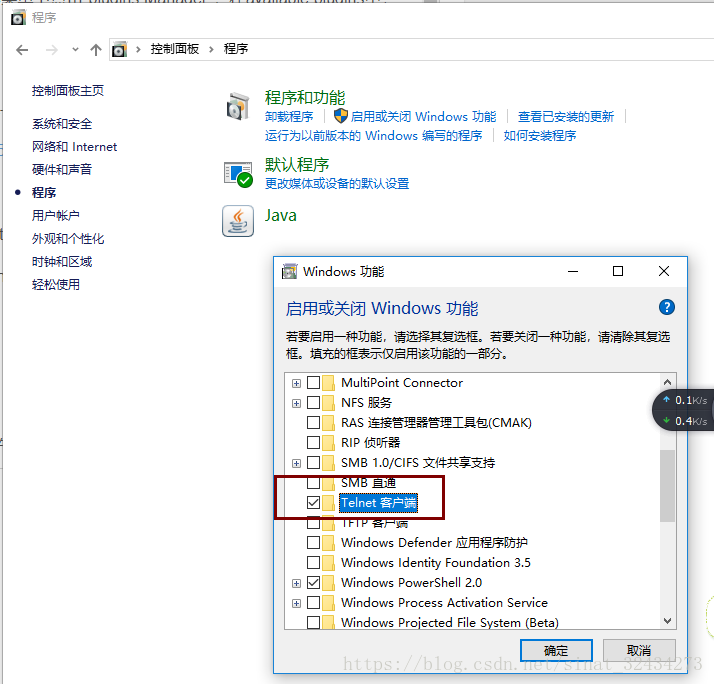
   2)使用cmd命令验证agent是否启动成功

    telnet ip 4444;#连接agent

    test                   #向服务器发送connecttest

    exit                   #断开对agent的连接

   3)查看服务器接收到的数据

 服务器接收到加压机发送的信息,证明agent启动成功

4、PerfMon Metrics Collector参数设置

通过右键“测试计划-添加-监听器-PerfMon Metrics Collector”添加对应插件
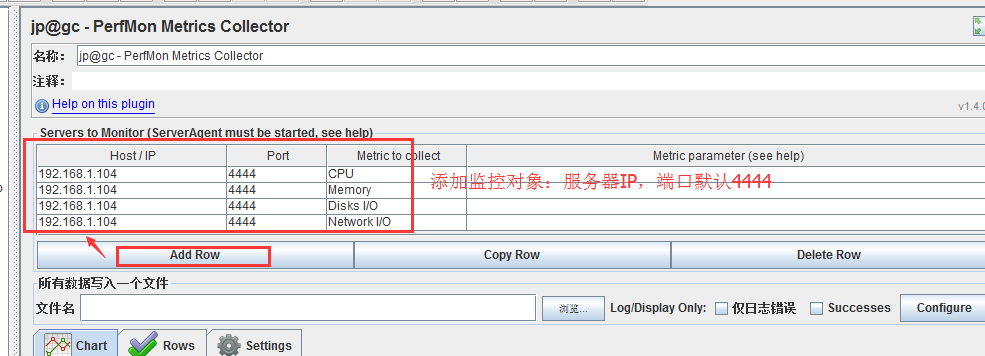
 

  其中:

Host/IP是压测服务器的地址;

Port端口号默认为4444;

Metric to collect:需要监控的元素,包括cpu、memory、swap、disks、network、tcp、tail、exec、jmx;

Metric parameter:监控元素的具体参数,点击展开即可查看;