

惯性聚合 高效追踪和阅读你感兴趣的博客、新闻、科技资讯
阅读原文 在惯性聚合中打开

推荐订阅源

爱范儿
爱范儿
博客园_首页
W
WeLiveSecurity
S
Secure Thoughts
S
Security @ Cisco Blogs
Recent Commits to openclaw:main
Hugging Face - Blog
Hugging Face - Blog
www.infosecurity-magazine.com
H
Hacker News: Front Page
Project Zero
Project Zero
cs.CV updates on arXiv.org
U
Unit 42
N
News and Events Feed by Topic
N
News and Events Feed by Topic
Hacker News - Newest:
Hacker News - Newest: "LLM"
Forbes - Security
Forbes - Security
T
Tor Project blog
I
Intezer
B
Blog
F
Full Disclosure
Security Archives - TechRepublic
F
Fortinet All Blogs
Schneier on Security
T
Threat Research - Cisco Blogs
AI
AI
Google DeepMind News
L
LINUX DO - 最新话题
Cloudbric
Cloudbric
L
Lohrmann on Cybersecurity
WordPress大学
WordPress大学
博客园 - 聂微东
雷峰网
雷峰网
P
Privacy International News Feed
让小产品的独立变现更简单 - ezindie.com
cs.AI updates on arXiv.org
PCI Perspectives
PCI Perspectives
Y
Y Combinator Blog
Spread Privacy
Spread Privacy
Simon Willison's Weblog
罗磊的独立博客
Vercel News
Vercel News
A
Arctic Wolf
The Register - Security
freeCodeCamp Programming Tutorials: Python, JavaScript, Git & More
Microsoft Azure Blog
H
Heimdal Security Blog
Know Your Adversary
Know Your Adversary
P
Proofpoint News Feed
C
Cybersecurity and Infrastructure Security Agency CISA
P
Proofpoint News Feed

博客园 - showonce

使用群晖的SynologyDrive同步本地文件到NAS时如何设置过滤某些文件夹的方法 群晖通过 acme.sh 申请 ZeroSSL 泛域名证书(适配 80 端口封锁)+ 自动续期同步完整步骤 关于投影机通过TCP网络控制开关机的一些设置 关于电脑按下开机按钮或重启按钮后,电脑没有进入到windows系统桌面,而是进入到蓝屏恢复界面的解决方法 申请个人版的SSL证书(免费的) Unity开发时,在visual studio编辑器中没有中文注释的解决办法 关于Unity的Android工程,写文件的问题 Unity关于引用.Net或其他C# dll的问题。(我是用的版本是2018.3) 群晖系统,为域名添加证书,以及怎么申请免费的证书 Unity插件DOTween中的中的Ease 首次在macbook使用unity开发遇到的一些列问题 关于使用云服务器做广域网通讯测试的资料整理 二进制、六进制、八进制、十进制、十六进制等之间的转换规则 Unity中使用PersistentDataPath加载文件 C#进制转换 在VS里编辑unity代码调用系统方法不显示中文注释或英文注释 打开本地【C】【D】【E】驱动器时候提示 X:\ 找不到应用程序 - showonce windows系统开机启动一个程序的方法-总结 vlc的几种播放状态
第一次接触json所需要的知识总结,用在C#中
showonce · 2023-12-04 · via 博客园 - showonce

这是我在C#中第一次用到json,以前都用别的替代,但是了解了之后发现这个是真的好用。

首先,有几个网站先贴上来保存一下。

  1. JSON 模式验证器 - Newtonsoft (jsonschemavalidator.net),顾名思义,就是验证我们的json格式是否正确。
  2. Introduction (newtonsoft.com),可以从这里下载这个包,也可以直接在VS的NuGet中搜索 Newtonsoft.Json

下面开始贴一些基础代码。如保存json,读取json

保存json

这个是要保存的对象数据
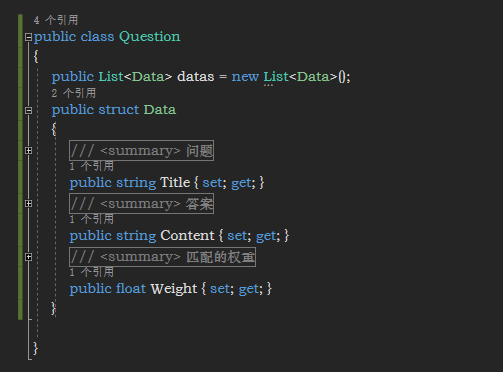
 1 public class Question
 2 {
 3     public List<Data> datas = new List<Data>();
 4     public struct Data
 5     {
 6         /// <summary>
 7         /// 问题
 8         /// </summary>
 9         public string Title { set; get; }
10         /// <summary>
11         /// 答案
12         /// </summary>
13         public string Content { set; get; }
14         /// <summary>
15         /// 匹配的权重
16         /// </summary>
17         public float Weight { set; get; }
18     }
19 
20 }

1      Question q2 = new Question();
2         q2.datas.Add(new Question.Data() { Title = "你叫什么名字", Content = "我叫小艺", Weight = 0 });
3         string questionSerial = JsonConvert.SerializeObject(q2);
4         File.WriteAllText("D:/js.json", questionSerial);

 这样就把Question对象一json保存到了js.json文件中了。

从文件中加载json文件

1       string questionJson = File.ReadAllText("D:/js.json");
2         JObject jobj = JObject.Parse(questionJson);
3         string jobjSerial = JsonConvert.SerializeObject(jobj);
4         Question questionDeserial = JsonConvert.DeserializeObject<Question>(jobjSerial);
5         for (int i = 0; i < questionDeserial.datas.Count; ++i)
6         {
7             Debug.Log($"question2,title:{questionDeserial.datas[i].Title}; content:{questionDeserial.datas[i].Content}; weight:{questionDeserial.datas[i].Weight}");
8         }

.......

就现写这么多吧