








对于join字段索引,被驱动表才是关键,join执行过程如下:
1)先扫描驱动表,根据WHERE条件过滤
2)对于驱动表的每一行,用join字段值去被驱动表查找匹配行
3)这时需要被驱动表的join字段必须要有索引
下面是建议原则:
驱动表:首先要确保where条件充分利用好索引,放在联合索引最前面,join字段放在联合索引的最后,这样通过where条件过滤后不用回表就能拿到join字段的值
被驱动表:也存在where过滤条件,join字段索引优先,where字段放在后面,这样通过join字段快速定位记录,再用where条件索引字段过滤,能用覆盖索引
-- 创建测试数据
CREATE TABLE test_msg (
    id INT PRIMARY KEY AUTO_INCREMENT,
    user_id INT,
    channel_id_type VARCHAR(10),
    unionid VARCHAR(100),
    INDEX idx_test (channel_id_type, unionid,user_id)
);

CREATE TABLE test_info (
    id INT PRIMARY KEY AUTO_INCREMENT,
    user_id INT,
    user_status VARCHAR(5),
    cert_type VARCHAR(5),
    INDEX idx_userid_status_cert (user_id,user_status, cert_type)
);

- 插入测试数据
INSERT INTO test_msg (user_id, channel_id_type, unionid)
SELECT n, '1', 'UNION001'
FROM (SELECT @row := @row + 1 AS n FROM
      (SELECT 0 UNION ALL SELECT 1 UNION ALL SELECT 2) t1,
      (SELECT 0 UNION ALL SELECT 1 UNION ALL SELECT 2) t2,
      (SELECT 0 UNION ALL SELECT 1 UNION ALL SELECT 2) t3,
      (SELECT @row := 0) t4) numbers
LIMIT 100;

INSERT INTO test_info (user_id, user_status, cert_type)
SELECT n,
       IF(n % 10 = 0, '1', '0'),  -- 10% 符合 user_status
       IF(n % 5 = 0, '01', '02')  -- 20% 符合 cert_type
FROM (SELECT @row2 := @row2 + 1 AS n FROM
      (SELECT 0 UNION ALL SELECT 1 UNION ALL SELECT 2) t1,
      (SELECT 0 UNION ALL SELECT 1 UNION ALL SELECT 2) t2,
      (SELECT 0 UNION ALL SELECT 1 UNION ALL SELECT 2) t3,
      (SELECT 0 UNION ALL SELECT 1 UNION ALL SELECT 2) t4,
      (SELECT 0 UNION ALL SELECT 1 UNION ALL SELECT 2) t5,
      (SELECT @row2 := 0) t6) numbers
LIMIT 10000;SELECT *
FROM test_msg msg
LEFT JOIN test_info info ON msg.user_id = info.user_id
WHERE msg.channel_id_type = '1'
AND msg.unionid = 'UNION001'
AND info.user_status = '1'
AND info.cert_type = '01';执行计划:
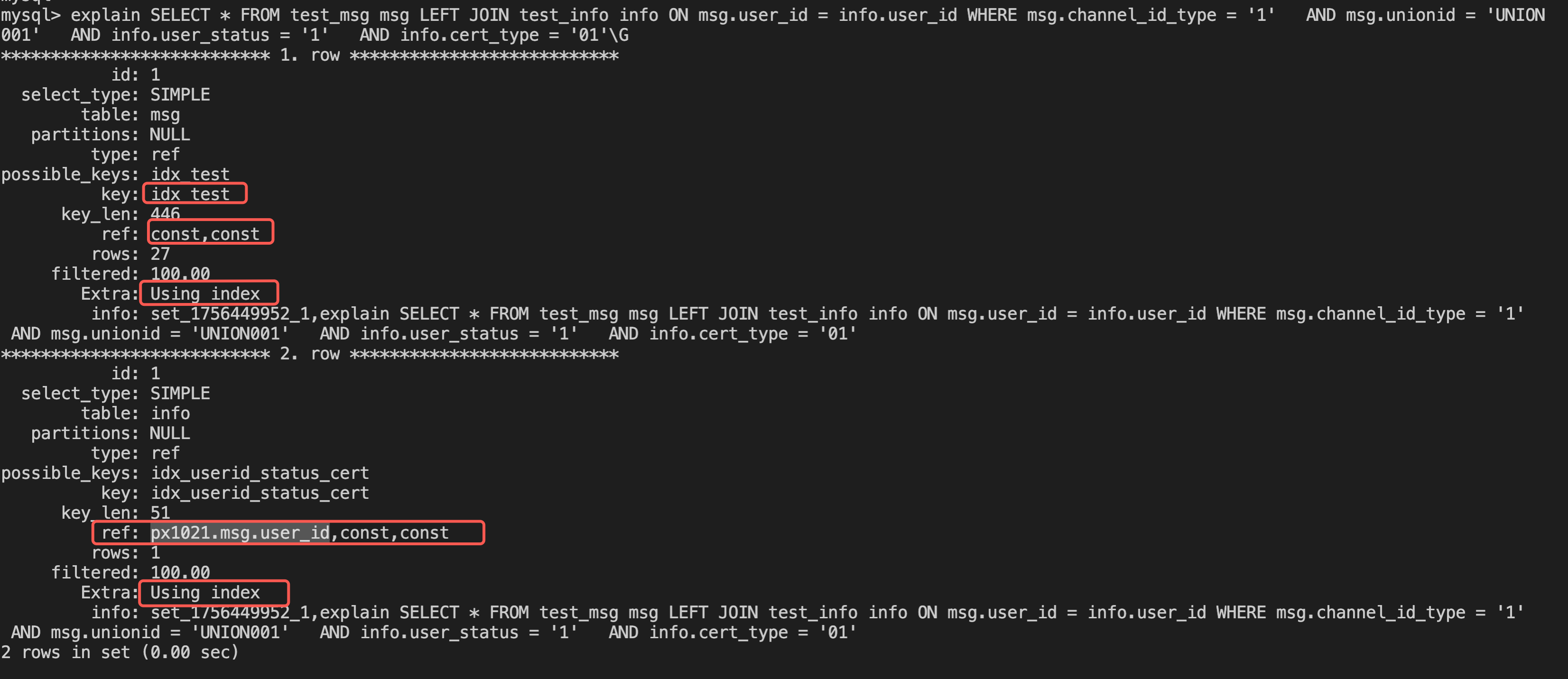
从执行计划看,驱动表msg和被驱动表info都走了覆盖索引
SELECT *
FROM test_msg msg
STRAIGHT_JOIN test_info info ON msg.user_id = info.user_id
WHERE msg.channel_id_type = '1'
  AND msg.unionid = 'UNION001'
  AND info.user_status = '1'
  AND info.cert_type = '01';
执行计划:
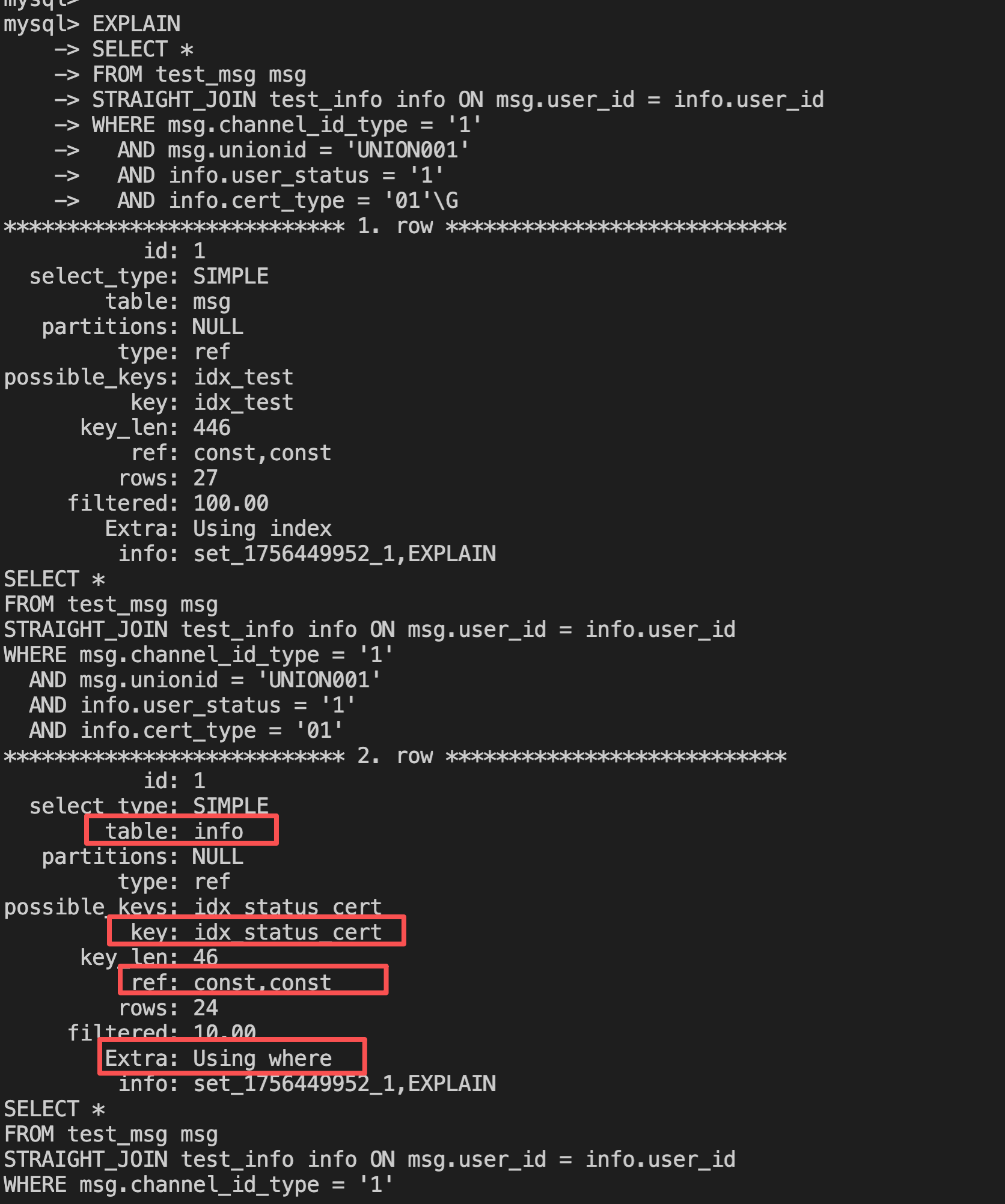 虽然也走了索引但是过滤性只有10%,执行流程如下:
### 第二行(被驱动表 info)
```
table: info
type: ref                           ← 这里是关键!
key: idx_status_cert               ← 使用了 WHERE 条件索引
key_len: 46                        ← user_status + cert_type
ref: const,const                   ← 'const,const' 不是 'msg.user_id'!
rows: 24                           ← 预计扫描24行
filtered: 10.00                    ← 只有10%会匹配!
Extra: Using where                 ← JOIN条件在WHERE中过滤
```

**关键发现:**

1. **`ref: const,const`** → 使用的是 `user_status='1', cert_type='01'`
2. **不是 `ref: msg.user_id`** → 没有使用 user_id 索引查找!
3. **`filtered: 10.00`** → 只有10%的行会匹配 JOIN 条件
4. **`Extra: Using where`** → JOIN 条件 `msg.user_id = info.user_id` 是在获取数据后才过滤的

---

## 实际执行流程
```
步骤1:扫描 msg 表
  - 使用索引 idx_test 的前2列
  - WHERE channel_id_type='1' AND unionid='UNION001'
  - 得到 27 行
  - 从索引中读取每行的 user_id(覆盖索引)

步骤2:对 msg 的 27 行,JOIN info 表
  ┌────────────────────────────────────────────────┐
  │ FOR EACH row in msg (27 次循环):              │
  │                                                │
  │   1. 使用索引 idx_status_cert 扫描            │
  │      WHERE user_status='1' AND cert_type='01' │
  │      → 得到 24 行                             │
  │                                                │
  │   2. 在这 24 行中逐行检查(Using where):     │
  │      WHERE info.user_id = msg.user_id         │
  │      → 平均只有 2-3 行匹配 (filtered: 10%)   │
  │                                                │
  │   总计:每次循环读取 24 行,过滤后留 2-3 行   │
  └────────────────────────────────────────────────┘

总扫描行数:27 × 24 = 648 行
实际匹配:27 × 2.4 ≈ 65 行
如果 info.user_id 有索引会怎样?
CREATE INDEX idx_userid_status_cert ON test_info(
    user_id,
    user_status,
    cert_type
);
```

### 新的执行计划
```
*************************** 2. row ***************************
table: info
type: ref
key: idx_userid_status_cert        ← 使用新索引
key_len: 50                        ← user_id + user_status + cert_type
ref: msg.user_id,const,const       ← 关键!用 msg.user_id 查找
rows: 1                            ← 每次只查1行!
filtered: 100.00                   ← 100% 匹配
Extra: Using index                 ← 覆盖索引
```

### 新的执行流程
```
步骤1:扫描 msg 表
  - 得到 27 行

步骤2:对 msg 的 27 行,JOIN info 表
  ┌────────────────────────────────────────────────┐
  │ FOR EACH row in msg (27 次循环):              │
  │                                                │
  │   直接用索引查找:                             │
  │   WHERE user_id = msg.user_id                 │
  │     AND user_status = '1'                     │
  │     AND cert_type = '01'                      │
  │   → 每次最多 1 行(索引精确查找)             │
  │                                                │
  └────────────────────────────────────────────────┘

总扫描行数:27 × 1 = 27 行
实际匹配:27 行
```

---

## 性能对比

### 场景1:无 user_id 索引(当前情况)
```
驱动表:27 行
被驱动表:每次扫描 24 行 × 27 次 = 648 行扫描
WHERE 过滤:648 → 65 行(90% 被丢弃)

总IO:675 行
有效数据:65 行
浪费率:90%
```

### 场景2:有 user_id 索引
```
驱动表:27 行
被驱动表:每次查找 1 行 × 27 次 = 27 行查找

总IO:54 行
有效数据:27 行(假设全部匹配)
浪费率:0%
性能提升:675 vs 54 → 提升 12.5 倍!而且随着数据量越大,差距越明显!
JOIN 字段必须有索引! 尤其是:
(join_col, where_col1, where_col2)此内容由惯性聚合(RSS阅读器)自动聚合整理,仅供阅读参考。 原文来自 — 版权归原作者所有。