
惯性聚合 高效追踪和阅读你感兴趣的博客、新闻、科技资讯
阅读原文 在惯性聚合中打开

推荐订阅源

V
Vulnerabilities – Threatpost
V
Visual Studio Blog
博客园_首页
Last Week in AI
Last Week in AI
J
Java Code Geeks
V
V2EX
博客园 - Franky
Apple Machine Learning Research
云风的 BLOG
云风的 BLOG
博客园 - 司徒正美
N
Netflix TechBlog - Medium
钛媒体:引领未来商业与生活新知
钛媒体:引领未来商业与生活新知
爱范儿
爱范儿
B
Blog
freeCodeCamp Programming Tutorials: Python, JavaScript, Git & More
U
Unit 42
W
WeLiveSecurity
Threat Intelligence Blog | Flashpoint
A
Arctic Wolf
S
Security Affairs
博客园 - 聂微东
Exploit-DB.com RSS Feed
Microsoft Azure Blog
雷峰网
雷峰网
L
LangChain Blog
大猫的无限游戏
大猫的无限游戏
罗磊的独立博客
I
Intezer
有赞技术团队
有赞技术团队
Forbes - Security
Forbes - Security
Engineering at Meta
Engineering at Meta
D
Docker
C
Check Point Blog
N
News | PayPal Newsroom
H
Hacker News: Front Page
T
The Blog of Author Tim Ferriss
K
KPMG report finds enterprise disconnect between AI and its ROI | CIO
C
CXSECURITY Database RSS Feed - CXSecurity.com
SecWiki News
SecWiki News
The Last Watchdog
The Last Watchdog
Recorded Future
Recorded Future
量子位
NISL@THU
NISL@THU
T
Tailwind CSS Blog
奇客Solidot–传递最新科技情报
奇客Solidot–传递最新科技情报
MongoDB | Blog
MongoDB | Blog
MyScale Blog
MyScale Blog
cs.AI updates on arXiv.org
I
InfoQ
Hacker News: Ask HN
Hacker News: Ask HN

博客园 - Ace001

netcore如何在启动时拿到web运行端口 win10 频繁蓝屏特别是在微信登录后磁盘读写占用率100%更容易蓝屏的尝试解决办法 博文阅读密码验证 - 博客园 博文阅读密码验证 - 博客园 博文阅读密码验证 - 博客园 博文阅读密码验证 - 博客园 博文阅读密码验证 - 博客园 博文阅读密码验证 - 博客园 c# 获取cpu温度 xshell把界面转发到xming ida 操作 mstsc带用户名密码自动登录 博文阅读密码验证 - 博客园 博文阅读密码验证 - 博客园 nuget控制台乱码的解决办法 博文阅读密码验证 - 博客园 博文阅读密码验证 - 博客园 chrome打开网站突然变的很卡的解决办法(可能是*** verge导致) - Ace001 博文阅读密码验证 - 博客园 博文阅读密码验证 - 博客园
ros1-编译并启动仿真环境
Ace001 · 2025-09-04 · via 博客园 - Ace001

1.安装noetic依赖

cd ~

mkdir catkin_ws

cd catkin_ws

mkdir src

下载此项目 https://github.com/6-robot/wpr_simulation 放入src目录

cd wpr_simulation

cd scripts

chmod +x  ./install_for_noetic.sh

 ./install_for_noetic.sh


cd ~/catkin_ws/src/wpb_home/wpb_home_bringup/scripts
./install_for_noetic.sh
cd ~/catkin_ws/src/waterplus_map_tools/scripts
./install_for_noetic.sh

2.编译Ros工作空间

cd ~/catkin_src

catkin_make

source ~/catkin_ws/devel/setup.bash

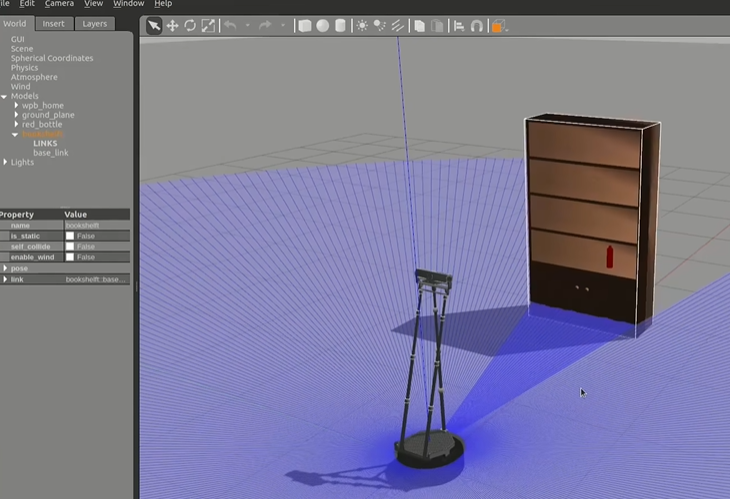
3.启动仿真器

roslaunch wpr_simulation wpb_simple.launch
image

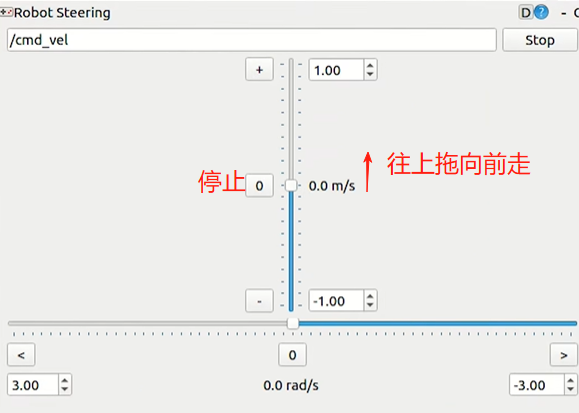
4.安装并启动控制节点

sudo apt install ros-noetic-rgt-robot-steering

roscore    #启动ros核心

rosrun rqt_robot_steering rqt_robot_steering   #启动控制节点
image

向上拖动控制滑杆控制小车前进速度,可以看到仿真器里的机器人向前运动了,点击 0  可以停止移动

 启动rviz

rosrun rviz rviz