


惯性聚合 高效追踪和阅读你感兴趣的博客、新闻、科技资讯
阅读原文 在惯性聚合中打开

推荐订阅源

罗磊的独立博客
Apple Machine Learning Research
The Cloudflare Blog
WordPress大学
WordPress大学
钛媒体:引领未来商业与生活新知
钛媒体:引领未来商业与生活新知
奇客Solidot–传递最新科技情报
奇客Solidot–传递最新科技情报
博客园 - 叶小钗
博客园 - 聂微东
阮一峰的网络日志
阮一峰的网络日志
腾讯CDC
博客园 - 三生石上(FineUI控件)
V
V2EX
有赞技术团队
有赞技术团队
V
Visual Studio Blog
小众软件
小众软件
Jina AI
Jina AI
酷 壳 – CoolShell
酷 壳 – CoolShell
博客园 - Franky
量子位
T
Tailwind CSS Blog
cs.CV updates on arXiv.org
P
Palo Alto Networks Blog
Cisco Talos Blog
Cisco Talos Blog
I
Intezer
Project Zero
Project Zero
A
Arctic Wolf
P
Privacy International News Feed
V
Vulnerabilities – Threatpost
L
Lohrmann on Cybersecurity
S
Securelist
C
Cybersecurity and Infrastructure Security Agency CISA
C
CXSECURITY Database RSS Feed - CXSecurity.com
T
Tor Project blog
Hacker News - Newest:
Hacker News - Newest: "LLM"
S
Security @ Cisco Blogs
cs.AI updates on arXiv.org
Threat Intelligence Blog | Flashpoint
Google DeepMind News
N
News and Events Feed by Topic
TaoSecurity Blog
TaoSecurity Blog
L
LINUX DO - 热门话题
G
GRAHAM CLULEY
Help Net Security
Help Net Security
N
News | PayPal Newsroom
W
WeLiveSecurity
G
Google Developers Blog
Microsoft Security Blog
Engineering at Meta
Engineering at Meta
MongoDB | Blog
MongoDB | Blog
C
Check Point Blog

博客园 - 找不到Object

57.基于springboot+vue的宠物领养平台 达梦数据库导出表结构到excel中 vware中centos虚拟机系统和宿主使用同一局域网 Excel中利用vba代码导出图片时以某一单元格内容重命名 vware中ubuntu虚拟机系统和宿主使用同一局域网 mysql查询近几天sql centos7离线安装docker liunx虚拟机VMware增加磁盘空间后,挂载磁盘 liunx服务器22端口开启 centos 7 NTP离线安装部署 centos7安装nginx nginx常用配置说明 centos7通过docker安装mysql VMware 虚拟机下CentOS 7连接网络 在JSP中使用el函数标签获取默认值(男女性别选项) ssm登录与退出 MVC(Model -View-Controller)实例应用模式 MVC模式 设计模式浅谈
centos7下安装docker
找不到Object · 2020-11-14 · via 博客园 - 找不到Object

centos7安装docker镜像详细教程

1.查看centos内核,要求3.8以上   uname -a

2.(可选) 把yum包更新到最新(生产环境慎重!yum update会对软件包和内核升级,此处只是为了排除系统环境的影响)  


 如果此步报错 


处理方法为: 进入文件 cd /etc/yum.repos.d/   

 

修改CentOS-Base.repo文件 设置为无效

mv   /etc/yum.repos.d/CentOS-Base.repo   /etc/yum.repos.d/CentOS-Base.repo.bak

3.安装需要的软件包, yum-util 提供yum-config-manager功能,另外两个是devicemapper驱动依赖的 

yum install -y yum-utils device-mapper-persistent-data lvm2

 4.设置yum源 yum-config-manager --add-repo http://mirrors.aliyun.com/docker-ce/linux/centos/docker-ce.repo #阿里云yum源

如果设置yum-config-manager --add-repo https://download.docker.com/linux/centos/docker-ce.repo 可能会安装失败

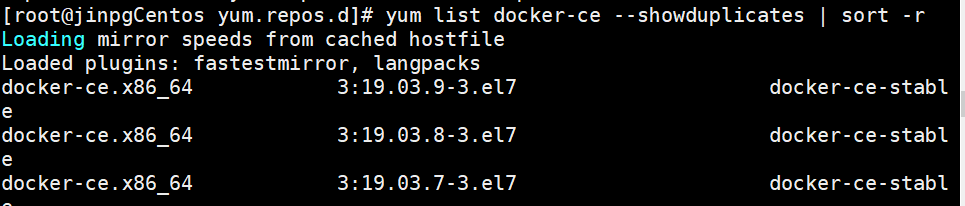
   

5.查看docker版本  yum list docker-ce --showduplicates | sort -r


6. 安装doucker版本安装 yum install -y docker-ce-18.03.1.ce,如果报错


依次执行

wget -O /etc/yum.repos.d/CentOS-Base.repo http://mirrors.aliyun.com/repo/Centos-7.repo

yum install epel-release -y

yum install container-selinux -y #安装

提示complete安装完成后 继续执行 yum install -y docker-ce-18.03.1.ce 安装docker



安装完成
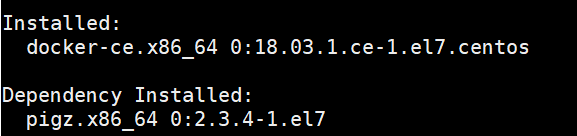
 

7. 启动Docker,命令:systemctl start docker,然后选择是否加入开机启动 systemctl enable docker,如下

8.查看版本  docker version ,验证安装是否成功(有client和service两部分表示docker安装启动都成功了)

 9. 重启docker命令  systemctl restart docker.service




