









1. 简单的插入数据,然后查询整个表
 1  public static void Main(string[] args)
 2         {
 3             var connectionString = "Server=.;Database=Demo;User Id=sa;Password = keno;";
 4
 5             //02 insert
 6             var customerModel = new Customer { CustomerName = "张三", Address = "北京", City = "北京", Country = "中国", PostalCode = "121212" };
 7             using (var connection = new SqlConnection(connectionString))
 8             {
 9                 string sql = "insert into [dbo].[Customer]([CustomerName],[Address],[City],[PostalCode],[Country]) values(@CustomerName,@Address,@City,@PostalCode,@Country)";
10                 var addRow = connection.Execute(sql, customerModel);
11                 Console.WriteLine(addRow);
12
13                 var customers = connection.Query<Customer>("select * from [dbo].[Customer]").ToList();
14
15                 foreach (var customer in customers)
16                 {
17                     Console.WriteLine("id: " + customer.CustomerID + " CustomerName:  " + customer.CustomerName + " Address: " + customer.Address + " City: " + customer.City + " PostalCode: " + customer.PostalCode);
18                 }
19             }
20
21             Console.ReadKey();
22         }
显示结果

2.如果将强类型去掉,他的结果会变成一个动态类型
1 var customers = connection.Query("select * from [dbo].[Customer]").ToList();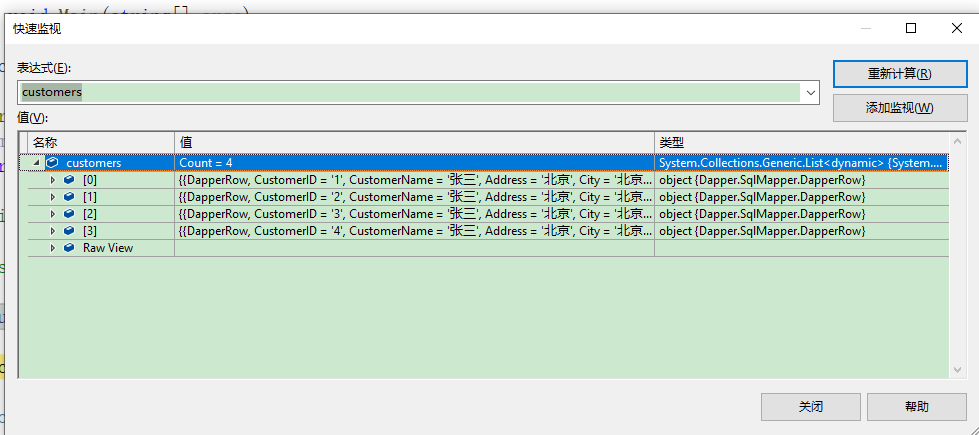
3.删除
 1  //03 delete
 2             using (var connection = new SqlConnection(connectionString))
 3             {
 4                 var count = connection.Execute("delete from customer where customerid=@customerId", new { @customerId = 1 });
 5                 if (count > 0)
 6                 {
 7                     Console.WriteLine("Delete Success" + count);
 8                 }
 9                 else
10                 {
11                     Console.WriteLine("Delete Failed" + count);
12                 }
13             }
insert update delete 使用同一个方法 excuate 返回数据的执行结果
好了今天的内容就写到这儿了,我们都知道在一个复杂的项目中不仅仅是单条数据的 CRUD ,那么我接着下来研究将会是数据的批量执行及数据的复杂查询
see you tomorrow!
此内容由惯性聚合(RSS阅读器)自动聚合整理,仅供阅读参考。 原文来自 — 版权归原作者所有。