惯性聚合 高效追踪和阅读你感兴趣的博客、新闻、科技资讯
阅读原文 在惯性聚合中打开

推荐订阅源

P
Proofpoint News Feed
WordPress大学
WordPress大学
Help Net Security
Help Net Security
Jina AI
Jina AI
Security Latest
Security Latest
Y
Y Combinator Blog
Project Zero
Project Zero
freeCodeCamp Programming Tutorials: Python, JavaScript, Git & More
GbyAI
GbyAI
Know Your Adversary
Know Your Adversary
Threat Intelligence Blog | Flashpoint
NISL@THU
NISL@THU
Cisco Talos Blog
Cisco Talos Blog
博客园 - 司徒正美
MyScale Blog
MyScale Blog
Cyberwarzone
Cyberwarzone
D
Docker
T
The Blog of Author Tim Ferriss
G
Google Developers Blog
C
CERT Recently Published Vulnerability Notes
B
Blog
L
LangChain Blog
Exploit-DB.com RSS Feed
SecWiki News
SecWiki News
The Hacker News
The Hacker News
C
Check Point Blog
L
Lohrmann on Cybersecurity
V2EX - 技术
V2EX - 技术
S
Securelist
T
Threat Research - Cisco Blogs
Stack Overflow Blog
Stack Overflow Blog
TaoSecurity Blog
TaoSecurity Blog
云风的 BLOG
云风的 BLOG
Latest news
Latest news
人人都是产品经理
人人都是产品经理
L
LINUX DO - 最新话题
Application and Cybersecurity Blog
The Register - Security
Webroot Blog
Webroot Blog
Simon Willison's Weblog
奇客Solidot–传递最新科技情报
奇客Solidot–传递最新科技情报
Microsoft Security Blog
AWS News Blog
AWS News Blog
C
Cybersecurity and Infrastructure Security Agency CISA
cs.AI updates on arXiv.org
小众软件
小众软件
T
Tailwind CSS Blog
cs.CL updates on arXiv.org
宝玉的分享
宝玉的分享
O
OpenAI News

博客园 - 码甲哥不卷

WorkBuddy已经成国民应用了,我们day0支持了腾讯混元3大模型 1分钟买不了吃亏系列: nginx动态域名解析 3min手搓一个帮助文档,很合理吧! 哈哈哈哈哈打不过我吧,没有办法我(vllm)就是这么强大! GLM模型这么火,咱们用vllm也咧一个呗! 同样都是九年义务教育,他知道的AI算力科普好像比我多耶 higress 这个中登才是AI时代的心头好 MetalLB才是给Ingress这个老登做负重前行的那个男人 我不允许谁还不清楚function call在AI-Agent领域中打手的地位 还有比ollama更傻瓜式的大模型本地部署方式吗 ? 🔎我不允许谁还分不清这三种watch机制的区别 云原生AI算力平台的架构解读 🚀糟糕,我实现的k8s informer好像是依托答辩 🎉在k8s调度的花园里面挖呀挖 🎉卷不过AI算法, AI工程化或许是一个出路 我是新来的,我需要知道这些吗?网关上的限流器 新来的外包,在大群分享了它的限流算法的实现 新来的外包,限流算法用的这么6 面试总被追问k8s调度器工作原理, 收藏 == 学废 kong网关反向代理grpc请求 幂等的双倍快乐,你值得拥有 JWT 这点小秘密,你们肯定知道! Go动态感知资源变更的技术实践,你指定用过!
超性感的轻量级openclaw平替,我给nanobot打call
神仙别打架 · 2026-02-28 · via 博客园 - 码甲哥不卷

春节期间,qwen3.5和openclaw火到爆, 咱们让子弹飞了一阵子,目前收到的信息是 ① 大龙虾配置极其复杂,非科班生很容易失败 ② 大龙虾很费token。

香港大学开源的nanobot 作为大龙虾的平替, 我试用下来,门槛相对较低,资源占用很少,功能完备, github上26k star。

image

同时公司有8卡4090算力资源,那必须养一只大龙虾了。

1. ollama 下载千问3.5大模型

本次选用qwen3.5:122b大模型: qwen3.5:122b | 81GB | 256K | Text, Image

ollama run qwen3.5:122b

ollama  ps
NAME            ID              SIZE      PROCESSOR    CONTEXT    UNTIL               
qwen3.5:122b    8b9d11d807c5    103 GB    100% GPU     262144     17 minutes from now
  • SIZE: 模型占用的内存
  • PROCESSOR: 100% GPU 模型被加载进 gpu vram, 还有其他可能的值: 50%/50% CPU/GPU , 100% CPU
  • UNTIL: 默认的卸载时间, 空闲5min就会从内存卸载模型, 可通过环境变量或cli参数修改。

2. nanobot 安装/启动

一键安装uv tool install nanobot-ai,

下面的通道、模型配置 请关注 .nanonbot/config.json 配置文件

① nanobot 最推荐的连接通道是telegram, 按照nanobot github文档3步就可以配置好。

"telegram": {
      "enabled": true,
      "token": "xxx:ooo",
      "allowFrom": ["xxxooo"],  
      "proxy": null
    },
    
 #  YOUR_BOT_TOKEN, YOUR_USER_ID   

② 给nanobot配置本地qwen3.5 大模型

// 本地qwen3.5在11434端口上提供服务!

"vllm": {
      "apiKey": "local",   
      "apiBase": "http://localhost:11434/v1",
      "extraHeaders": null
    },

// 指示agents使用qwen3.5:122b大模型
"agents": {
    "defaults": {
      "workspace": "~/.nanobot/workspace",
      "model": "qwen3.5:122b",
      "maxTokens": 8192,
      "temperature": 0.7,
      "maxToolIterations": 20,
      "memoryWindow": 50
    }
  },

③ 启动nanobot

官方给出的nanobot gateway 是前台启动nanobot,不适合生产环境。

需要使用 nohup nanobot gateway > nanobot.log 2>&1 & 命令:忽略挂断信号让nanobot在后台运行。

注意nanobot cli参数优先于config配置文件, nanobot cli默认的端口是18790

image

3. 让nanobot具备网络访问能力

nanobot 默认缺少网络搜索能力!

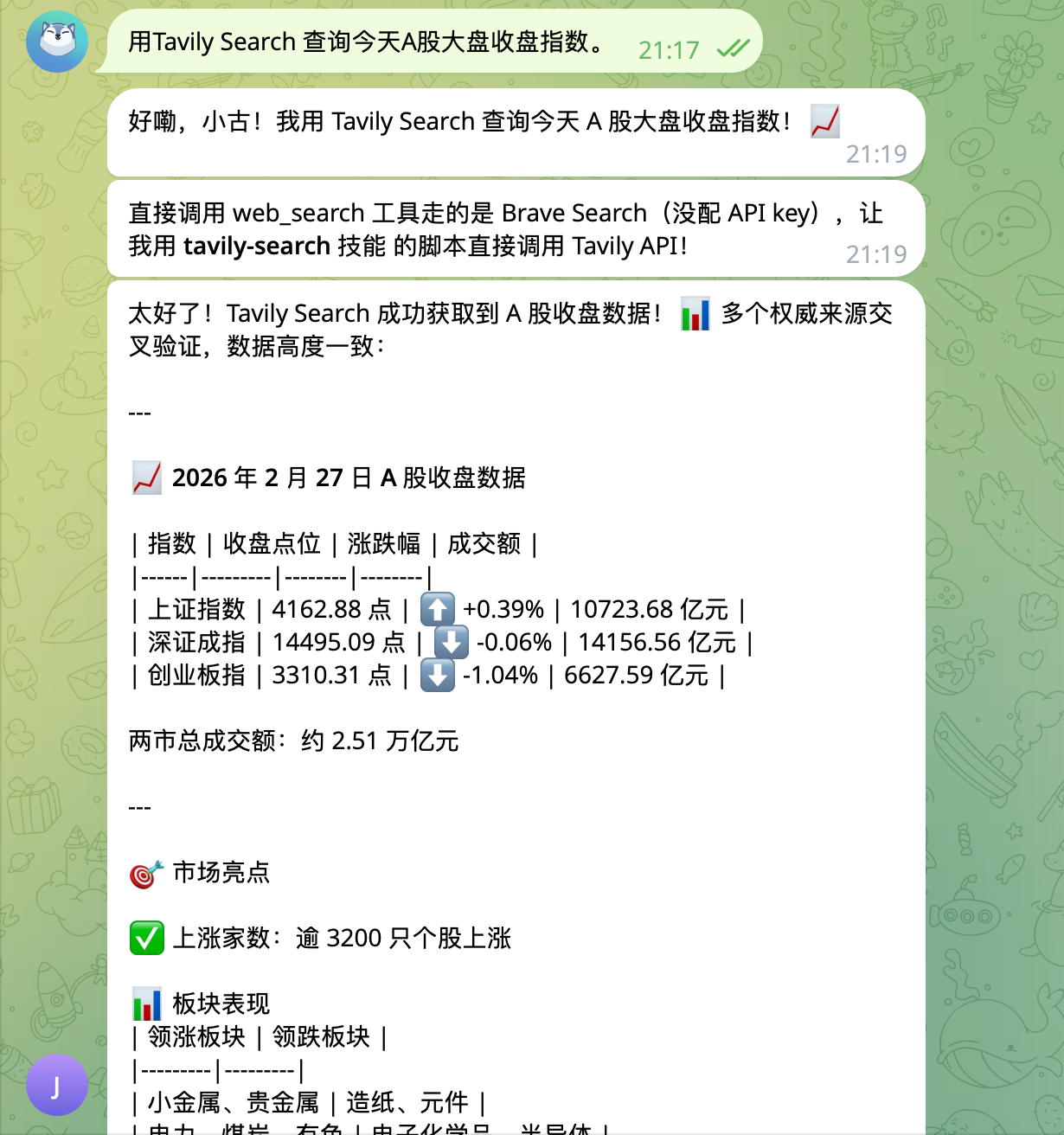
但是有skill 可以做网络访问, 咱们让nanobot自己去安装 tavily web_search技能

nanobot默认无网络搜索能力,比如你问”今天A股大盘指数是多少?", 它就不知道。
当前内置的skills是被高度信任的,可访问必要网络。

① nanobot 已经内置了一些skill, 方便你做初始动作(在/home/user/nanobot/nanobot/skills 目录):

drwxrwxr-x 2 user user 4.0K Feb 24 23:07 clawhub   // 这个技能可从clawhub安装新的SKILL
drwxrwxr-x 2 user user 4.0K Feb 24 23:07 cron   // 定时任务
drwxrwxr-x 2 user user 4.0K Feb 24 23:07 github
drwxrwxr-x 2 user user 4.0K Feb 24 23:07 memory
-rw-rw-r-- 1 user user  861 Feb 24 23:07 README.md
drwxrwxr-x 2 user user 4.0K Feb 24 23:07 skill-creator
drwxrwxr-x 2 user user 4.0K Feb 24 23:07 summarize  
drwxrwxr-x 3 user user 4.0K Feb 24 23:07 tmux
drwxrwxr-x 2 user user 4.0K Feb 24 23:07 weather   // 天气技能,无需APIKEY

② 利用内置的clawhub skill, 让nanobot自己去安装tavily websearch技能

image

③ 让nanobot自己去配置 tavily的apikey

apikey 获取路径:

tavily网站上注册账户--Remote MCP-- Generate MCP Link , 在聊天框:“让nabobot把这个{apikey}配置进去”。

为什么不用nanobot官方推荐的 Brave web search?
① 要FQ ② 获取免费额度的apikey,要信用卡,我没有!估计很多人没有!!!

image

nanobot 会根据收到的自然语言, 自己去写入config.json配置。
image


okk!, 一切就绪。