

惯性聚合 高效追踪和阅读你感兴趣的博客、新闻、科技资讯
阅读原文 在惯性聚合中打开

推荐订阅源

大猫的无限游戏
大猫的无限游戏
Webroot Blog
Webroot Blog
cs.AI updates on arXiv.org
T
Threat Research - Cisco Blogs
V2EX - 技术
V2EX - 技术
L
LINUX DO - 热门话题
Google DeepMind News
Recorded Future
Recorded Future
S
Schneier on Security
I
InfoQ
Cyber Security Advisories - MS-ISAC
cs.CV updates on arXiv.org
The GitHub Blog
The GitHub Blog
S
Security @ Cisco Blogs
O
OpenAI News
W
WeLiveSecurity
Vercel News
Vercel News
阮一峰的网络日志
阮一峰的网络日志
Simon Willison's Weblog
人人都是产品经理
人人都是产品经理
Cloudbric
Cloudbric
The Last Watchdog
The Last Watchdog
The Hacker News
The Hacker News
Google Online Security Blog
OSCHINA 社区最新新闻
OSCHINA 社区最新新闻
GbyAI
GbyAI
NISL@THU
NISL@THU
T
Tailwind CSS Blog
V
Visual Studio Blog
PCI Perspectives
PCI Perspectives
K
KPMG report finds enterprise disconnect between AI and its ROI | CIO
Jina AI
Jina AI
D
DataBreaches.Net
B
Blog RSS Feed
N
News and Events Feed by Topic
N
News and Events Feed by Topic
H
Heimdal Security Blog
cs.CL updates on arXiv.org
腾讯CDC
Latest news
Latest news
V
Vulnerabilities – Threatpost
Hacker News: Ask HN
Hacker News: Ask HN
WordPress大学
WordPress大学
V
V2EX
aimingoo的专栏
aimingoo的专栏
博客园 - 司徒正美
Apple Machine Learning Research
D
Darknet – Hacking Tools, Hacker News & Cyber Security
The Register - Security
Help Net Security
Help Net Security

博客园 - centosboy

Thinkpad T490卡顿排查 xinference初探 diff的安装与使用 ubuntu docker运行大模型 vllm部署 zabbix监控mongodb /root/.dbshell无权限解决办法 开机启动后应用limit没有生效 关于运维工作的一点感悟 Autossh打洞 hive分区表实践 hashlib模块 rm 防误删脚本 linux 通过inode删除文件 那些年踩过的坑 htpdate代替ntpdate同步时间 Openfire搭建聊天系统 zookeeper运维 centos ping添加丢包记录 Linux tee命令输出显示在屏幕和保存到日志文件中
将CDLINUX装入U盘
centosboy · 2020-12-21 · via 博客园 - centosboy

所需资源:

cdlinux.iso

unetbootin-windows-585

grub4dos.

bootice_0.9

制作方法:

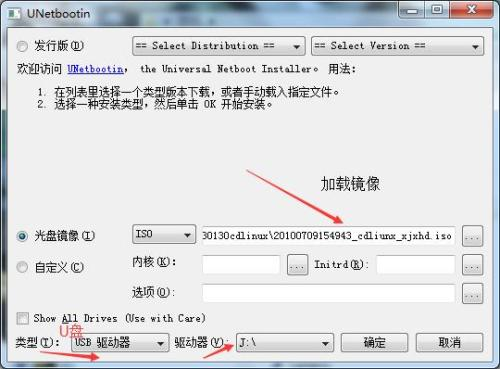
1.打开unetbootin-windows-585,,选择第二项光盘镜像,载入你刚下载的CDlinux-0.9.7.iso文件路径,选择你的U盘,确定
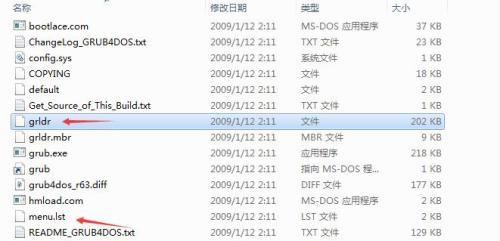
2.打开下载grub4dos,选择grldr和menu 文件,复制到U盘的根目录,复制之后u盘里面是这样
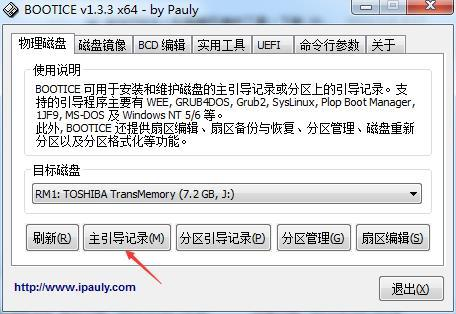
3.打开bootice,选择U盘.点(主引导记录)
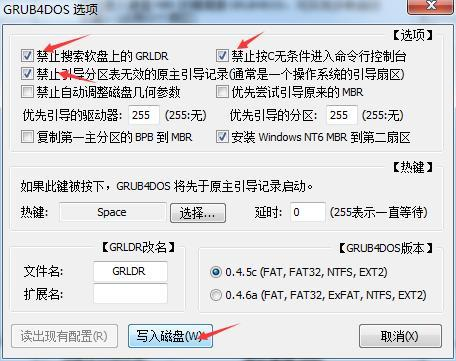
之后按下图选择选项,写入磁盘
4.进入U盘,编辑编辑menu.lst,在其内加入如下内容,并保存
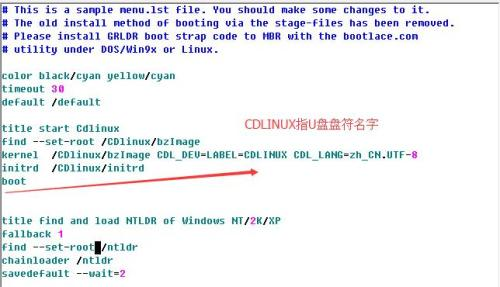
title start Cdlinux

find --set-root /CDlinux/bzImage

kernel /CDlinux/bzImage CDL_DEV=LABEL=CDLINUX CDL_LANG=zh_CN.UTF-8

initrd /CDlinux/initrd

boot

在上面的menu.lst内的CDL_DEV=LABEL=CDLINUX 中的CDLINUX是指U盘的标签名

5.重启选择U盘启动