




2025-06-02 08:11 abce 阅读(130) 评论() 收藏 举报
donor:192.168.137.1
recipient:192.168.137.2
可以在配置文件中配置插件,然后重启实例:
[mysqld]
plugin-load-add=mysql_clone.so
运行时安装克隆插件:
mysql> install plugin clone soname 'mysql_clone.so';
Query OK, 0 rows affected (0.04 sec)
检查克隆插件是否安装成功:
mysql> select plugin_name,plugin_status from information_schema.plugins where plugin_name='clone';
+-------------+---------------+
| plugin_name | plugin_status |
+-------------+---------------+
| clone       | ACTIVE        |
+-------------+---------------+
1 row in set (0.00 sec)
donor 和 recipient 都必须成功安装和运行了克隆插件。
doner端创建用户:
mysql> CREATE USER 'donor_clone_user'@'%' IDENTIFIED BY 'password';
Query OK, 0 rows affected (0.01 sec)

mysql> GRANT BACKUP_ADMIN on *.* to 'donor_clone_user'@'%';
Query OK, 0 rows affected (0.01 sec)

mysql> show grants for 'donor_clone_user'@'%';
+-----------------------------------------------------+
| Grants for donor_clone_user@%                       |
+-----------------------------------------------------+
| GRANT USAGE ON *.* TO `donor_clone_user`@`%`        |
| GRANT BACKUP_ADMIN ON *.* TO `donor_clone_user`@`%` |
+-----------------------------------------------------+
2 rows in set (0.00 sec)
recipient 端创建用户:
mysql> CREATE USER 'recipient_clone_user'@'%' IDENTIFIED BY 'password';
Query OK, 0 rows affected (0.02 sec)

mysql> GRANT CLONE_ADMIN on *.* to 'recipient_clone_user'@'%';
Query OK, 0 rows affected (0.00 sec)

mysql> show grants for 'recipient_clone_user'@'%';
+--------------------------------------------------------+
| Grants for recipient_clone_user@%                      |
+--------------------------------------------------------+
| GRANT USAGE ON *.* TO `recipient_clone_user`@`%`       |
| GRANT CLONE_ADMIN ON *.* TO `recipient_clone_user`@`%` |
+--------------------------------------------------------+
2 rows in set (0.00 sec)
mysql> SET GLOBAL clone_valid_donor_list = '192.168.137.1:3306';
Query OK, 0 rows affected (0.00 sec)
使用上面创建的用户('recipient_clone_user'@'%')登录到recipient
recipient_clone_user@localhost (none)>CLONE INSTANCE FROM 'donor_clone_user'@'192.168.137.1':3306 IDENTIFIED BY 'password';
数据克隆结束后,recipient 节点会自动重启。
在克隆过程中,如果观察数据目录下的文件,会发现有以下一些中间文件和目录生成:
drwxr-x--- 2 mysql mysql        127 Apr 24 11:10 #clone
-rw-r----- 1 mysql mysql    3620438 Apr 24 11:10 ib_buffer_pool.#clone
-rw-r----- 1 mysql mysql   12582912 Apr 24 11:10 ibdata1.#clone
-rw-r----- 1 mysql mysql          0 Apr 24 11:10 mysql.ibd.#clone
-rw-r----- 1 mysql mysql          0 Apr 24 11:10 undo_001.#clone
-rw-r----- 1 mysql mysql          0 Apr 24 11:10 undo_002.#clone
在克隆过程中,可以登录到 recipient 节点的数据库实例的,监控克隆操作的相关信息。
可用的表有performance_schema.clone_progress 和 performance_schema.clone_status。
查看克隆操作的状态:performance_schema.clone_status。可能处于的状态有:not started、in progress、completed、failed。
mysql> select * from performance_schema.clone_status\G
*************************** 1. row ***************************
             ID: 1
            PID: 0
          STATE: Completed
     BEGIN_TIME: 2025-04-23 16:45:26.380
       END_TIME: 2025-04-23 16:46:21.214
         SOURCE: 192.168.137.1:3306
    DESTINATION: LOCAL INSTANCE
       ERROR_NO: 0
  ERROR_MESSAGE:
    BINLOG_FILE: binlog.000029
BINLOG_POSITION: 156097213
  GTID_EXECUTED: e0867619-561a-11ef-ae68-005056b08cea:1-73840,
e2f7b725-b197-11ed-85a8-005056b034b6:1-12
1 row in set (0.00 sec)

mysql>
查看克隆操作的每个阶段:performance_schema.clone_progress
mysql> select stage,state,begin_time as start_time,end_time,data,network from performance_schema.clone_progress;
+-----------+-------------+----------------------------+----------------------------+-------------+-------------+
| stage     | state       | start_time                 | end_time                   | data        | network     |
+-----------+-------------+----------------------------+----------------------------+-------------+-------------+
| DROP DATA | Completed   | 2025-04-23 16:45:26.446034 | 2025-04-23 16:45:27.724301 |           0 |           0 |
| FILE COPY | In Progress | 2025-04-23 16:45:27.724422 | NULL                       | 17268522582 | 17269481184 |
| PAGE COPY | Not Started | NULL                       | NULL                       |           0 |           0 |
| REDO COPY | Not Started | NULL                       | NULL                       |           0 |           0 |
| FILE SYNC | Not Started | NULL                       | NULL                       |           0 |           0 |
| RESTART   | Not Started | NULL                       | NULL                       |           0 |           0 |
| RECOVERY  | Not Started | NULL                       | NULL                       |           0 |           0 |
+-----------+-------------+----------------------------+----------------------------+-------------+-------------+
7 rows in set (0.01 sec)

mysql> select stage,state,begin_time as start_time,end_time,data,network from performance_schema.clone_progress;
+-----------+-----------+----------------------------+----------------------------+-------------+-------------+
| stage     | state     | start_time                 | end_time                   | data        | network     |
+-----------+-----------+----------------------------+----------------------------+-------------+-------------+
| DROP DATA | Completed | 2025-04-23 16:45:26.446034 | 2025-04-23 16:45:27.724301 |           0 |           0 |
| FILE COPY | Completed | 2025-04-23 16:45:27.724422 | 2025-04-23 16:46:16.341543 | 28984901206 | 28986487040 |
| PAGE COPY | Completed | 2025-04-23 16:46:16.341742 | 2025-04-23 16:46:16.570970 |           0 |         393 |
| REDO COPY | Completed | 2025-04-23 16:46:16.571159 | 2025-04-23 16:46:16.798674 |        2560 |        3195 |
| FILE SYNC | Completed | 2025-04-23 16:46:16.798880 | 2025-04-23 16:46:17.203273 |           0 |           0 |
| RESTART   | Completed | 2025-04-23 16:46:17.203273 | 2025-04-23 16:46:20.496796 |           0 |           0 |
| RECOVERY  | Completed | 2025-04-23 16:46:20.496796 | 2025-04-23 16:46:21.214459 |           0 |           0 |
+-----------+-----------+----------------------------+----------------------------+-------------+-------------+
7 rows in set (0.01 sec)
除了从上面两个表查看监控信息,还可以借助instruments,开启instruments:
mysql> update performance_schema.setup_instruments set ENABLED='YES' where NAME LIKE 'stage/innodb/clone%';
Query OK, 0 rows affected (0.00 sec)
Rows matched: 3 Changed: 3 Warnings: 0
其它具体信息,可以参考官方文档,这里就不再多写了。
数据库克隆主要分为如下几个阶段:
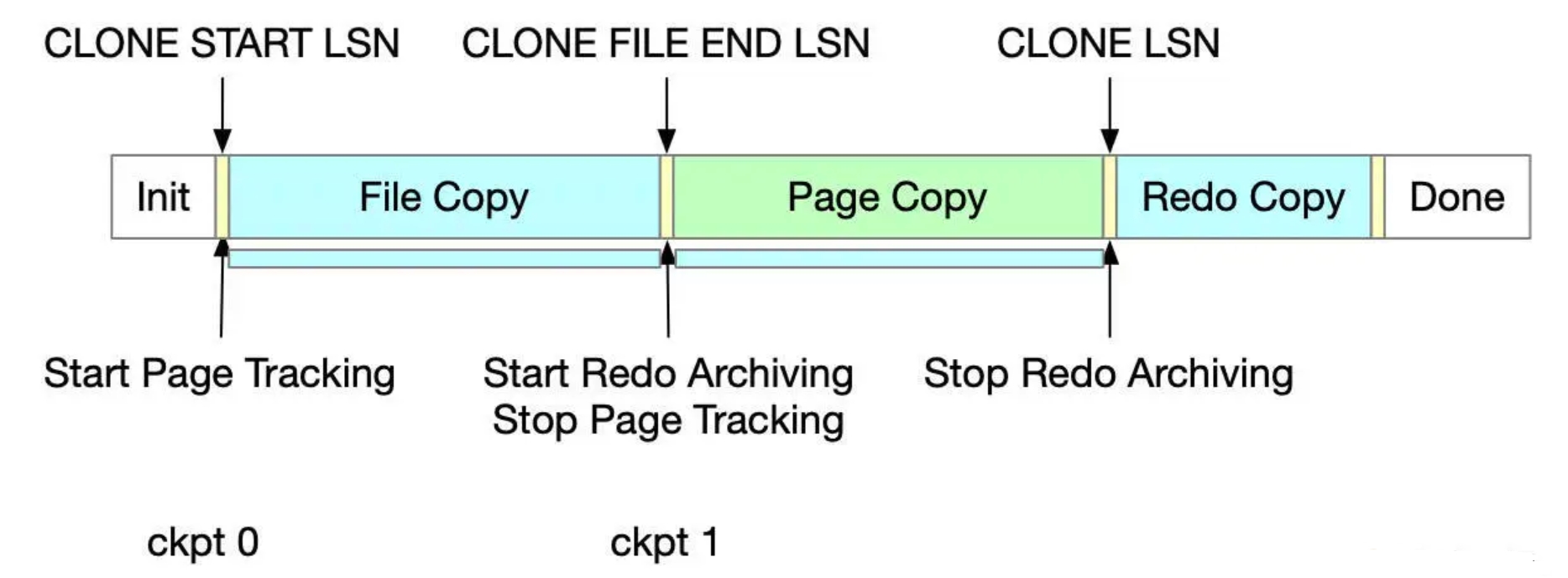
(1)init:
克隆对象的初始化状态是由donor标识的
(2)file copy:
调用snapshot_copy接口的时候,状态从 init 变成 file copy; 在状态改变之前,从clone start lsn开始启动page tracking;在 file copy 阶段,会拷贝所有的数据文件发送到 recipient
(3)page copy:
所有文件被拷贝发送到recipient之后,状态变成page copy;状态切换成page copy之前,在CLONE FILE END LSN位置启动 Redo Archiving,并停止page tracking;在page copy阶段,位于clone start lsn和CLONE FILE END LSN之间被修改的页面,根据页的id,从buffer pool中被读取和发送到recipient;可以根据页的space id,page id做排序,从而避免从donor随机读取,在recipient端随机写
(4)redo copy:
所有被修改的页发送完成后,就从page copy状态变成redo copy状态;在clone lsn位置停止redo archiving;clone lsn是被克隆的数据库的lsn,在这个位置可以获取复制的位置;clone lsn是开启复制前,提交的最后一个事务;在redo copy阶段,发送归档的redo日志文件,lsn介于clone file end lsn到clone lsn之间
(5)done:
克隆对象保持在done状态,直到调用snapshot_end(),结束done状态
默认情况下,远程克隆操作会先删除用户创建的数据(模式、表、表空间)和接收者数据目录中的二进制日志,然后再克隆捐赠者 MySQL Server 实例中的数据。通过克隆到指定的数据目录,可以避免从当前接收者数据目录中删除数据。
克隆到指定的数据目录的过程与克隆远程数据中描述的过程相同,但有一个例外: CLONE INSTANCE 语句必须包含 DATA DIRECTORY 子句。例如:
mysql> CLONE INSTANCE FROM 'user'@'example.donor.host.com':3306
       IDENTIFIED BY 'password'
       DATA DIRECTORY = '/path/to/clone_dir';
这里需要指定绝对路径,且目录必须存在。
不过,这样的话,克隆结束后不会自动启动,需要手动将数据目录指定到新的目录,重启 mysql 实例。
如果是想通过克隆创建从库,克隆结束后可以通过performance_schema.clone_status查看复制的起始位置:
root@localhost (none)>select * from performance_schema.clone_status\G
*************************** 1. row ***************************
             ID: 1
            PID: 0
          STATE: Completed
     BEGIN_TIME: 2025-04-23 16:45:26.380
       END_TIME: 2025-04-23 16:46:21.214
         SOURCE: 192.168.137.1:3306
    DESTINATION: LOCAL INSTANCE
       ERROR_NO: 0
  ERROR_MESSAGE:
    BINLOG_FILE: binlog.000029
BINLOG_POSITION: 156097213
  GTID_EXECUTED: e0867619-561a-11ef-ae68-005056b08cea:1-73840,
e2f7b725-b197-11ed-85a8-005056b034b6:1-12
1 row in set (0.00 sec)

root@localhost (none)>
此内容由惯性聚合(RSS阅读器)自动聚合整理,仅供阅读参考。 原文来自 — 版权归原作者所有。