惯性聚合 高效追踪和阅读你感兴趣的博客、新闻、科技资讯
阅读原文 在惯性聚合中打开

推荐订阅源

Cyberwarzone
Cyberwarzone
Vercel News
Vercel News
freeCodeCamp Programming Tutorials: Python, JavaScript, Git & More
奇客Solidot–传递最新科技情报
奇客Solidot–传递最新科技情报
aimingoo的专栏
aimingoo的专栏
B
Blog RSS Feed
A
About on SuperTechFans
T
The Blog of Author Tim Ferriss
爱范儿
爱范儿
腾讯CDC
S
SegmentFault 最新的问题
Exploit-DB.com RSS Feed
The Hacker News
The Hacker News
J
Java Code Geeks
大猫的无限游戏
大猫的无限游戏
B
Blog
IT之家
IT之家
Spread Privacy
Spread Privacy
K
KPMG report finds enterprise disconnect between AI and its ROI | CIO
C
Cisco Blogs
Recent Announcements
H
Hacker News: Front Page
AI
AI
I
InfoQ
H
Heimdal Security Blog
T
Threatpost
Cisco Talos Blog
Cisco Talos Blog
Threat Intelligence Blog | Flashpoint
I
Intezer
W
WeLiveSecurity
SecWiki News
SecWiki News
MongoDB | Blog
MongoDB | Blog
宝玉的分享
宝玉的分享
博客园 - 【当耐特】
云风的 BLOG
云风的 BLOG
T
Threat Research - Cisco Blogs
V2EX - 技术
V2EX - 技术
N
News and Events Feed by Topic
cs.CV updates on arXiv.org
O
OpenAI News
阮一峰的网络日志
阮一峰的网络日志
T
Troy Hunt's Blog
www.infosecurity-magazine.com
博客园 - 司徒正美
Apple Machine Learning Research
雷峰网
雷峰网
T
Tor Project blog
有赞技术团队
有赞技术团队
Schneier on Security
Last Week in AI
Last Week in AI

博客园 - smileNicky

魔珐星云SDK实战测评:重构数字人交互的底层逻辑 Ling Studio 深度体验:当万亿参数大模型遇上AI原生IDE,编程范式正在重构 魔珐星云SDK实战测评:从0到1搭建会“思考+互动”的智能数字人客服应用 云电脑玩转 CANN 全攻略:从环境搭建到创新应用落地 SpringBoot系列之集成EasyExcel实现百万级别的数据导入导出实践 分布式ID生成方案总结整理 并发编程系列之如何正确使用线程池? Spring Cloud Alibaba系列之分布式服务组件Dubbo Spring5.0源码学习系列之事务管理概述 Spring5.0源码学习系列之Spring AOP简述 利用ADB命令强制卸载oppo自带浏览器 SpringBoot系列之从入门到精通系列教程 SpringCloud系列之API网关(Gateway)服务Zuul SpringCloud系列之服务容错保护Netflix Hystrix SpringCloud系列之客户端负载均衡Netflix Ribbon SpringCloud系列之使用Feign进行服务调用 SpringCloud系列使用Eureka进行服务治理 Spring Security系列之极速入门与实践教程 SpringBoot系列之actuator监控管理极速入门与实践 SpringBoot系列之发送邮件极速入门与实践
SpringBoot系列之IDEA项目中设置热部署教程
smileNicky · 2020-07-23 · via 博客园 - smileNicky

1、新建SpringBoot项目

环境准备

  • JDK 1.8
  • SpringBoot2.2.1
  • Maven 3.2+
  • 开发工具
    • smartGit
    • IntelliJ IDEA2018

创建一个SpringBoot Initialize项目,详情可以参考我之前博客:SpringBoot系列之快速创建项目教程
![在这里插入图片描述]( https://img-blog.csdnimg.cn/20200723104042367.png?x-oss-process=image/watermark ,type_ZmFuZ3poZW5naGVpdGk,shadow_10,text_aHR0cHM6Ly9ibG9nLmNzZG4ubmV0L3UwMTQ0MjczOTE=,size_16,color_FFFFFF,t_70)
检查spring-boot-devtools是否加上?

<dependency>
            <groupId>org.springframework.boot</groupId>
            <artifactId>spring-boot-devtools</artifactId>
            <scope>runtime</scope>
            <optional>true</optional>
        </dependency>

ps:修改如下配置,reload才生效,<fork>true</fork>,用于明确表示编译版本配置有效
![在这里插入图片描述]( https://img-blog.csdnimg.cn/20200723131440464.png?x-oss-process=image/watermark ,type_ZmFuZ3poZW5naGVpdGk,shadow_10,text_aHR0cHM6Ly9ibG9nLmNzZG4ubmV0L3UwMTQ0MjczOTE=,size_16,color_FFFFFF,t_70)
补充:
如果有加上Thymeleaf模板引擎,需要关了Thymeleaf缓存,然后按Ctrl+F9重新编译,修改配置文件:

spring:
  thymeleaf:
    cache: false

2、IntelliJ IDEA配置

Settings->Build,Execut, Deployment -> Compiler,勾选中左侧的Build Project automatically
![在这里插入图片描述]( https://img-blog.csdnimg.cn/20200723124809860.png?x-oss-process=image/watermark ,type_ZmFuZ3poZW5naGVpdGk,shadow_10,text_aHR0cHM6Ly9ibG9nLmNzZG4ubmV0L3UwMTQ0MjczOTE=,size_16,color_FFFFFF,t_70)

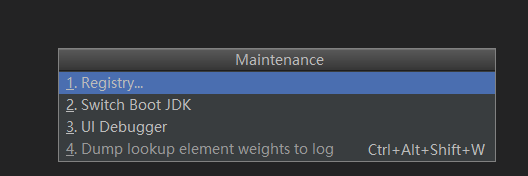
Ctrl+Alt+Shift+/,选择Registry

在这里插入图片描述
勾选complier.automake.allow.when.app.running
![在这里插入图片描述]( https://img-blog.csdnimg.cn/20200723104905775.png?x-oss-process=image/watermark ,type_ZmFuZ3poZW5naGVpdGk,shadow_10,text_aHR0cHM6Ly9ibG9nLmNzZG4ubmV0L3UwMTQ0MjczOTE=,size_16,color_FFFFFF,t_70)

ok,next需要重启 IntelliJ IDEA,既可实现java文件自动构建,不过对于html还是要按Ctrl+F9编译

代码例子下载:code download