

惯性聚合 高效追踪和阅读你感兴趣的博客、新闻、科技资讯
阅读原文 在惯性聚合中打开

推荐订阅源

C
Check Point Blog
J
Java Code Geeks
H
Hackread – Cybersecurity News, Data Breaches, AI and More
D
Docker
腾讯CDC
The GitHub Blog
The GitHub Blog
大猫的无限游戏
大猫的无限游戏
Microsoft Security Blog
GbyAI
GbyAI
Stack Overflow Blog
Stack Overflow Blog
博客园 - 司徒正美
T
The Blog of Author Tim Ferriss
Vercel News
Vercel News
P
Proofpoint News Feed
雷峰网
雷峰网
博客园_首页
B
Blog RSS Feed
Microsoft Azure Blog
爱范儿
爱范儿
V
V2EX
F
Fortinet All Blogs
酷 壳 – CoolShell
酷 壳 – CoolShell
MyScale Blog
MyScale Blog
S
SegmentFault 最新的问题

博客园 - vikingwei

<<人纪>>针灸篇倪海厦 NIFI免密调用API HTTPS NIFI调用API HTTP PostgreSQL源码安装 Installation from Source Code SQL Server 常用的83条SQL语句,速速收藏 用户中心 - 博客园 用户中心 - 博客园 用户中心 - 博客园 用户中心 - 博客园 用户中心 - 博客园 用户中心 - 博客园 用户中心 - 博客园 用户中心 - 博客园 用户中心 - 博客园 用户中心 - 博客园 用户中心 - 博客园 用户中心 - 博客园 用户中心 - 博客园 用户中心 - 博客园
netstat 查看端口(sqlserver)
vikingwei · 2020-11-12 · via 博客园 - vikingwei

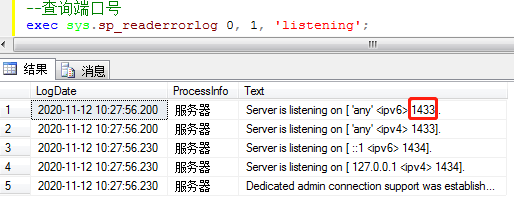
1.查看sqlserver占用了哪此端口
--查询端口号
exec sys.sp_readerrorlog 0, 1, 'listening';
  2.查看端口号对应的进程(PID)

netstat -ano|findstr "<端口号>"

netstat -ano|findstr "1433"

也可以在任务管理器中查找:查看-->选择列-->找到pid选中 进程就能找到pid号。
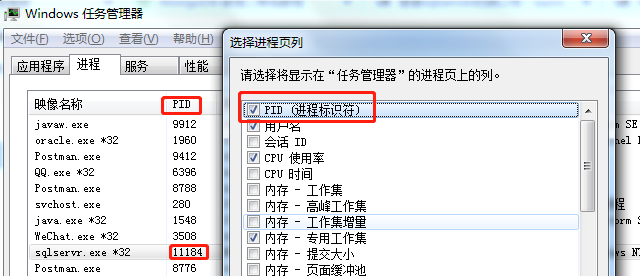
  3.查看该PID对应的进程名称。

tasklist|findstr "<PID号>"

tasklist|findstr "11184"

  其它的系统或进程同样的方法查找。