







1、新建项目
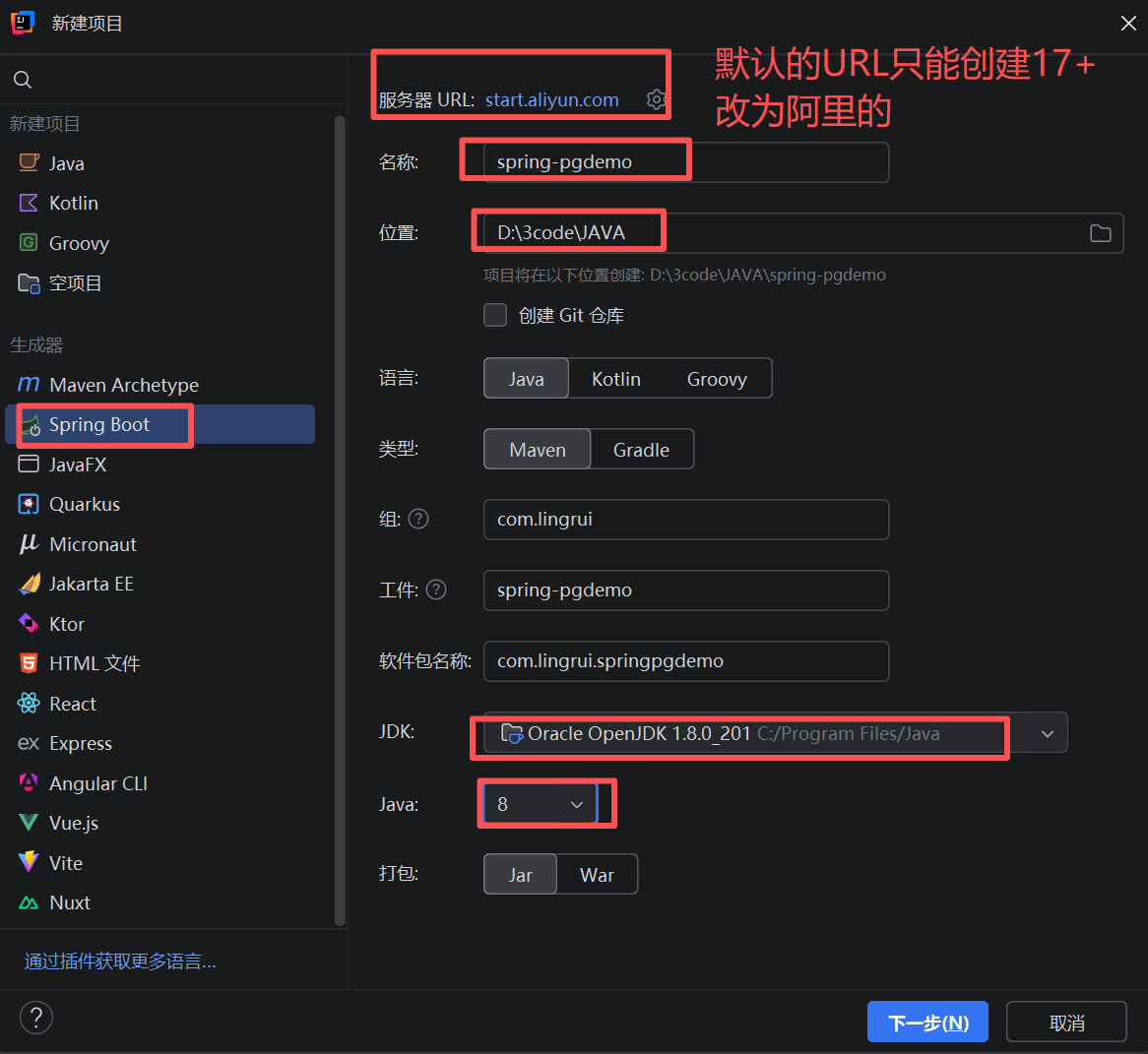
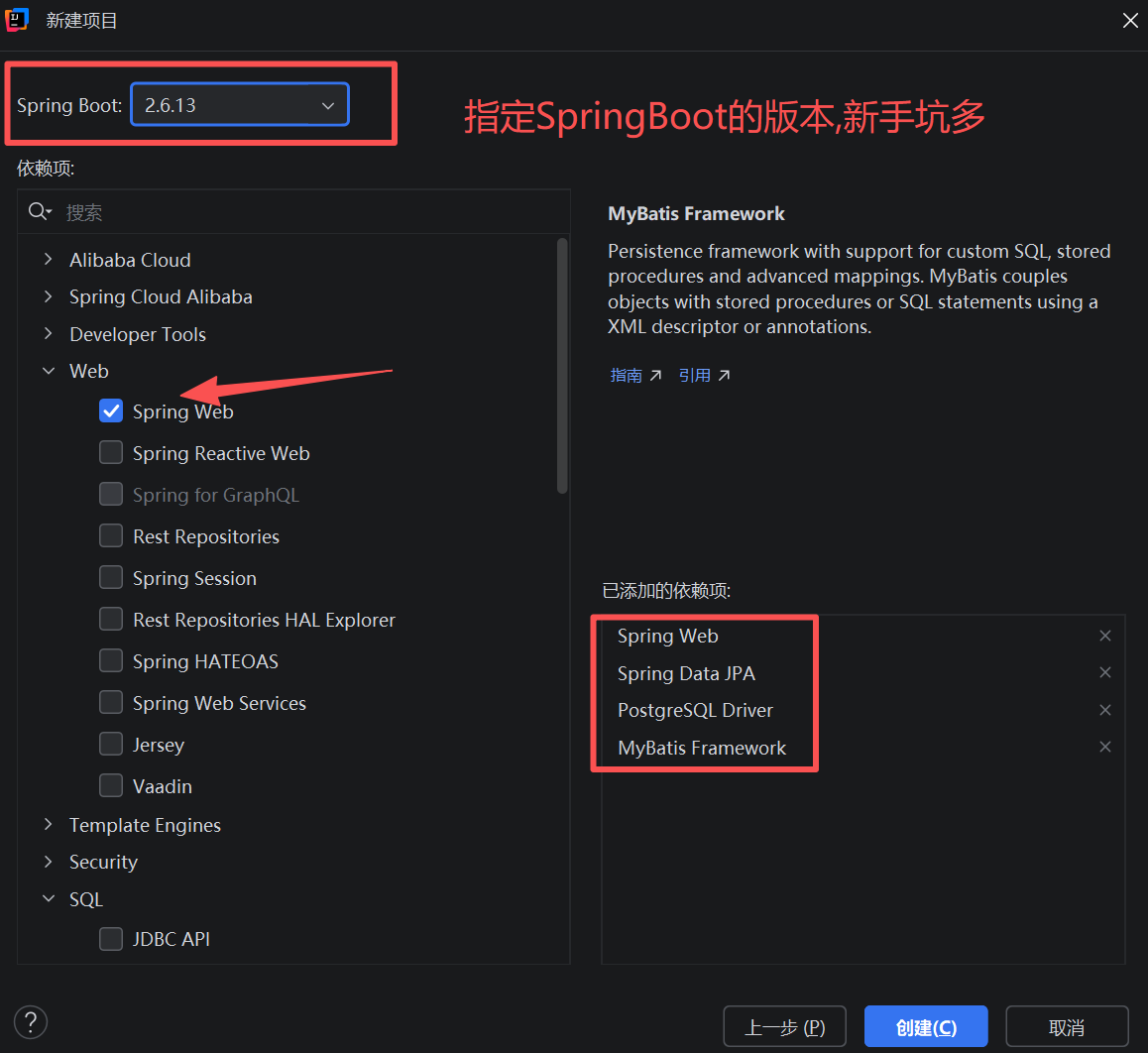
2选择SpringBoot 版本和需要的依赖。新手要注意与jdk的版本要一致。(jdk1.8+springboot2.6.13)
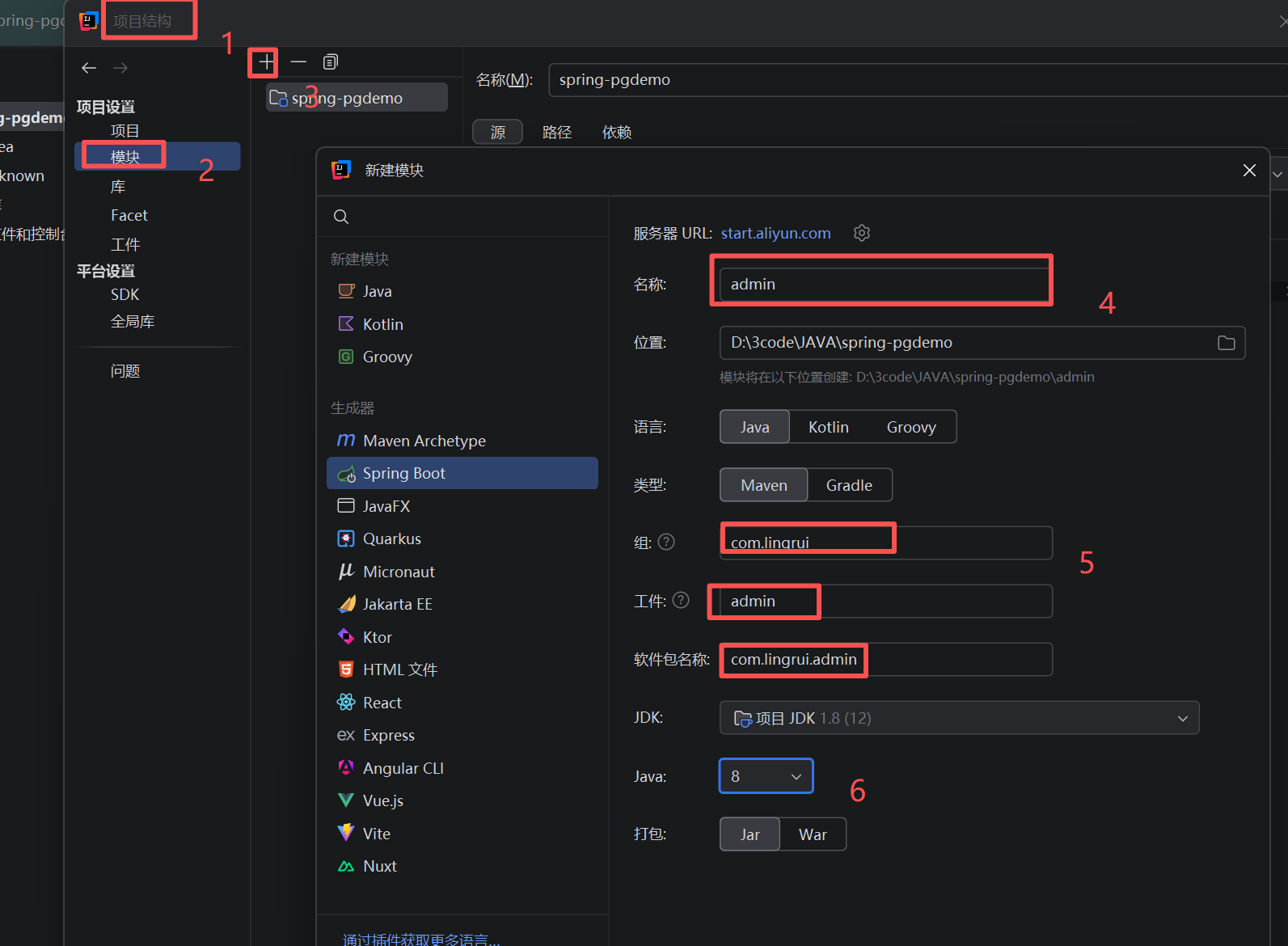
3创建模块,(设置--项目结构--项目设置--模块,点右边的 + 号)
附:
pom.xml
<?xml version="1.0" encoding="UTF-8"?>
<project xmlns="http://maven.apache.org/POM/4.0.0" xmlns:xsi="http://www.w3.org/2001/XMLSchema-instance"
         xsi:schemaLocation="http://maven.apache.org/POM/4.0.0 https://maven.apache.org/xsd/maven-4.0.0.xsd">
    <modelVersion>4.0.0</modelVersion>
    <groupId>com.lingrui</groupId>
    <artifactId>admin</artifactId>
    <version>0.0.1-SNAPSHOT</version>
    <name>admin</name>
    <description>admin</description>
    <properties>
        <java.version>1.8</java.version>
        <project.build.sourceEncoding>UTF-8</project.build.sourceEncoding>
        <project.reporting.outputEncoding>UTF-8</project.reporting.outputEncoding>
        <spring-boot.version>2.7.12</spring-boot.version>
    </properties>
    <dependencies>
        <dependency>
            <groupId>org.springframework.boot</groupId>
            <artifactId>spring-boot-starter</artifactId>
        </dependency>
        <!-- Spring Boot JPA启动器 - 提供ORM相关功能 -->
        <dependency>
            <groupId>org.springframework.boot</groupId>
            <artifactId>spring-boot-starter-data-jpa</artifactId>
        </dependency>
        <!-- Spring Boot Web启动器 - 提供Web开发相关功能 -->
        <dependency>
            <groupId>org.springframework.boot</groupId>
            <artifactId>spring-boot-starter-web</artifactId>
        </dependency>

        <dependency>
            <groupId>org.springframework.boot</groupId>
            <artifactId>spring-boot-starter-test</artifactId>
            <scope>test</scope>
        </dependency>
        <!-- PostgreSQL数据库驱动 - 用于连接PostgreSQL数据库 -->
        <dependency>
            <groupId>org.postgresql</groupId>
            <artifactId>postgresql</artifactId>
            <scope>runtime</scope>  <!-- 运行时依赖,编译时不需要 -->
        </dependency>
    </dependencies>
    <dependencyManagement>
        <dependencies>
            <dependency>
                <groupId>org.springframework.boot</groupId>
                <artifactId>spring-boot-dependencies</artifactId>
                <version>${spring-boot.version}</version>
                <type>pom</type>
                <scope>import</scope>
            </dependency>
        </dependencies>
    </dependencyManagement>

    <build>
        <plugins>
            <plugin>
                <groupId>org.apache.maven.plugins</groupId>
                <artifactId>maven-compiler-plugin</artifactId>
                <version>3.10.1</version>
                <configuration>
                    <source>1.8</source>
                    <target>1.8</target>
                    <encoding>UTF-8</encoding>
                </configuration>
            </plugin>
            <plugin>
                <groupId>org.springframework.boot</groupId>
                <artifactId>spring-boot-maven-plugin</artifactId>
                <version>${spring-boot.version}</version>
                <configuration>
                    <mainClass>com.lingrui.admin.AdminApplication</mainClass>
                    <skip>true</skip>
                </configuration>
                <executions>
                    <execution>
                        <id>repackage</id>
                        <goals>
                            <goal>repackage</goal>
                        </goals>
                    </execution>
                </executions>
            </plugin>
        </plugins>
    </build>

</project>
application.yml
server:
  port: 8099
# Spring框架配置
spring:
  # 数据源配置 - 连接数据库的相关设置
  datasource:
    # 数据库连接URL,指定数据库类型、主机地址、端口和数据库名
    url: jdbc:postgresql://localhost:5432/clientinfo
    # 数据库用户名
    username: postgres
    # 数据库密码
    password: 123456
    # 数据库驱动类名
    driver-class-name: org.postgresql.Driver

  # JPA配置 - Java持久化API相关设置
  jpa:
    # Hibernate配置 - ORM框架相关设置
    hibernate:
      # DDL自动更新策略,update表示根据实体类自动更新数据库表结构
      ddl-auto: update
    # 是否在控制台显示SQL语句
    show-sql: true
    # Hibernate属性配置
    properties:
      hibernate:
        # 指定Hibernate方言,用于生成特定数据库的SQL语句
        dialect: org.hibernate.dialect.PostgreSQLDialect
此内容由惯性聚合(RSS阅读器)自动聚合整理,仅供阅读参考。 原文来自 — 版权归原作者所有。