




惯性聚合 高效追踪和阅读你感兴趣的博客、新闻、科技资讯
阅读原文 在惯性聚合中打开

推荐订阅源

Know Your Adversary
Know Your Adversary
博客园 - 叶小钗
量子位
大猫的无限游戏
大猫的无限游戏
freeCodeCamp Programming Tutorials: Python, JavaScript, Git & More
博客园 - 【当耐特】
博客园 - Franky
有赞技术团队
有赞技术团队
博客园 - 聂微东
腾讯CDC
钛媒体:引领未来商业与生活新知
钛媒体:引领未来商业与生活新知
Jina AI
Jina AI
Last Week in AI
Last Week in AI
cs.AI updates on arXiv.org
Cloudbric
Cloudbric
WordPress大学
WordPress大学
W
WeLiveSecurity
V2EX - 技术
V2EX - 技术
博客园_首页
S
Security @ Cisco Blogs
The Last Watchdog
The Last Watchdog
Recent Commits to openclaw:main
OSCHINA 社区最新新闻
OSCHINA 社区最新新闻
Security Latest
Security Latest
L
Lohrmann on Cybersecurity
T
Threat Research - Cisco Blogs
Forbes - Security
Forbes - Security
宝玉的分享
宝玉的分享
The Register - Security
The Hacker News
The Hacker News
B
Blog RSS Feed
C
CXSECURITY Database RSS Feed - CXSecurity.com
Schneier on Security
T
Troy Hunt's Blog
The GitHub Blog
The GitHub Blog
Hacker News: Ask HN
Hacker News: Ask HN
Spread Privacy
Spread Privacy
Hugging Face - Blog
Hugging Face - Blog
博客园 - 三生石上(FineUI控件)
GbyAI
GbyAI
cs.CV updates on arXiv.org
罗磊的独立博客
Blog — PlanetScale
Blog — PlanetScale
M
MIT News - Artificial intelligence
T
Tor Project blog
S
Security Affairs
Security Archives - TechRepublic
NISL@THU
NISL@THU
P
Proofpoint News Feed
C
Cyber Attacks, Cyber Crime and Cyber Security

博客园 - nuccch

在Cursor中读取飞书文档 使用GIMP去除水印的有效方法 如何基于VSCode打造Java开发环境 在IDEA中配置注释模板 在Windows中使用Linux系统 树形层级结构的数据库表设计方案 如何理解和认识设计模式 申请Let's Encrypt免费HTTPS证书的方法 为GIT仓库项目设置独立配置参数 DBeaver设置不断开连接 构建工具Gradle入门实践 如何在Maven中排除依赖传递 87键键盘的数字键对应快捷键含义 关于Java JSON库的选择 解决mybatis批量更新慢问题 解决Spring Cloud Gateway中使用CompletableFuture.supplyAsync()执行Feign调用报错 Spring Boot框架中在Controller方法里获取Request和Response对象的2种方式 解读Spring Boot框架中不同位置抛出异常的处理流程 探究Spring Boot框架中访问不存在的接口时触发对error路径的访问 Swagger开启账号验证访问
Spring Cloud工程中使用Nacos配置中心的2种方式
nuccch · 2025-11-27 · via 博客园 - nuccch

先说结论

使用Nacos作为配置中心时,因工程配置文件名称的不同,配置Nacos参数的方式也有所不同。
如下示例使用的框架及服务版本信息为:
  • Spring Boot:2.6.13
  • Spring Cloud:2021.0.5
  • Spring Cloud Alibaba:2021.0.5.0
  • Nacos:2.2.3

项目实践

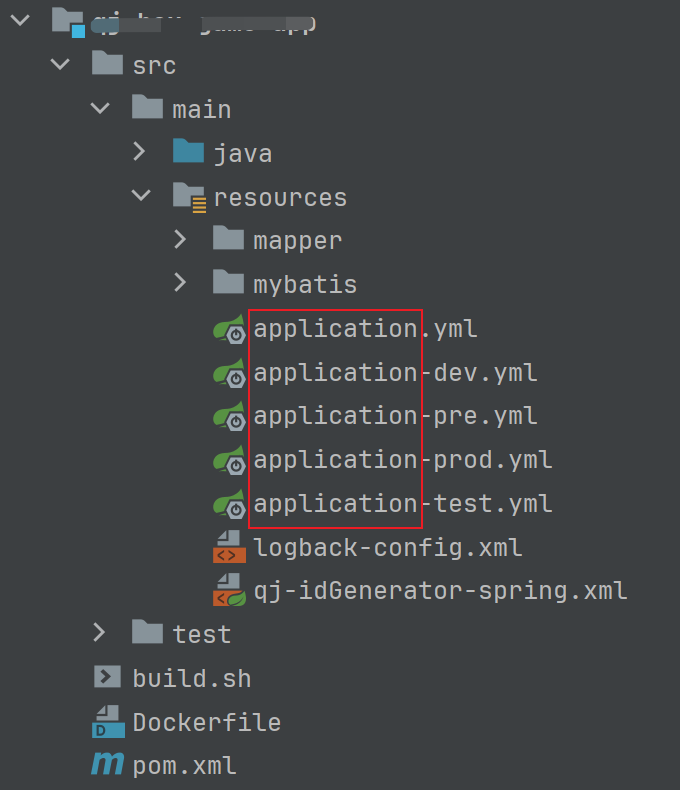
使用application.yaml

application-yaml
当在项目中使用application*.yaml作为工程配置文件时,做如下配置。

<!-- 使用nacos作为配置中心 -->
<dependency>
    <groupId>com.alibaba.cloud</groupId>
    <artifactId>spring-cloud-starter-alibaba-nacos-config</artifactId>
</dependency>

通过spring.config.import同时指定本地和nacos配置。

spring:
  cloud:
    nacos:
      config: # 配置中心
        namespace: public
        server-addr: 192.168.10.10:8848
        username: xxx
        password: xxx
        group: DEFAULT_GROUP
        enabled: true
        file-extension: yaml    
  config: # 使用nacos:前缀从配置中心加载配置
    import: application-dev.yml,nacos:application-redis.yaml

当需要从Nacos配置中心加载多个配置文件时,每一个配置文件都需要使用nacos:前缀指定,如下示例:

spring:
  config: # 使用nacos:前缀加载多份配置
    import: application-dev.yml,nacos:application-redis.yaml,nacos:application-mysql.yaml
使用bootstrap.yaml

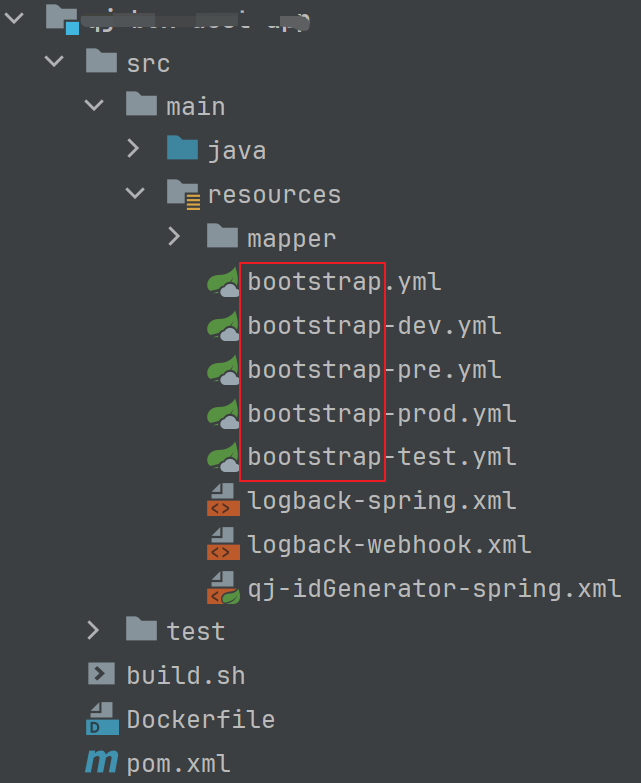
bootstrap-yaml
当在项目中使用bootstrap*.yaml作为工程配置文件时,做如下配置。

<!-- 使用nacos作为配置中心 -->
<dependency>
    <groupId>com.alibaba.cloud</groupId>
    <artifactId>spring-cloud-starter-alibaba-nacos-config</artifactId>
</dependency>
<dependency>
    <groupId>org.springframework.cloud</groupId>
    <artifactId>spring-cloud-starter-bootstrap</artifactId>
</dependency>

通过spring.cloud.nacos.config.extension-configs指定多份nacos配置。

spring:
  cloud:
    nacos:
      config: # 配置中心
        namespace: public
        server-addr: 192.168.10.10:8848
        username: nacos
        password: xxxxxx
        group: DEFAULT_GROUP
        enabled: true
        file-extension: yaml
        extension-configs: # 通过data-id指定多份配置
          - data-id: application-redis.yaml
            group: DEFAULT_GROUP
            refresh: true
          - data-id: ${spring.application.name}.yaml # 注意:占位符要替换为实际的Nacos配置中心dataId(如:xxx-yyy-zzz),否则无法启动应用
            group: DEFAULT_GROUP
            refresh: true
        refresh-enabled: true
        import-check:
          enabled: false

至此。