







CustomListViewTest.axaml代码
<Window xmlns="https://github.com/avaloniaui"
        xmlns:x="http://schemas.microsoft.com/winfx/2006/xaml"
        xmlns:d="http://schemas.microsoft.com/expression/blend/2008"
        xmlns:mc="http://schemas.openxmlformats.org/markup-compatibility/2006"
        Height="375" Width="525"
        xmlns:local="using:AvaloniaUI.Demos.Book._19.StoreDatabase"
        xmlns:main="using:AvaloniaUI"
         x:DataType="main:CustomListViewTest"
        x:Class="AvaloniaUI.CustomListViewTest"
        Title="CustomListViewTest">

    <Window.Resources>
        <local:ImagePathToBitmapConverter x:Key="ImagePathConverter" />
    </Window.Resources>
    <Grid Margin="5" RowDefinitions="*,auto">

        <!-- 表格视图:DataGrid -->
        <DataGrid Name="gridView"
                  HeadersVisibility="None"
                  ItemsSource="{Binding Products}"
                  AutoGenerateColumns="False"
                  IsReadOnly="False">
            <DataGrid.Columns>
                <DataGridTextColumn Header="Name"
                                    Binding="{Binding ModelName}"/>
                <DataGridTextColumn Header="Model"
                                    Binding="{Binding ModelNumber}" />
                <DataGridTextColumn Header="Price" IsReadOnly="True"
                                    Binding="{Binding UnitCost, StringFormat='{}{0:C}'}" />
            </DataGrid.Columns>
        </DataGrid>


        <!-- 图片缩略图视图 -->
        <ListBox Name="imageView"
                 Grid.Row="0"
                 ItemsSource="{Binding Products}"
                 IsVisible="False">
            <ListBox.ItemsPanel>
                <ItemsPanelTemplate>
                    <WrapPanel />
                </ItemsPanelTemplate>
            </ListBox.ItemsPanel>

            <ListBox.ItemTemplate>
                <DataTemplate>
                    <StackPanel Width="150" VerticalAlignment="Top">
                        <Image Source="{Binding ProductImagePath, Converter={StaticResource ImagePathConverter}}" />
                        <TextBlock Text="{Binding ModelName}"
                                   TextWrapping="Wrap"
                                   HorizontalAlignment="Center" />
                    </StackPanel>
                </DataTemplate>
            </ListBox.ItemTemplate>
        </ListBox>


        <!-- 图片 + 详情视图 -->
        <ListBox Name="imageDetailView"
                 Grid.Row="0"
                 ItemsSource="{Binding Products}"
                 IsVisible="False">

            <ListBox.ItemTemplate>
                <DataTemplate>
                    <Grid ColumnDefinitions="auto,2*">
                        <Image Margin="5"
                               Width="100"
                               Source="{Binding ProductImagePath, Converter={StaticResource ImagePathConverter}}" />
                        <StackPanel Grid.Column="1"
                                    VerticalAlignment="Center">
                            <TextBlock FontWeight="Bold"
                                       Text="{Binding ModelName}" />
                            <TextBlock Text="{Binding ModelNumber}" />
                            <TextBlock Text="{Binding UnitCost, StringFormat='{}{0:C}'}" />
                        </StackPanel>
                    </Grid>
                </DataTemplate>
            </ListBox.ItemTemplate>

        </ListBox>

        <!-- 视图切换 -->
        <Grid Grid.Row="1"
              Margin="5"
              ColumnDefinitions="auto,*">

            <TextBlock Margin="5"
                       VerticalAlignment="Center"
                       Text="Choose your view:" />

            <ComboBox Name="lstView"
                      Grid.Column="1"
                      Margin="5"
                      Width="150"
                      HorizontalAlignment="Left"
                      SelectionChanged="lstView_SelectionChanged">
                <ComboBoxItem Content="GridView" />
                <ComboBoxItem Content="ImageView" />
                <ComboBoxItem Content="ImageDetailView" />
            </ComboBox>

        </Grid>
    </Grid>
</Window>
CustomListViewTest.axaml.cs代码
using Avalonia;
using Avalonia.Controls;
using Avalonia.Markup.Xaml;
using AvaloniaUI.Demos.Book._19.StoreDatabase;
using System.Collections.ObjectModel;

namespace AvaloniaUI;

public partial class CustomListViewTest : Window
{
    private StoreDb1 db = new StoreDb1();
    public ObservableCollection<Product> Products { get; set; }
    public CustomListViewTest()
    {
        InitializeComponent();
        Products = db.GetProducts();
        this.DataContext = this;

        // 默认使用表格视图
        lstView.SelectedIndex = 0;
        UpdateView("GridView");
    }

    private void lstView_SelectionChanged(object? sender, SelectionChangedEventArgs e)
    {
        var selected = (lstView.SelectedItem as ComboBoxItem)?.Content as string;
        UpdateView(selected);
    }

    private void UpdateView(string? name)
    {
        gridView.IsVisible = name == "GridView";
        imageView.IsVisible = name == "ImageView";
        imageDetailView.IsVisible = name == "ImageDetailView";
    }
}
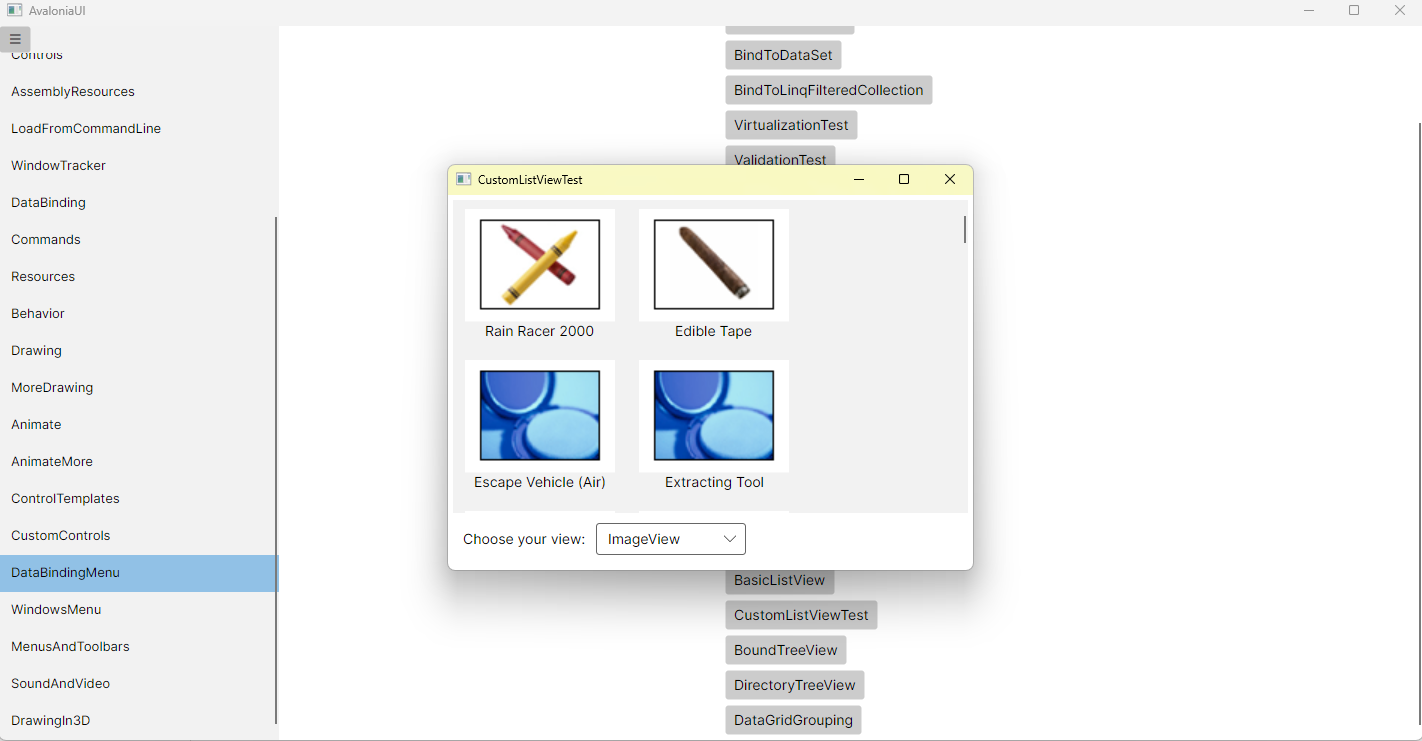
运行效果
此内容由惯性聚合(RSS阅读器)自动聚合整理,仅供阅读参考。 原文来自 — 版权归原作者所有。