



惯性聚合 高效追踪和阅读你感兴趣的博客、新闻、科技资讯
阅读原文 在惯性聚合中打开

推荐订阅源

Google DeepMind News
人人都是产品经理
人人都是产品经理
S
Securelist
P
Proofpoint News Feed
H
Help Net Security
S
Schneier on Security
T
Tenable Blog
C
Cisco Blogs
S
Security @ Cisco Blogs
博客园 - 司徒正美
博客园 - 叶小钗
Cisco Talos Blog
Cisco Talos Blog
Google DeepMind News
C
Cybersecurity and Infrastructure Security Agency CISA
Google Online Security Blog
Exploit-DB.com RSS Feed
Hacker News: Ask HN
Hacker News: Ask HN
NISL@THU
NISL@THU
云风的 BLOG
云风的 BLOG
V
Vulnerabilities – Threatpost
T
The Blog of Author Tim Ferriss
aimingoo的专栏
aimingoo的专栏
W
WeLiveSecurity
www.infosecurity-magazine.com
Jina AI
Jina AI
腾讯CDC
WordPress大学
WordPress大学
Simon Willison's Weblog
Vercel News
Vercel News
小众软件
小众软件
N
Netflix TechBlog - Medium
有赞技术团队
有赞技术团队
AWS News Blog
AWS News Blog
雷峰网
雷峰网
Forbes - Security
Forbes - Security
The Hacker News
The Hacker News
博客园 - 聂微东
F
Full Disclosure
量子位
Scott Helme
Scott Helme
宝玉的分享
宝玉的分享
A
About on SuperTechFans
钛媒体:引领未来商业与生活新知
钛媒体:引领未来商业与生活新知
Schneier on Security
让小产品的独立变现更简单 - ezindie.com
K
Kaspersky official blog
AI
AI
SecWiki News
SecWiki News
Webroot Blog
Webroot Blog
Martin Fowler
Martin Fowler

博客园 - 仙守

用audit审计去记录谁用了docker docker容器大小使用限制 docker容器的磁盘使用进行限额 sentry私有化部署: 在8c16g上降低资源使用 私有化部署sentry: 获取dsn 私有化部署sentry:卷备份及恢复 docker 保存所有镜像 私有化部署sentry:镜像构建 docker拉取代理脚本 基于docker构建es集群 在es中进行update+upsert milvus遍历查询全部数据 简单剖析qwen-agent回答是怎么获取tool的 一个中转代码,底层调用openai,上层模拟openai 一个小工具识别哪个docker占用gpu NLP之预训练语言模型BERT NLP之预训练语言模型GPT NLP之引言 [推荐系统]粗排之FSCD
vscode密钥从windows连接远程linux
仙守 · 2025-11-24 · via 博客园 - 仙守

windows作为本地机器,远程linux作为开发机器,

1 下载

去微软官网下载vscode的windows本地版

2 ssh插件

vscode下载remote-ssh插件

3 windows本机的配置

vscode会有两个ssh的config位置

  C:\Users\你的账户名称\.ssh\config
  C:\ProgramData\ssh\ssh_config

为了方便,我们清空C:\ProgramData\ssh\ssh_config这里面的所有字符文字,然后第一个配置中如此写,我们这里要登录第二个机器

Host vscode中展示的名称1
  HostName 你的远程ip1
  Port 1141
  User root
  ForwardAgent yes
  PasswordAuthentication yes
  IdentityFile C:\Users\你的账户名称\.ssh\一个rsa的私钥id_rsa

Host vscode中展示的名称2
  HostName 你的远程ip2
  Port 32114
  User root
  ForwardAgent yes
  PasswordAuthentication yes
  IdentityFile C:\Users\你的账户名称\.ssh\另一个rsa的私钥d_rsa

4 获取ssh的密钥文件

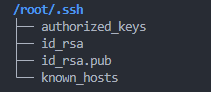
你可以本机执行或者远程linux上执行ssh-keygen 一路回车到底,就能得到~/.ssh/ 这下面有个[id_rsa]私钥和一个pub结尾的公钥。
image

把私钥文件放到windows本机的【C:\Users\你的账户名称.ssh\】下面,减少其他事端

  • 也就是作为windows此时扮演ssh客户端发起的角色,所以自己保留私钥;
  • linux远程服务器作为ssh服务端接收的角色,需要知道公钥,下面的步骤就是关于linux远程服务器的操作。

5 远程linux的执行部分

在配置文件 /etc/ssh/sshd_config 中得保证有如下配置

PubkeyAuthentication yes
AuthorizedKeysFile   .ssh/authorized_keys 

然后执行如下命令,意思是将这个公钥的访问设为已认证,因为我们上面设定的ssh端口是32114,所以这里也要记得对应,先通过

ip address

上面的命令获取linux本服务器的ip,用于下面

 ssh-copy-id -p 32114 -i ~/.ssh/id_rsa.pub root@linux本机器ip

最后你的vscode就能顺畅的不需要输入密码就能登录远程linux了,避免每次断连后的密码输入重连接