惯性聚合 高效追踪和阅读你感兴趣的博客、新闻、科技资讯
阅读原文 在惯性聚合中打开

推荐订阅源

Jina AI
Jina AI
V
Vulnerabilities – Threatpost
Security Latest
Security Latest
AI
AI
奇客Solidot–传递最新科技情报
奇客Solidot–传递最新科技情报
量子位
H
Help Net Security
Attack and Defense Labs
The GitHub Blog
The GitHub Blog
L
LINUX DO - 最新话题
A
Arctic Wolf
博客园_首页
S
Securelist
S
Secure Thoughts
Google DeepMind News
让小产品的独立变现更简单 - ezindie.com
T
Tailwind CSS Blog
Apple Machine Learning Research
酷 壳 – CoolShell
酷 壳 – CoolShell
Stack Overflow Blog
Stack Overflow Blog
N
Netflix TechBlog - Medium
Cyberwarzone
Cyberwarzone
小众软件
小众软件
T
Threatpost
Exploit-DB.com RSS Feed
Blog — PlanetScale
Blog — PlanetScale
N
News and Events Feed by Topic
NISL@THU
NISL@THU
Forbes - Security
Forbes - Security
博客园 - 聂微东
F
Fortinet All Blogs
Simon Willison's Weblog
H
Heimdal Security Blog
罗磊的独立博客
S
Security @ Cisco Blogs
B
Blog
T
Troy Hunt's Blog
Engineering at Meta
Engineering at Meta
cs.CL updates on arXiv.org
The Hacker News
The Hacker News
The Last Watchdog
The Last Watchdog
Hacker News - Newest:
Hacker News - Newest: "LLM"
I
Intezer
T
Threat Research - Cisco Blogs
C
Cybersecurity and Infrastructure Security Agency CISA
The Cloudflare Blog
S
Schneier on Security
月光博客
月光博客
L
LINUX DO - 热门话题
cs.CV updates on arXiv.org

博客园 - 大西瓜3721

SVN分支/合并原理及最佳实践 Web.Config中Runtime节点-DLL版本冲突问题 工作问题 Vue资料 轻松实现WCF服务的构造函数依赖注入 WCF 依赖注入-- Attribute MVC视图分析 C#简单枚举和标志枚举的用法和区别 XDate Admin.NET框架资料 日志管理之log4net+Autofac 关于NopCommerce3.6版用户登录详解 AutoFac注册的动态实例 Named和Keyed NOP源码分析 六 NOP源码分析五---set的存储 NOP源码分析四 Nop源码分析三 NOP源码分析 二 NOP源码分析 一 NopCommerce的资料 IServiceCollection和IServiceProvider 控制反转——Autofac框架 精选10款C#/.NET开发必备类库 11个免费开源后台管理系统模板 H5连接蓝牙打印机打印小票 MVC开源CMS nginx的安装&一个最简单的配置(windows和Centos) DNS解析
自定义控件 - 流式布局:TagFlowLayout
大西瓜3721 · 2026-02-11 · via 博客园 - 大西瓜3721

https://github.com/hongyangAndroid/FlowLayout

https://www.jianshu.com/p/abc82fce0e1f

在项目中需要用到流式布局的样式,此文学习鸿洋大神的FlowLayout控件,学习使用一下。出自 http://blog.csdn.net/lmj623565791/article/details/38352503

流式布局的特点:

  • 支持setAdapter设置数据源
  • 支持单选、多选
  • 点击回调事件

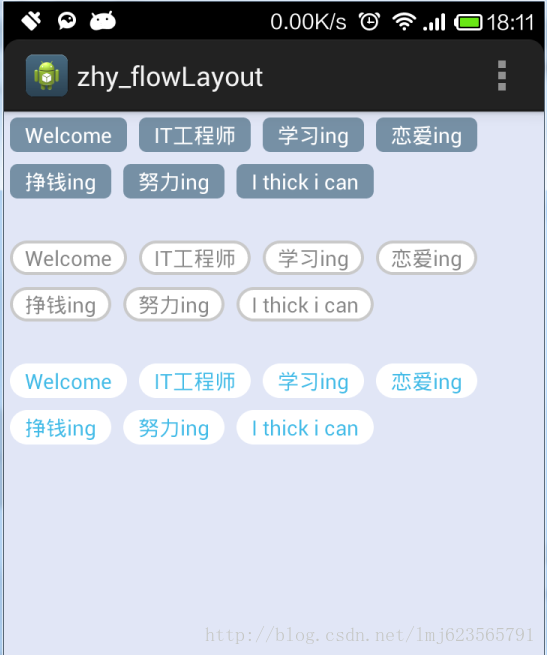
效果图:

使用方法

1 gradle依赖

 compile 'com.hyman:flowlayout-lib:1.1.2'

2 布局文件中使用

    <com.zhy.view.flowlayout.TagFlowLayout
        android:id="@+id/tagfl"
        android:layout_width="match_parent"
        android:layout_height="wrap_content"
        app:max_select="1" />

app:max_select = 1 表示单选

3 代码中设置数据源

复制代码

    List<String> datas = new ArrayList<>();
        TagAdapter<String> adapter= new TagAdapter<String>(datas) {
            @Override
            public View getView(FlowLayout parent, int position, String o) {
                TextView view = (TextView) LayoutInflater.from(mContext).inflate(R.layout.item_tag, parent,false);
                view.setText(o);
                return view;
            }
        };
        tagFlowLayout.setAdapter(adapter);

复制代码

4 设置textview资源文件布局

复制代码

<?xml version="1.0" encoding="utf-8"?>
<TextView xmlns:android="http://schemas.android.com/apk/res/android"
    android:id="@+id/item_tag"
    android:layout_width="wrap_content"
    android:layout_height="wrap_content"
    android:layout_centerVertical="true"
    android:layout_marginLeft="@dimen/margin"
    android:textColor="@drawable/b_text_color"
    android:text="标签" />

复制代码

5 设置点击事件,默认选中第一个

复制代码

tagFlowLayout.setOnTagClickListener(new TagFlowLayout.OnTagClickListener() {
            @Override
            public boolean onTagClick(View view, int position, FlowLayout parent) {
                LogUtil.e("点击了tag:"+position);
                return false;
            }
        });
        tagFlowLayout.setOnSelectListener(new TagFlowLayout.OnSelectListener() {
            @Override
            public void onSelected(Set<Integer> selectPosSet) {
                LogUtil.e("选中了tag:"+selectPosSet);

            }
        });
adapter.setSelectedList(0);//默认选中第一个

复制代码