惯性聚合 高效追踪和阅读你感兴趣的博客、新闻、科技资讯
阅读原文 在惯性聚合中打开

推荐订阅源

T
Troy Hunt's Blog
Blog — PlanetScale
Blog — PlanetScale
Engineering at Meta
Engineering at Meta
F
Full Disclosure
Recorded Future
Recorded Future
The GitHub Blog
The GitHub Blog
Microsoft Security Blog
GbyAI
GbyAI
博客园_首页
博客园 - 叶小钗
MongoDB | Blog
MongoDB | Blog
Exploit-DB.com RSS Feed
Recent Commits to openclaw:main
H
Hacker News: Front Page
人人都是产品经理
人人都是产品经理
The Cloudflare Blog
博客园 - 司徒正美
Webroot Blog
Webroot Blog
Google DeepMind News
Help Net Security
Help Net Security
Cloudbric
Cloudbric
PCI Perspectives
PCI Perspectives
有赞技术团队
有赞技术团队
K
KPMG report finds enterprise disconnect between AI and its ROI | CIO
TaoSecurity Blog
TaoSecurity Blog
L
Lohrmann on Cybersecurity
量子位
Threat Intelligence Blog | Flashpoint
T
Tailwind CSS Blog
Hacker News - Newest:
Hacker News - Newest: "LLM"
B
Blog RSS Feed
Apple Machine Learning Research
大猫的无限游戏
大猫的无限游戏
P
Proofpoint News Feed
N
News and Events Feed by Topic
罗磊的独立博客
T
Threat Research - Cisco Blogs
Schneier on Security
T
Tor Project blog
IT之家
IT之家
M
MIT News - Artificial intelligence
S
Security @ Cisco Blogs
O
OpenAI News
AI
AI
S
Securelist
Simon Willison's Weblog
The Last Watchdog
The Last Watchdog
月光博客
月光博客
Security Archives - TechRepublic
L
LINUX DO - 热门话题

博客园 - 唯有暗香

解决win远程桌面不能复制粘贴 解决连接无法继续,因为未启用身份验证,并且远程计算机需要启用身份验证以进行连接 Proxmox VE 服务器虚拟化 PVE 值得学习博客推荐 麒麟操作系统入门到精通 麒麟操作系统 (kylinos) 从入门到精通 修改Windows系统远程端口(默认3389) win11 edge浏览器下载要等好一会儿才开始 亲测解决 麒麟操作系统插入U盘有锁,无法拷贝文件U盘。 win10 开机一直卡在欢迎界面转圈 亲测 H3C如何批量查询设备借口带宽利用率 车辆事故和保险公司沟通的经验 腾讯在线文档去掉底色 每个单元格中都有A、B、C、D选项,转换为A、B、C、D四列。 火狐浏览器-每次启动都到选择用户配置文件界面 领导分享的微信小程序音乐请你帮忙下载 windows 系统信息-服务器型号查询等 wps-word打印某几页 kali-Linux高速下载 新手专用 一条命令暂停更新Win11一万天
麒麟操作系统常用运维命令
唯有暗香 · 2025-07-26 · via 博客园 - 唯有暗香

1.使用软件包查询命令,查看相关的软件包版本。

 $sudo dpkg -l |grep Package  #注:Package为软件包包名。

2.麒麟操作系统查看详细版本信息,先下载https://security-oss.kylinos.cn/Desktop/libkysdk-sysinfo.zip。查看工具。使用命令查看版本信息。

 kylin-sysinfo version --all  #(博主仅测试2403版本查看成功过,其他版本自测。)

3.查看系统安装时间(参考)。

 sudo date -r /vat/log/installer/  

3.以管理员权限安装当前目录下所有 .deb 格式的软件包。

$sudo dpkg -i *.deb 

4.网络命令

查看路由表

方法一

ip route show 或者ip r
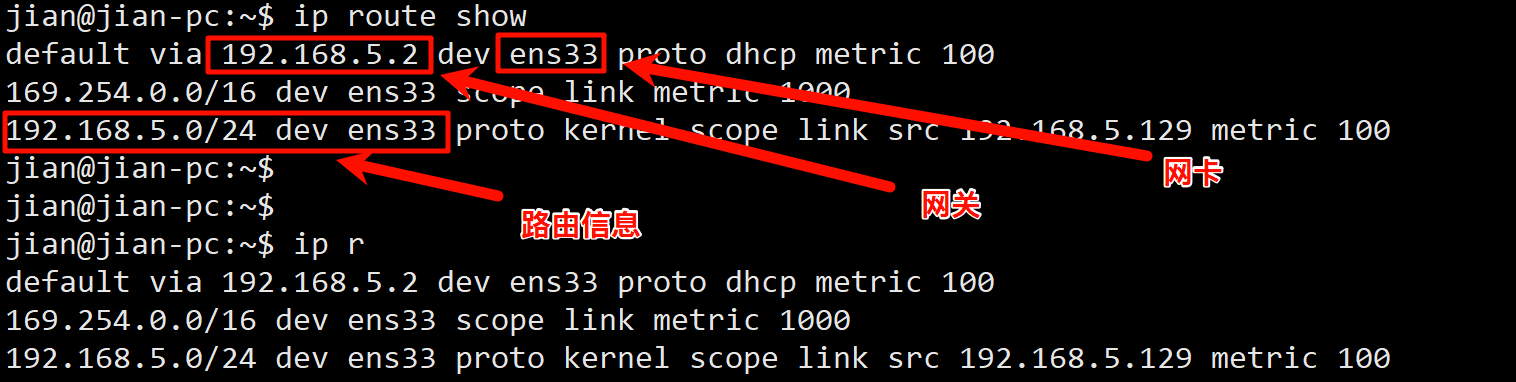
PixPin_2025-12-23_11-06-37

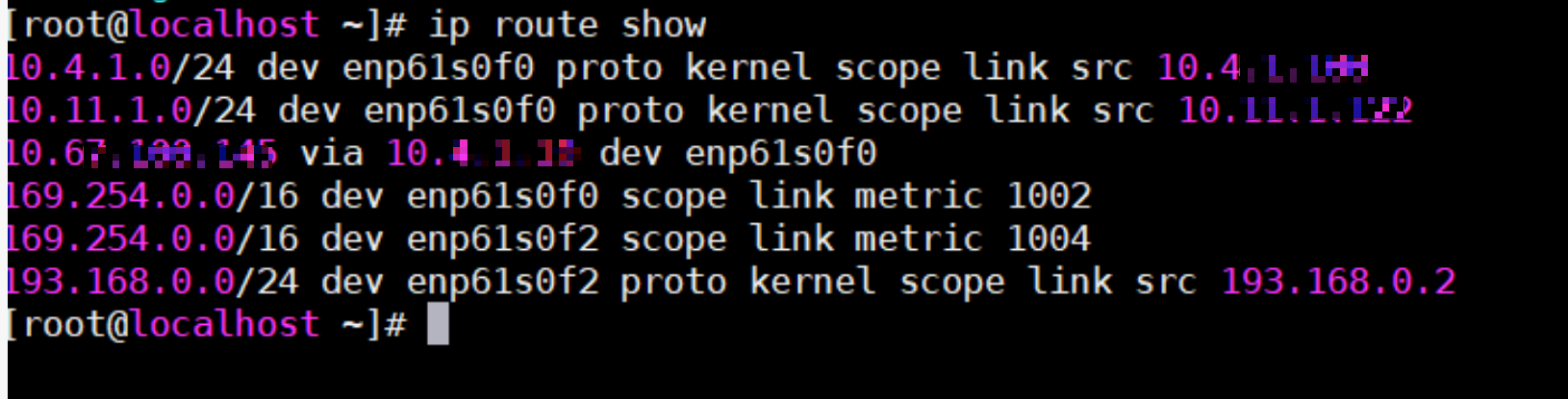
注:没有default via这条内容,表示没有配置默认网关 比如下图:

PixPin_2025-12-23_11-16-23

方法二

route -n

PixPin_2025-12-23_11-07-35

 注:Destination (目标)为 0.0.0.0 的才是默认网关,若没有此项,说明无默认路由。

        其他行表示特定网段的手动或自动路由。

查看操作系统版本信息

cat /etc/os-release