转自:https://www.cnblogs.com/conquerorren/p/12982045.html
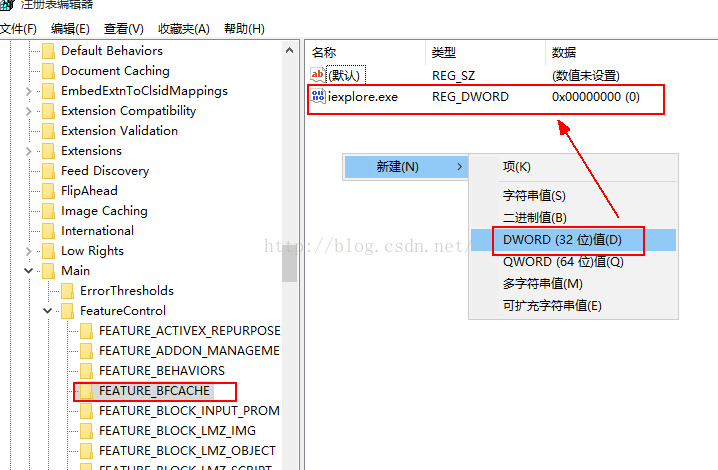
刚好遇见这个问题,感觉很奇怪。多方查找,找到这个,给自己做保留。IE11不支持Selenium 2.0,在什么情况下不支持呢?比如:通过WebDriver获取页面上的元素时,经常会捕获到这样的异常: OpenQA.Selenium.NoSuchWindowException: Unable to find element on closed window at OpenQA.Selenium.Remote.RemoteWebDriver.UnpackAndThrowOnError(Response errorResponse) in c:\Projects\webdriver\dotnet\src\webdriver\Remote\RemoteWebDriver.cs:line 1139 解决方法: For IE 11 only, you will need to set a registry entry on the target computer so that the driver can maintain a connection to the instance of Internet Explorer it creates. (这段告诉你需要修改注册表。) For 32-bit Windows installations, the key you must examine in the registry editor is HKEY_LOCAL_MACHINE\SOFTWARE\Microsoft\Internet Explorer\Main\FeatureControl\FEATURE_BFCACHE. (32bit Windows看这里。) For 64-bit Windows installations, the key is HKEY_LOCAL_MACHINE\SOFTWARE\Wow6432Node\Microsoft\Internet Explorer\Main\FeatureControl\FEATURE_BFCACHE. Please note that the FEATURE_BFCACHE subkey may or may not be present, and should be created if it is not present. Important: Inside this key, create a DWORD value named iexplore.exe with the value of 0.(64bit Windows看这里。) 翻译过来的意思即,修改你的注册表(Run->regedit->Enter),路径如下: HKEY_LOCAL_MACHINE\SOFTWARE\Wow6432Node\Microsoft\Internet Explorer\Main\FeatureControl\FEATURE_BFCACHE 如果FeatureControl下没有FEATURE_BFCACHE,就以FEATURE_BFCACHE为名new一个key!并在其下创建一个DWORD,取名为:iexplore.exe,value为0。
修改完你的注册表后,重启你的计算机。之后以管理员权限运行Visual Studio(或者eclipse),打开你的项目,运行,你会发现,问题解决了。(注意:如果不使用管理员身份运行将仍然报错。)
此内容由惯性聚合(RSS阅读器)自动聚合整理,仅供阅读参考。 原文来自 — 版权归原作者所有。