

惯性聚合 高效追踪和阅读你感兴趣的博客、新闻、科技资讯
阅读原文 在惯性聚合中打开

推荐订阅源

C
Check Point Blog
Microsoft Security Blog
aimingoo的专栏
aimingoo的专栏
V
V2EX
博客园 - 【当耐特】
T
Tailwind CSS Blog
Apple Machine Learning Research
量子位
MyScale Blog
MyScale Blog
Hugging Face - Blog
Hugging Face - Blog
大猫的无限游戏
大猫的无限游戏
The Cloudflare Blog
月光博客
月光博客
I
InfoQ
WordPress大学
WordPress大学
Martin Fowler
Martin Fowler
T
The Blog of Author Tim Ferriss
爱范儿
爱范儿
小众软件
小众软件
罗磊的独立博客
Recent Announcements
Blog — PlanetScale
Blog — PlanetScale
J
Java Code Geeks
Cyber Security Advisories - MS-ISAC

博客园 - 苏荷酒吧

曲线Curve three平行光和阴影 three入门 配置Prettier 网易云音乐地址 git本地新建分支并推送到远程仓库 git commit规范 VSCode配置项 Vee Validate Vue工程调试方式 Mock数据神器 ...使用 nodejs server开发思路 Git远程仓库 日期格式 v-model修饰符 从0到1构建全栈知识体系 Element组件,v-for循环,表单验证方法 上传文件转换为base64图片
真机调试
苏荷酒吧 · 2021-04-25 · via 博客园 - 苏荷酒吧

一,使用浏览器配合手机调试

1),Chrome+Android调试

1,PC端安装最新版本的Google浏览器

2,移动端安装最新版本的Google浏览器

3,移动端打开开发者模式

4,PC和移动端处于同一个网络

5,通过USB连接PC和Android

6,浏览器输入网址:chrome://inspect/#devices

7,启动本地服务器http://localhost:8080

9,控制台点击inspect

10,接下来就可以进行调试
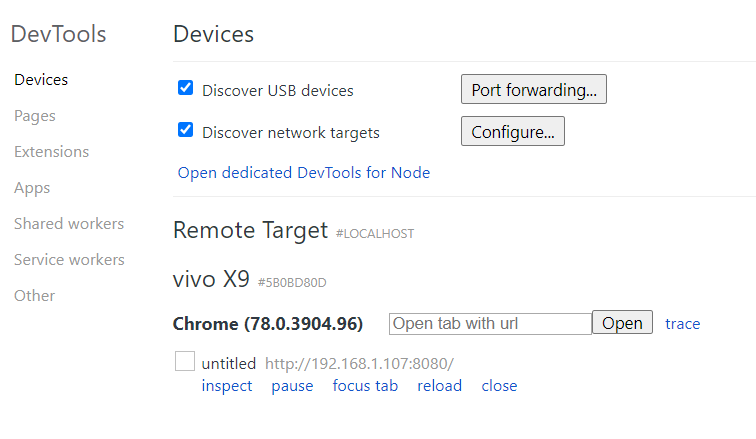
2), Safari+iOS

二,使用Proxy调试

三,类真机调试

1),winnre

安装

 yarn -g install weinre

 weinre --version

 weinre --help

 weinre --httpPort=10000 --boundHost=-all-

引用

//
http://localhost:10000/target/target-script-min.js#anonymous
// 换成
http://192.168.1.107:10000/target/target-script-min.js#dp
// 赋值到网页中去
// 然后打开浏览器输入网址
http://localhost:10000/client/#dp

2),vConsole

安装

项目中引入

<script src="path/to/vconsole.min.js"></script>
<script>
  // init vConsole
  var vConsole = new VConsole();
  console.log('Hello world');
</script>