惯性聚合 高效追踪和阅读你感兴趣的博客、新闻、科技资讯
阅读原文 在惯性聚合中打开

推荐订阅源

The Last Watchdog
The Last Watchdog
Exploit-DB.com RSS Feed
S
Secure Thoughts
MongoDB | Blog
MongoDB | Blog
博客园 - Franky
T
Tor Project blog
Threat Intelligence Blog | Flashpoint
Google DeepMind News
L
LINUX DO - 最新话题
博客园_首页
奇客Solidot–传递最新科技情报
奇客Solidot–传递最新科技情报
Vercel News
Vercel News
Last Week in AI
Last Week in AI
月光博客
月光博客
cs.CL updates on arXiv.org
P
Proofpoint News Feed
博客园 - 叶小钗
NISL@THU
NISL@THU
C
Check Point Blog
K
Kaspersky official blog
N
News and Events Feed by Topic
OSCHINA 社区最新新闻
OSCHINA 社区最新新闻
A
Arctic Wolf
T
Threatpost
GbyAI
GbyAI
L
LINUX DO - 热门话题
钛媒体:引领未来商业与生活新知
钛媒体:引领未来商业与生活新知
P
Privacy & Cybersecurity Law Blog
N
News and Events Feed by Topic
Scott Helme
Scott Helme
P
Privacy International News Feed
The Register - Security
G
GRAHAM CLULEY
Recorded Future
Recorded Future
Apple Machine Learning Research
C
Cybersecurity and Infrastructure Security Agency CISA
B
Blog
Project Zero
Project Zero
Cyberwarzone
Cyberwarzone
Webroot Blog
Webroot Blog
Microsoft Security Blog
cs.CV updates on arXiv.org
D
DataBreaches.Net
J
Java Code Geeks
AWS News Blog
AWS News Blog
Help Net Security
Help Net Security
Engineering at Meta
Engineering at Meta
M
MIT News - Artificial intelligence
T
Threat Research - Cisco Blogs
Google DeepMind News

博客园 - CHPowerljp

在 VS2022 中关闭“包提醒”(通常指 NuGet 包更新提示、推荐包提示等) Windows 11 安装或重置过程中,跳过微软邮箱登录 本地HTTPS证书免费 使用本地私有IP而不是域名作为站点,IIS部署站点 C#客户端WPF/Winform调用WebService服务引用,对操作 “xxx” 的回复消息正文进行反序列化时出错【解决方案】 无密码远程桌面连接方法 SQLServer高并发 SQLlite数据库教程 IIS设置高并发 C# 连接Mysql读写 Linux安装php、mysql、apache服务 安装后phpmyadmin访问被拒绝的解决方案 XAMPP安装教程 Python开发环境搭建 .NET面试题大全(C#面试题)2020更新 javascript函数传递字符串参数 .NET HTTP异步请求(适用于并发请求同时大于上千上万个) .NET之设计模式总结完整版 Linux安装Docker Navicat连接mysql提示1251解决方案 js获取select下拉框选中的值 Windows下安装Mysql数据库
IIS部署.NET Core方法及常见的需要注意的坑
CHPowerljp · 2020-05-07 · via 博客园 - CHPowerljp

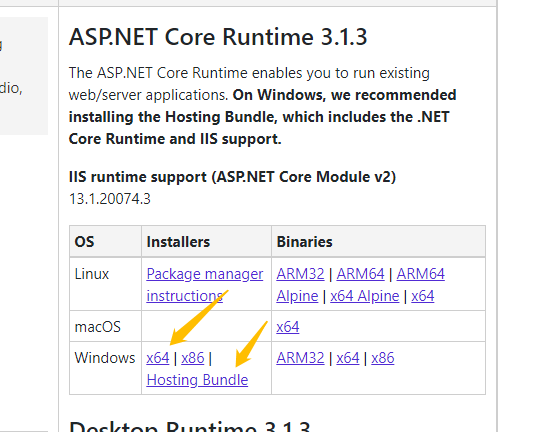
1.发布前安装.NET Core环境 ,分别是.Net Core Runtime 和 Hosting Bundle

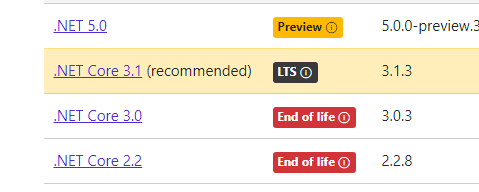
地址:https://dotnet.microsoft.com/download/dotnet-core

我选的是稳定版3.1 
 选择两个下载
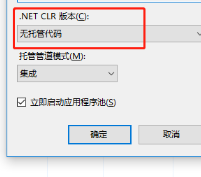
2.发布到服务器后,程序池CLR版本修改为无托管代码
 3. 检查IIS模块是否安装好了

如果有AspNetCoreModule说明安装ok

4.站点权限记得赋予全部权限

5.常见需要注意的坑:

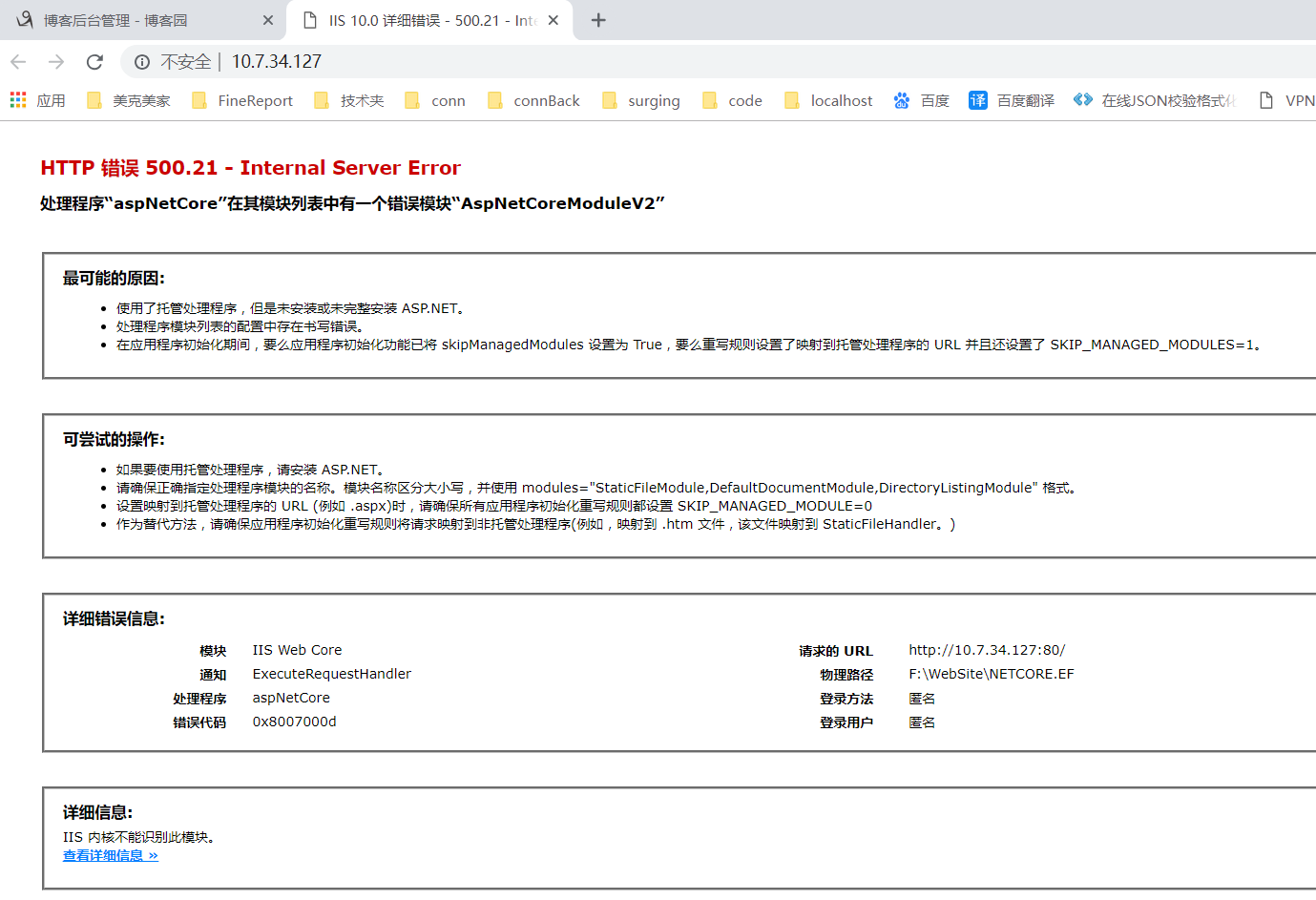
a. 安装的Core版本和代码不一致,会提示: